





Latest Version
December 23, 2025
blackstar
Tools
Android
0
Free
com.blackstar.apps.largetext
Report a Problem
More About Large Text - Banner Creator
Unlocking the Full Potential of Your Text Editor: Features You Can't Miss
In today's digital landscape, having a versatile text editor is essential for both personal and professional use. Whether you're drafting an email, creating content for your blog, or simply jotting down notes, the right features can enhance your writing experience. Below, we explore the key functionalities that make a text editor stand out, ensuring you can work efficiently and creatively.
Flexible Orientation: Landscape and Portrait Modes
One of the standout features of a modern text editor is its support for both landscape and portrait modes. This flexibility allows users to choose the orientation that best suits their needs. Whether you're working on a tablet or a smartphone, switching between modes can significantly improve your workflow. Landscape mode is ideal for extensive writing sessions, providing a wider view of your text, while portrait mode is perfect for quick notes and browsing.
Express Yourself: Text and Emoticon Integration
Communication is not just about words; it's also about expression. A top-notch text editor enables users to incorporate emoticons alongside their written content. This feature adds a layer of personality to your messages, making them more engaging and relatable. Whether you're sending a casual message to a friend or crafting a professional email, the ability to include emoticons can enhance the tone and clarity of your communication.
Customization at Your Fingertips: Change Text Color, Background, and Font
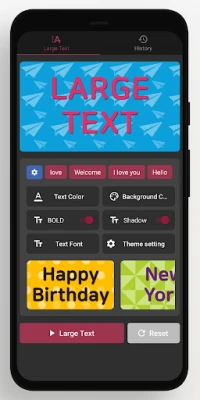
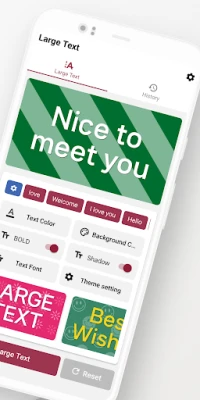
Every writer has a unique style, and a great text editor recognizes this by offering extensive customization options. Users can easily change the text color, background, and font to create a personalized writing environment. This level of customization not only makes the writing process more enjoyable but also helps in reducing eye strain during long writing sessions. Choose colors and fonts that resonate with your style and enhance your productivity.
Theme Options: Tailor Your Writing Experience
In addition to basic customization, many text editors provide various theme options. Users can select from a range of themes that suit their mood or the nature of their work. Whether you prefer a minimalist design for distraction-free writing or a vibrant theme to inspire creativity, having multiple options allows you to tailor your writing environment to your preferences. This personalization can lead to increased focus and motivation.
History Feature: Recall Large Text Settings with Ease
One of the most practical features of a sophisticated text editor is the ability to save and recall large text settings from your history. This functionality is particularly useful for users who frequently work with lengthy documents or specific formatting styles. By saving your preferred settings, you can quickly access them whenever needed, streamlining your writing process and ensuring consistency across your projects.
Favorite Phrases: Register and Use with Convenience
For those who often find themselves using the same phrases or expressions, the ability to register and access favorite phrases can be a game-changer. This feature allows users to save commonly used text snippets, making it easy to insert them into your writing without having to retype. Whether it's a signature closing line for emails or frequently referenced terms in your writing, this functionality saves time and enhances efficiency.
Conclusion: Elevate Your Writing with the Right Text Editor
In conclusion, the right text editor can significantly enhance your writing experience. With features like landscape and portrait mode support, emoticon integration, extensive customization options, theme choices, history recall, and the ability to register favorite phrases, you can create a writing environment that suits your needs perfectly. Embrace these functionalities to unlock your full potential and make your writing process more enjoyable and efficient.
Rate the App
User Reviews















Popular Apps










Editor's Choice









