


Latest Version
3.4.3.2
December 22, 2025
ESTsecurity Corp.
Tools
Android
0
Free
com.estsoft.alyac
Report a Problem
More About Dr.Capsule – Mobile Security
Ultimate Mobile Security: Protect Your Device with Dr.Capsule
In today's digital age, safeguarding your mobile device is more crucial than ever. With threats like malware, phishing, and data breaches lurking around every corner, having a comprehensive mobile security solution is essential. Dr.Capsule offers real-time protection through advanced features such as Virus Scan, Smishing Detection, and Wi-Fi Security, along with user-friendly tools for device optimization and privacy management. Let’s explore how Dr.Capsule can keep your phone safe, clean, and private.
🔒 Comprehensive Mobile Security
Virus Scan: Real-Time Malware Protection
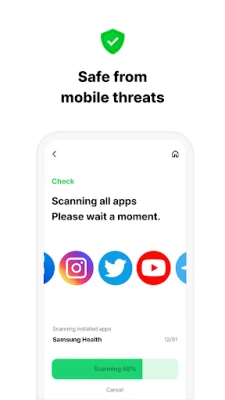
Dr.Capsule’s Virus Scan feature actively scans apps and files in real time, ensuring that malware and viruses are blocked before they can cause harm. This proactive approach to security helps maintain the integrity of your device and protects your sensitive information from malicious attacks.
Smishing Detection: Safeguard Against Phishing Attacks
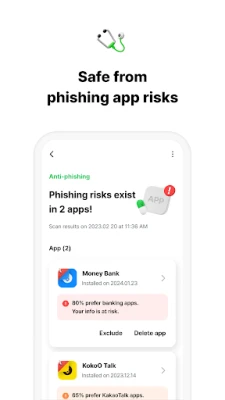
With the rise of SMS phishing, or smishing, it’s vital to have a reliable detection system in place. Dr.Capsule’s Smishing Detection feature identifies and blocks suspicious SMS messages that attempt to steal your personal information, providing an additional layer of security for your communications.
Wi-Fi Security: Safe Browsing and Payments
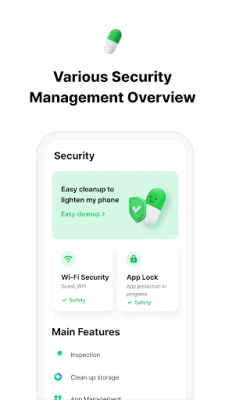
Connecting to public Wi-Fi can expose your device to various threats. Dr.Capsule’s Wi-Fi Security feature alerts you when you connect to unsafe networks, ensuring safer browsing and secure online transactions. This feature is essential for anyone who frequently uses public Wi-Fi.
App Lock: Protect Your Sensitive Information
Keep your private data secure with Dr.Capsule’s App Lock feature. By requiring a PIN or fingerprint to access sensitive applications, you can prevent unauthorized access to your personal information, ensuring that your data remains confidential.
⚡ Device Optimization Tools
Memory Cleanup: Efficient App Management
Dr.Capsule’s Memory Cleanup tool efficiently manages running apps, optimizing your device’s performance. By freeing up memory, you can ensure that your phone runs smoothly and efficiently, enhancing your overall user experience.
Easy Cleanup: Free Up Storage Space
Over time, junk files can accumulate and take up valuable storage space. The Easy Cleanup feature allows you to instantly delete these unnecessary files, giving you more room for the apps and content you love.
Photo Cleanup: Organize Your Gallery
Keep your photo gallery organized with the Photo Cleanup feature. This tool helps you find and remove duplicate or similar photos, ensuring that your gallery remains tidy and easy to navigate.
App Manager: Overview of Your Applications
With the App Manager, you can quickly check all your installed apps, including those that are rarely used or newly installed. This feature allows for better management of your applications, helping you to optimize your device further.
💊 Privacy & Convenience Features
Privacy Cleaning: Protect Your Personal Information
Dr.Capsule’s Privacy Cleaning feature clears your clipboard, browser history, downloads, and search records, preventing personal information leaks. This ensures that your private data remains confidential and secure from prying eyes.
Collected Notifications: Stay Updated
The Collected Notifications feature gathers important alerts in one place, ensuring you never miss critical updates. This convenient tool helps you stay organized and informed without the hassle of sifting through multiple notifications.
Quick Bar: Handy Shortcuts for Everyday Use
Access essential tools quickly with the Quick Bar, which includes shortcuts for features like the flashlight and screen capture. This functionality enhances your user experience by providing easy access to frequently used tools.
🌟 Why Choose Dr.Capsule?
Dr.Capsule stands out as an all-in-one mobile security and optimization solution. With real-time protection against smishing, malware, and unsafe networks, along with easy-to-use tools for cleaning, organizing, and securing your phone, it’s the ultimate choice for anyone looking to enhance their mobile security.
✅ Additional Features
Dr.Capsule also offers an option to Remove Ads on your device, eliminating in-app advertisements for a more focused user experience. However, rewarded ads will still be present, ensuring that you can enjoy the benefits of the app without distractions.
System Requirements and Permissions
Dr.Capsule supports both Korean and English languages and requests only essential permissions to function effectively:
- Required Access Permissions:
- Storage: Enables scanning and quick cleanup functions.
- Optional Access Permissions:
- Accessibility: Facilitates memory cleanup by checking running apps (no user information or sensitive data is collected or transmitted).
- Location in the background (OS 10 or later): Provides management functions such as Wi-Fi connection notifications.
Even if users do not agree to the selective access permissions, they can still utilize Dr.Capsule’s services.
Contact Information
For any inquiries or support, you can reach out via email at m_alyac@estsecurity.com.
Dr.Capsule activates a foreground service when necessary to provide stable security features while the app is running, such as quick virus scanning, real-time detection, app locking, and Wi-Fi protection. When using the screen capture feature, the foreground service will be temporarily activated and will automatically stop once the capture is complete.
In conclusion, Dr.Capsule is your go-to solution for comprehensive mobile security and optimization. With its robust features and user-friendly interface, you can enjoy peace of mind knowing your device is protected.
Rate the App
User Reviews















Popular Apps










Editor's Choice









