



Latest Version
10.14
December 21, 2025
KomalArt Info
Tools
Android
0
Free
com.komalartinfo.screeenmirrorinngg
Report a Problem
More About All Router Admin - WiFi DNS
Unlocking Your Router's Potential: A Comprehensive Guide to Router Management
Managing your router effectively is crucial for maintaining a secure and efficient home network. With the right tools, you can easily access your router's admin settings, change passwords, and even modify DNS settings. This article explores the powerful features of a network management tool designed for router control, ensuring you have everything you need to optimize your internet experience.
Accessing Your Router Admin
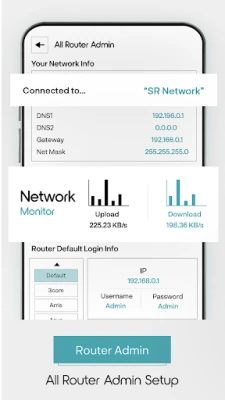
The router admin interface is your gateway to managing your network. It provides essential information such as:
- Connected Wi-Fi name
- Network mode
- IP address
- DNS1 and DNS2 settings
- Gateway information
With this tool, you can monitor your network's upload and download speeds, ensuring you are getting the performance you expect from your internet service provider.
Finding Your Router's Default Password
Have you forgotten your router password? No worries! This tool allows you to retrieve the default password easily. Simply enter the brand and model of your router, and you will receive the default password instantly. This feature is particularly useful for those who may have lost their login credentials over time.
Generating Strong Passwords
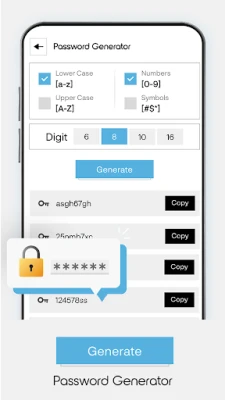
Security is paramount when it comes to your home network. The built-in password generator allows you to create robust passwords that enhance your network's security. You can customize your password using:
- Uppercase and lowercase letters
- Numbers
- Special symbols
This feature ensures that your new password is not only secure but also easy to remember.
Changing Your DNS Settings
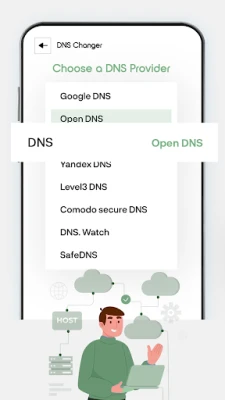
Changing your DNS settings can significantly improve your internet speed and security. With the DNS changer feature, you can:
- Select your preferred DNS provider
- Tap 'Start' to connect
Once connected, you will see the status of your connection, including the DNS provider name, connection type, and the name of the connected network. Additionally, you can add custom DNS settings and view a list of available DNS options.
Testing DNS Speed
Understanding your DNS speed is essential for optimizing your internet experience. This tool allows you to test the speed of your DNS connection, providing valuable insights into your network's performance. By monitoring DNS speed, you can make informed decisions about which DNS provider works best for your needs.
Main Features of the All Router Admin - WiFi DNS App
This powerful app offers a range of features designed to enhance your network management experience:
- Fast, safe, and user-friendly interface
- Comprehensive network information display
- Real-time monitoring of upload and download speeds
- Access to router's default login information
- Router admin management capabilities
- Default router password retrieval
- DNS modification options
- DNS speed testing functionality
- Display of connected network name and connection type
- Access to default usernames and passwords for various routers
All these features are accessible directly from your mobile device, eliminating the need to use a computer.
Utilizing VPNService for Enhanced Security
The All Router Admin - WiFi DNS app employs the VPNService base class to establish a secure DNS connection. When your Android device connects to the internet, it is assigned an IP address, which serves as its unique identifier in the virtual network. This app processes these encrypted numbers as site addresses using DNS servers, allowing you to access websites seamlessly.
Conclusion
In conclusion, managing your router and optimizing your network has never been easier. With the All Router Admin - WiFi DNS app, you can access essential features such as password management, DNS settings, and network monitoring—all from the convenience of your mobile device. Take control of your home network today and enjoy a faster, more secure internet experience.
Rate the App
User Reviews















Popular Apps










Editor's Choice









