


Latest Version
December 18, 2025
Esri
Tools
Android
0
Free
com.esri.responder
Report a Problem
More About ArcGIS Mission Responder
Unlocking the Power of ArcGIS Mission Responder: A Comprehensive Guide
In today's fast-paced world, effective communication and situational awareness are crucial, especially for organizations operating in dynamic environments. ArcGIS Mission Responder is a cutting-edge mobile application that empowers users in the field to engage actively in missions as part of Esri’s innovative ArcGIS Mission product suite. This article delves into the features and benefits of ArcGIS Mission Responder, highlighting how it enhances operational efficiency and situational awareness.
What is ArcGIS Mission?
ArcGIS Mission is a tactical situational awareness solution that seamlessly integrates with Esri’s leading ArcGIS Enterprise platform. It enables organizations to create, share, and manage missions effectively, utilizing integrated maps, teams, and various mission-related materials such as photographs, documents, and map products. The primary goal of ArcGIS Mission is to provide organizations with a real-time view of their common operating picture, allowing remote and mobile users to gain situational understanding and answer the critical question: “What’s going on around me right now?”
The Role of ArcGIS Mission Responder
As the mobile component of ArcGIS Mission, Responder plays a pivotal role in facilitating communication and collaboration among team members. This mobile app allows operators to maintain constant connectivity with their teammates and other mission participants through real-time messaging and reporting. With ArcGIS Mission Responder, users can stay informed and engaged, ensuring that everyone is on the same page during critical operations.
Key Features of ArcGIS Mission Responder
ArcGIS Mission Responder is packed with features designed to enhance user experience and operational effectiveness. Here are some of the key functionalities:
- Secure Connection: Enjoy a secure and protected connection to ArcGIS Enterprise, ensuring that sensitive information remains confidential.
- Active Mission Participation: View and engage in active missions directly from your mobile device, allowing for real-time updates and interactions.
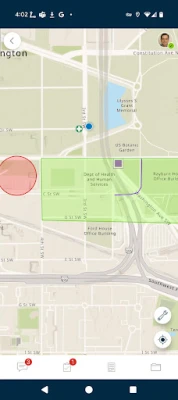
- Interactive Maps: Explore mission maps, layers, and other resources, providing users with the necessary tools to navigate and understand their environment.
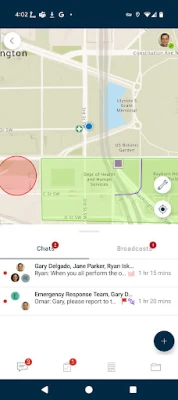
- Instant Messaging: Send and receive instant messages to and from other users, teams, and all mission participants, fostering seamless communication.
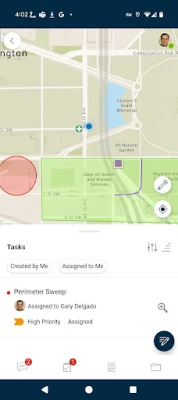
- User-Specific Tasks: Receive, view, and respond to tasks tailored to individual users, ensuring that everyone knows their responsibilities.
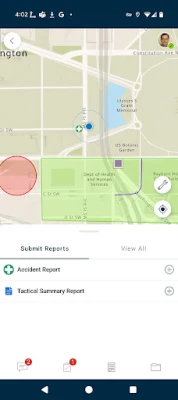
- Optimized Reporting: Utilize an optimized report form to create and view reports directly from the field, streamlining data collection and analysis.
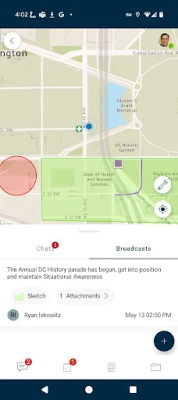
- Map Sketching: Create simple map sketches to communicate and collaborate effectively with other mission participants, enhancing situational awareness.
- GeoMessages: Attach photos and other file-based resources for sharing as GeoMessages, enriching the information shared among team members.
Enhancing Situational Awareness
One of the standout features of ArcGIS Mission Responder is its ability to enhance situational awareness. By providing real-time data and communication tools, users can make informed decisions quickly. Whether responding to emergencies, conducting field surveys, or managing resources, the app ensures that all team members have access to the same information, reducing the risk of miscommunication and errors.
Battery Life Considerations
While ArcGIS Mission Responder offers numerous benefits, it is essential to be mindful of battery consumption. Continued use of GPS running in the background can significantly decrease battery life. Users should consider optimizing their settings and managing GPS usage to ensure that their devices remain operational throughout critical missions.
Conclusion
ArcGIS Mission Responder is an invaluable tool for organizations seeking to enhance their operational efficiency and situational awareness. With its robust features and seamless integration with ArcGIS Enterprise, it empowers users in the field to communicate effectively and make informed decisions. By leveraging the capabilities of ArcGIS Mission Responder, organizations can ensure that they are always prepared to respond to the challenges they face, ultimately leading to more successful mission outcomes.
In a world where information is power, ArcGIS Mission Responder stands out as a vital resource for those who need to stay connected and informed in real-time. Embrace the future of situational awareness and operational excellence with ArcGIS Mission Responder.
Rate the App
User Reviews















Popular Apps










Editor's Choice









