

Latest Version
3.1.1
December 16, 2025
LuxDeLux
Tools
Android
0
Free
com.luxdelux.frequencygenerator
Report a Problem
More About Frequency Sound Generator
Unlock the Power of Sound with Our Frequency Generator App
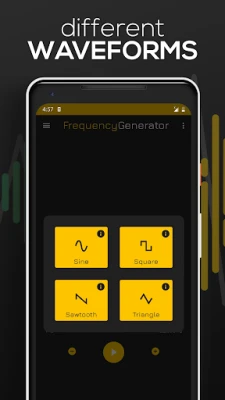
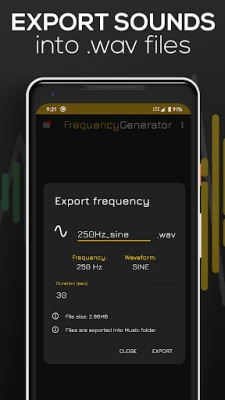
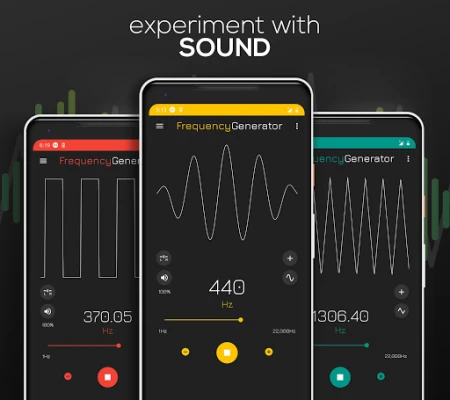
Experience the ultimate sound generation with our Frequency Generator Sound Player, designed to create sine, square, sawtooth, or triangle sound waves across a frequency range of 1Hz to 22,000Hz (hertz). This app delivers precise tones and sound waves while maintaining user-friendly functionality, making it the ideal tool for both high and low-frequency sound testing. Whether you're a musician, audiophile, or just curious about sound, our frequency tone generator is your top choice.
Effortless Sound Control
The Frequency Sound Generator offers intuitive controls that allow you to switch between sound waves effortlessly. Simply tap the sound wave icon on the main menu to select your desired waveform—sine, square, sawtooth, or triangle. Additionally, explore a diverse range of musical notes by tapping the 🎵 icon, making it easy to customize your sound experience.
Visualize Your Sound with Animated Waves
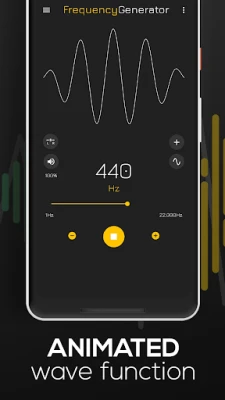
One of the standout features of our app is the animated sound wave function. This visually engaging tool represents the sound produced at any given frequency, enhancing your understanding of sound dynamics. Change the waveform by clicking the round button on the left side, and watch as the animated wave transforms along with the sound.
Precision Frequency and Volume Adjustment
Adjusting the sound frequency is a breeze with our user-friendly interface. Simply drag the yellow dot to modify the frequency, and utilize the - & + buttons for precise adjustments. You can also control the volume of the generated sounds, ranging from 0 to 100%, ensuring the perfect listening experience.
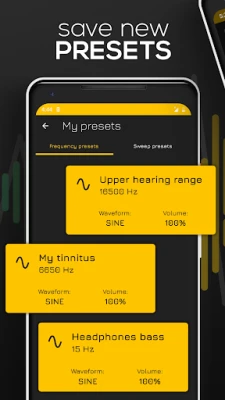
Save Your Favorite Presets
Never lose your favorite sound settings again! By clicking the three dots in the top right corner, you can create and load your own frequency sound presets. This feature allows you to quickly access your preferred settings without the hassle of reconfiguring them each time.
Background Playback for Continuous Sound
Our Frequency Generator app allows you to play frequency sounds in the background. In the app settings, you can choose to keep the sound playing even when you minimize the app, making it convenient for multitasking or background listening.
Versatile Applications of the Frequency Generator
This sound-generating app serves multiple purposes, including:
- Hearing Tests: Assess your hearing capabilities within the average human range of 20Hz to 20,000Hz. This range tends to diminish with age, making it valuable to test your hearing periodically.
- Speaker and Headphone Testing: Evaluate the performance of your audio equipment by testing both high-end (treble) and low-end (bass) tones.
- Instrument Tuning: Use the app as a tuner for your musical instruments, ensuring they are perfectly in tune for your performances.
- Speaker Cleaning: Utilize sound vibrations to help dislodge unwanted water from your speakers, enhancing their performance.
- Tinnitus Frequency Discovery: Find the specific frequency that corresponds to your tinnitus, aiding in better management of this condition.
Customizable Settings for Optimal Performance
Our Frequency Generator app includes several adjustable settings to enhance your user experience:
- Frequency Slider Range: Modify the frequency slider range for more precise frequency selection.
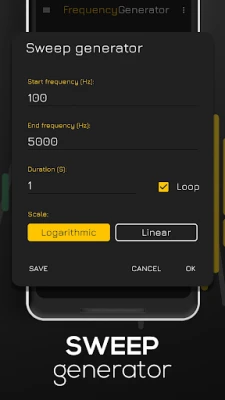
- Slider Scale Options: Choose between linear or logarithmic slider scales to suit your preferences.
- Low Latency Setting: Enable high-performance low latency audio for a more responsive slider experience. (Note: This setting may cause inaccuracies in high frequencies on some devices, especially at higher volumes.)
- Decimal Precision: Enable or disable decimal precision up to two decimals for more accurate sound generation.
- Adjustment Step Size: Customize the +/- button step size for even easier frequency adjustments.
Important Note on Audio Quality
While our app is designed for optimal sound generation, it's essential to note that mobile phones may not serve as high-quality audio sources. The built-in speakers can vary in quality, and users may occasionally hear sounds at very low or high frequencies that exceed the human hearing range. This noise is often static or "parasite" noise generated by the device rather than the intended frequency. For the best audio experience, we recommend using high-quality headphones.
Unlock the full potential of sound with our Frequency Generator Sound Player. Whether for testing, tuning, or simply exploring the world of sound, this app is your ultimate companion.
Rate the App
User Reviews















Popular Apps










Editor's Choice









