


Latest Version
2.9.6
December 18, 2025
Baseus
Tools
Android
2
Free
com.baseus.intelligent
Report a Problem
More About Baseus倍思
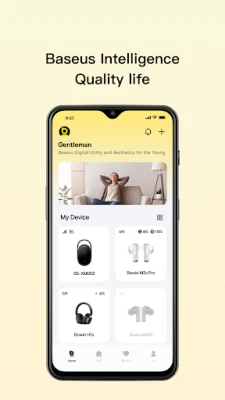
Unlock the Full Potential of Your Baseus Earphones with the Baseus App
In today's fast-paced world, having the right audio experience is essential. Baseus, a leading brand in audio technology, offers a range of earphones designed to elevate your listening experience. To maximize the functionality of these devices, the Baseus App is an invaluable tool. However, it's important to note that not all Baseus earphones are compatible with the app. This article will guide you through the compatible models and how to troubleshoot any issues you may encounter.
Compatible Baseus Earphones
The Baseus App is specifically designed to support a variety of Baseus earphones, ensuring that users can enjoy enhanced features and functionalities. Below is a comprehensive list of compatible models:
TWS Earphones
- Baseus Bowie MC1
- AirGo AS01
- AirGo 1 Ring
- Baseus Bowie MF1
- Eli Sport 1
- Eli Fit
- Eli 10i Fit
- AirGo AG20
- Baseus Bass BD1
- Baseus Bass 1+
- M2s Ultra
- Bowie M3
- Bowie M2s Pro
- Bowie M2s
- Bowie M2+
- Bowie M2
- Bowie M1
- AeQur G10
- AirNora 3
- AirNora 2
- AirNora
- Bowie 35
- Bowie 30
- Bowie WM05
- Bowie WM03
- Bowie WM02+
- Bowie WM02
- Bowie WM01Plus
- Bowie WM01
- Bowie WX5
- Bowie MZ10
- Bowie EZ10
- C-Mic CM10
- Baseus Bowie MA10s
- Bowie MA10
- Bowie MA10 Pro
- Bowie MA20
- Bowie MA20 Pro
- Bowie W04 Plus
- Bowie W04
- Bowie W04 Pro
- Bowie W04+
- Bowie W04+Pro
- Bowie E13
- Bowie E12
- Bowie E10
- Bowie E5
- Bowie E5x
- Bowie E2
- Bowie E3
- Bowie E8
- Baseus E9
- Bowie EX
- Storm 1
- Storm 3
- Encok W04
- Encok W04 Pro
- Encok W05Lite
- Encok W11
- Encok W12
Headsets
- Bowie 30 Max
- Bowie 10 Max
- Bowie H2
- Bowie D05
- Bowie H1i
- AeQur GH02
- Bowie H1 Pro
- Bowie H1s
- Bowie H1S
- Bowie H1
Neck Earphones
- Baseus P1 Lite
- Baseus P1x
- Baseus P1
- Bowie U2 Pro
- Bowie U2
Speakers
- AeQur N10
- AeQur 30 Air
- AeQur VO20
- AeQur DS10
Troubleshooting Connection Issues
While the Baseus App enhances the functionality of compatible earphones, some users may experience connection issues. If you encounter any problems, follow these troubleshooting steps:
- Check Compatibility: Ensure your earphones are listed among the compatible models.
- Update the App: Make sure you have the latest version of the Baseus App installed on your device.
- Bluetooth Settings: Verify that Bluetooth is enabled on your device and that your earphones are in pairing mode.
- Restart Devices: Sometimes, a simple restart of your earphones and the device can resolve connectivity issues.
- Contact Support: If problems persist, reach out to Baseus customer service at care@baseus.com for assistance.
Conclusion
The Baseus App is a powerful tool that enhances the functionality of your Baseus earphones, providing a superior audio experience. By ensuring compatibility and following troubleshooting steps, you can unlock the full potential of your audio devices. Enjoy your music, podcasts, and calls with the clarity and quality that only Baseus can provide.
Rate the App
User Reviews















Popular Apps










Editor's Choice









