

Latest Version
5.0.1
October 17, 2025
State Bank of India
Finance
Android
0
Free
com.sbi.SBAnywhereCorporate
Report a Problem
More About Yono Business
Unlocking the Power of Yono Business: The Ultimate Mobile App for SBI Corporate Customers
In today's fast-paced business environment, having a reliable and efficient banking solution is crucial for corporate entities. The Yono Business mobile application from the State Bank of India (SBI) is designed specifically for corporate internet banking users, offering a seamless experience across various banking services. This article delves into the features and benefits of Yono Business, making it an indispensable tool for corporate users.
What is Yono Business?
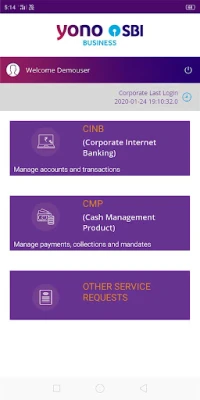
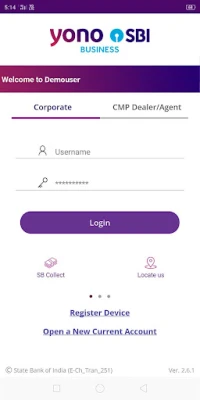
Yono Business is an integrated mobile application tailored for SBI's corporate internet banking customers. It provides a unified user experience for different banking variants, including Khata Plus, Vyapaar, Vistaar, and Saral. This app is designed for Corporate Makers, Authorizers, and Enquirers, enabling them to initiate payments and manage accounts effortlessly.
Streamlined Cash Management with CMP Payments
For businesses utilizing SBI's Cash Management Product (CMP), Yono Business offers a robust platform for managing bulk payments. Users can authorize payments directly through the app, ensuring that financial transactions are handled efficiently and securely.
Key Features of Yono Business
The Yono Business app is packed with features that cater to the diverse needs of corporate users. Here’s a closer look at its key functionalities:
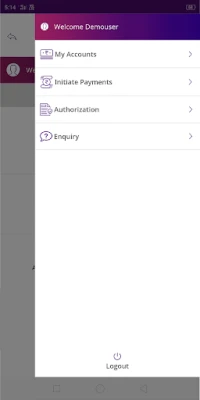
1. Account Management
- View Account Summary: Access a comprehensive overview of all account types.
- Mini Statement: Quickly check recent transactions.
- Add/Manage Accounts: Easily add or manage multiple accounts.
2. Payment Initiation
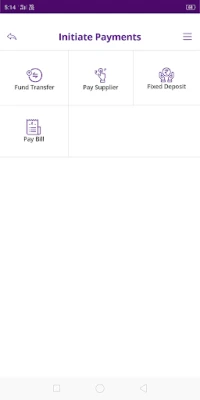
- Fund Transfers: Transfer funds between own, SBI, and non-SBI accounts using NEFT, RTGS, or IMPS.
- Supplier Payments: Make payments to registered suppliers seamlessly.
- Bill Payments: View, pay, and schedule bills while accessing biller details.
3. Fixed Deposits
Open e-TDR and e-STDR fixed deposits directly through the app, making it easier to manage investments.
4. Authorizations for Corporate Users
- Transaction Authorizations: Approve or reject transactions with ease.
- Merchant Transactions: Manage merchant-related transactions efficiently.
- Cancel E-cheques: Quickly cancel e-cheques when necessary.
5. Inquiry Features
Users can view details of e-cheques and e-TDR/STDR, ensuring they have all necessary information at their fingertips.
Specialized Features for SARAL Users
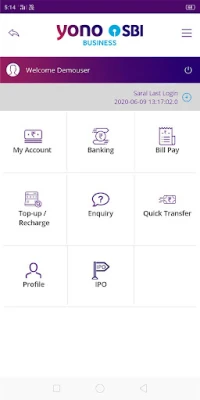
SARAL is a simplified product designed for sole proprietorships, micro enterprises, and individual businessmen. It offers essential online transaction facilities, including:
- Quick Transfers: Make swift fund transfers.
- Mobile Top-Up and DTH Recharge: Easily recharge mobile and DTH services.
- IPO Management: Apply, edit, and manage IPOs effortlessly.
- Beneficiary Management: Add and manage beneficiaries with ease.
- Profile Management: Customize account nicknames and display names.
Efficient CMP Payments Management
The CMP Payments feature is designed for businesses utilizing SBI's cash management services. It allows corporate users to manage their finances on the go, with functionalities for:
- Corporate Uploader: View the upload status of files.
- Corporate Approver: Authorize transactions efficiently.
- Corporate Authorizer: Manage accounts and authorize transactions.
- Corporate Releaser: Finalize transactions and manage accounts.
Additional Services for Corporate Users
Yono Business also provides access to a range of additional services, allowing corporate users to explore various product offerings from SBI. Users can raise service requests for any banking services, with a bank representative following up to assist further.
Services Dashboard
The Services Dashboard includes:
- Online and Offline Collection Services
- Payments
- Channel Finance
- Trade Finance
- Treasury Services
- Additional Services
Streamlined CMP Collections
The CMP Collections feature offers a user-friendly, eco-friendly, and secure solution for cash and cheque deposits. Corporate dealers and agents can deposit cash and cheques using the app, making transactions more efficient.
Key Features of CMP Collections
- Order Requests: Raise requests for cash and cheque collections.
- Order Tracking: Monitor the status of collection orders.
- Pending Collections: View and manage pending collections.
- Transaction Activation: Reactivate expired transactions.
- Order Management: Agents can view and update assigned orders.
Need Assistance? Contact Us!
For any complaints or assistance, visit Yono Business Support and select the "Contact Us" option for prompt help.
In conclusion, the Yono Business app is a powerful tool for SBI corporate customers, offering a comprehensive suite of features that streamline banking operations. With its user-friendly interface and robust functionalities, it empowers businesses to manage their finances efficiently, anytime and anywhere.
Rate the App
User Reviews















Popular Apps










Editor's Choice









