

Latest Version
December 12, 2025
PowerSchool Group LLC
Education
Android
0
Free
com.powerschool.plpe.mobile
Report a Problem
More About Unified Talent Mobile
Mastering Absence Management: A Comprehensive Guide to PowerSchool Features
In today's fast-paced educational environment, effective absence management is crucial for both educators and administrators. With the PowerSchool Professional Learning and SmartFind Express applications, users can streamline their absence workflows, ensuring a seamless experience. This article delves into the essential features of these applications, empowering users to manage their absences efficiently.
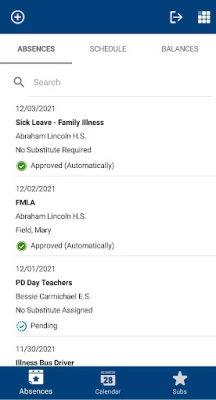
Create, View, Edit, or Cancel an Absence
Managing absences has never been easier. With the PowerSchool applications, users can create, view, edit, or cancel an absence directly from their mobile devices. This flexibility allows educators to stay organized and keep their schedules up to date, regardless of their location.
Step-by-Step Guide to Managing Absences
- Create an Absence: Simply navigate to the absence management section, select the date and reason for your absence, and submit your request.
- View Your Absences: Access a comprehensive list of your scheduled absences, ensuring you never miss a beat.
- Edit an Absence: If plans change, easily modify your absence details to reflect the new information.
- Cancel an Absence: If you no longer need to be absent, quickly cancel your request to keep your schedule accurate.
Set Your Preferred Substitutes
Finding the right substitute can be a daunting task. Fortunately, PowerSchool allows users to set their preferred substitutes within the application. This feature ensures that when you need to be absent, your preferred substitute is notified and can step in seamlessly.
How to Set Your Preferred Subs
- Access the substitute management section of the app.
- Select your preferred substitutes from the list provided.
- Save your preferences to ensure they are used for future absences.
View Your Schedule and Reason Balance
Keeping track of your schedule and reason balance is essential for effective absence management. The PowerSchool applications provide users with a clear view of their schedule and reason balance, allowing for better planning and decision-making.
Understanding Your Schedule and Reason Balance
Your schedule displays all upcoming classes and commitments, while the reason balance indicates how many absence days you have remaining for the year. This transparency helps educators manage their time effectively and avoid exceeding their allotted absence days.
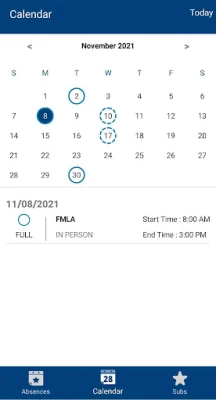
Calendar View for Absences
Visualizing your absences is made simple with the calendar view feature. This tool allows users to see their absences plotted on a calendar, providing a clear overview of when they will be away from their responsibilities.
Benefits of Using Calendar View
- Gain a quick visual representation of your absences.
- Easily identify patterns in your absence history.
- Plan future absences more effectively by seeing your commitments at a glance.
Professional Learning Course Management
For instructors and attendees of professional development courses, the PowerSchool applications offer a suite of features designed to enhance the learning experience.
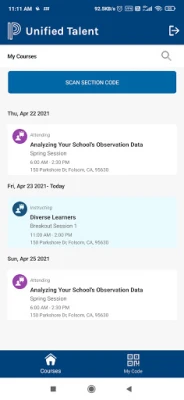
View Upcoming Professional Development Courses
Users can easily view their upcoming professional development courses, ensuring they stay informed about their learning opportunities. This feature helps educators plan their schedules around these important sessions.
Access Course Details
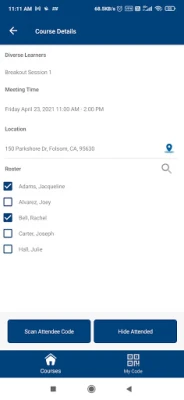
Each course comes with detailed information, including meeting times and locations. Users can even connect to Google Maps for easy navigation to their course venues, making attendance hassle-free.
Mark Class Attendance
Instructors can efficiently mark class attendance through the application, streamlining the process and ensuring accurate records are maintained. This feature is vital for tracking participation and engagement in professional development activities.
Important Note for Users
To take advantage of these powerful features, it is essential that your district is utilizing the PowerSchool Professional Learning or SmartFind Express applications. Ensure your district is equipped with these tools to maximize your absence management capabilities.
What’s New in PowerSchool Applications
Recent updates to the PowerSchool SmartFind Express application have introduced key absence workflows directly within the mobile app. Users can now:
- Create, view, edit, or cancel absences with ease.
- Set their preferred substitutes for a smoother transition during absences.
- Access their schedules, reason balances, and absences in a convenient calendar view.
These enhancements are designed to improve user experience and streamline absence management, making it easier than ever for educators to stay organized and focused on their teaching responsibilities.
Conclusion
Effective absence management is essential for educators and administrators alike. With the PowerSchool Professional Learning and SmartFind Express applications, users can easily create, view, edit, and cancel absences, set preferred substitutes, and manage their schedules. By leveraging these powerful tools, educators can ensure they remain organized and focused on their primary goal: providing quality education to their students.
Rate the App
User Reviews















Popular Apps










Editor's Choice









