


Latest Version
3.0.1
December 19, 2025
2ma
Communication
Android
0
Free
tma.contactswidgetplus
Report a Problem
More About Contacts Widget
Enhance Your Contact Display with Versatile Layouts
In today's fast-paced digital world, having an organized and visually appealing way to display your contacts is essential. With a variety of customizable shapes and layouts, you can effortlessly manage your contacts while adding a personal touch. This article explores the benefits of using multiple layouts for contact display, offering you the flexibility to choose what works best for your needs.
Multiple Layout Options for Every Preference
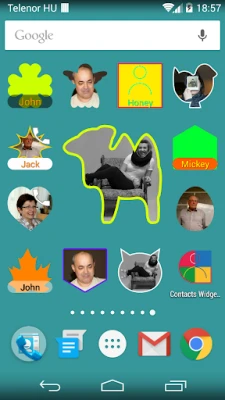
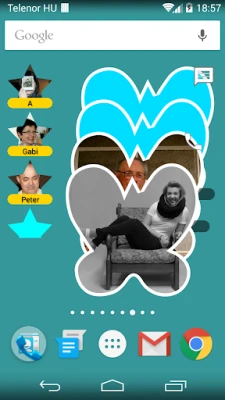
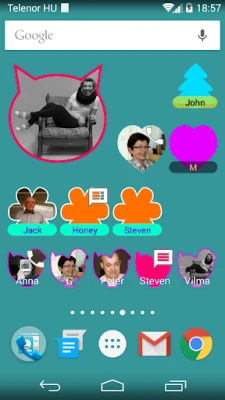
When it comes to displaying your contacts, variety is key. With six distinct layouts at your disposal, you can select the one that best fits your style and functionality requirements. Each layout is fully resizable, allowing you to adjust the size to suit your screen or personal preference. Whether you prefer a grid format, a list, or something more creative, these options ensure that your contacts are presented in a way that is both functional and visually appealing.
Effortless Configuration for Seamless Integration
Setting up your contact display has never been easier. The intuitive configuration process allows you to add individual contacts, highlight your favorites, or incorporate any pre-existing groups you have already established. This flexibility means you can tailor your contact display to reflect your personal or professional needs without any hassle.
Customizable Contact Ordering
One of the standout features of this contact display system is the ability to organize your contacts according to your preferences. You can easily rearrange the order of your contacts, ensuring that the most important ones are always at your fingertips. This level of customization enhances your user experience, making it simple to find and connect with the people who matter most.
Edit Widgets Post-Setup for Ongoing Flexibility
Life is dynamic, and so are your contact needs. After setting up your contact display, you can continue to make adjustments as necessary. The ability to edit widgets post-setup means you can keep your contact list fresh and relevant, adapting to changes in your personal or professional life without any complications.
Add a Splash of Color to Your Contact Pictures
Visual appeal plays a significant role in how we interact with our digital environments. By adding a colorful frame to your contact pictures, you can enhance the aesthetic of your contact display. This simple yet effective customization option allows you to express your personality and make your contact list more engaging.
Quick Access Features: Direct Dial and Messaging
In a world where speed is crucial, having quick access to your contacts is invaluable. You can choose to enable direct dial or messaging options, allowing you to connect with your contacts instantly. Additionally, the quick menu feature provides an efficient way to navigate through your contact options, ensuring that you can reach out to anyone you need without delay.
Conclusion: Elevate Your Contact Management Experience
With the ability to choose from multiple shapes and layouts, effortless configuration, and ongoing customization options, managing your contacts has never been more efficient or enjoyable. By incorporating colorful frames and quick access features, you can create a contact display that not only meets your functional needs but also reflects your personal style. Embrace the power of versatile contact management and transform the way you connect with others.
Rate the App
User Reviews















Popular Apps










Editor's Choice









