



Latest Version
32.3
February 11, 2026
twinlife
Communication
Android
1
$4.99
org.twinlife.device.android.twinme.plus
Report a Problem
More About twinme+ - secure messenger
Unlocking the Power of twinme+: Features That Enhance Your Communication Experience
In today's fast-paced digital world, effective communication is paramount. With the introduction of twinme+, users can enjoy an enhanced suite of features designed to streamline interactions and improve connectivity. This article delves into the standout functionalities of twinme+ that set it apart from traditional messaging apps.
Organize Your Connections with Spaces
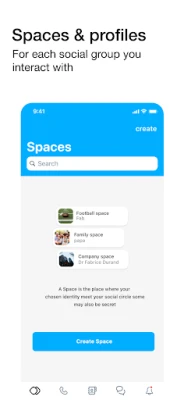
One of the most innovative features of twinme+ is the concept of Spaces. This functionality allows users to categorize their profiles, relationships, conversations, notifications, and settings based on different social groups. Whether you’re connecting with family, friends, colleagues, or sports teammates, Spaces help you maintain a structured communication environment.
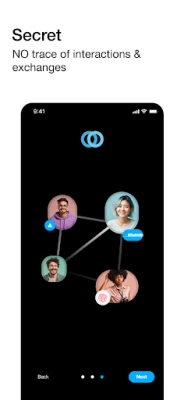
Moreover, twinme+ offers the option to create Secret Spaces. These exclusive areas do not appear in your list of Spaces and can only be accessed by entering a specific name. Remembering this name is crucial, as retrieving it later will be impossible.
Enhanced Security Features
Security is a top priority for many users, and twinme+ addresses this with robust locking options. You can easily lock or unlock the application using your device's biometric features or PIN locking services. This ensures that your conversations and personal data remain secure from unauthorized access.
Ephemeral Messaging for Privacy
In an age where privacy concerns are prevalent, twinme+ introduces ephemeral messages. These messages automatically disappear from both sender and receiver after a predetermined time, providing an extra layer of confidentiality for sensitive conversations.
Control Your Communication
With twinme+, you have the power to manage your interactions effectively. The app allows you to block specific contacts from calling you via voice or video, giving you control over who can reach you. This feature is particularly useful for maintaining boundaries in both personal and professional settings.
Seamless Music Streaming During Calls
Enhancing your communication experience, twinme+ enables users to stream music during calls. This feature allows you to share your favorite tunes with friends or simply enjoy background music while chatting, making conversations more enjoyable.
Group Calling Made Easy
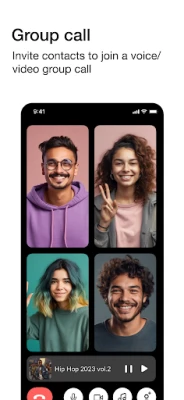
Group interactions are simplified with twinme+. Users can initiate voice or video calls within a group, making it easy to connect with multiple contacts simultaneously. Additionally, you can invite others to join an ongoing group call, ensuring that no one misses out on important discussions.
Effortless Call Transfers
Switching devices during a call is a breeze with twinme+. You can transfer an ongoing voice or video call from your mobile device to a PC seamlessly. This flexibility allows you to continue conversations without interruption, regardless of your location.
Click-to-Call with QR Codes
Another innovative feature is the ability to publish QR codes from the calls tab. These codes allow guests to call you without needing to install the application, making it easier for new contacts to connect with you instantly.
Easy Migration from twinme to twinme+
If you already have twinme installed on your device, transitioning to twinme+ is hassle-free. Your twinme account, along with all associated data such as contacts and conversations, will be automatically transferred to twinme+. Once the migration is complete, you can uninstall the original twinme app without losing any information.
For users with multiple profiles in twinme, each profile will be linked to a different Space in twinme+. This feature allows for easy management of contacts, enabling you to move them to your preferred Space effortlessly.
Data Usage and Permissions
twinme+ utilizes your device's internet connection, whether through WiFi or mobile data (3G/4G/LTE). Be mindful that data charges may apply, so it’s advisable to check with your carrier for details.
To ensure optimal functionality, twinme+ requires several permissions:
- Camera & Microphone: For taking pictures and making voice/video calls.
- Photos/Media/Files: To manage profiles and messages.
- Storage: For accessing files on SD cards.
- Network Connections: To monitor connectivity.
- Audio Settings: For adjusting audio volume.
- Prevent from Sleeping: To maintain active calls.
- Vibration: To provide feedback during interactions.
- Run at Startup: To ensure you receive messages and calls promptly.
Conclusion
With its array of innovative features, twinme+ redefines the way we communicate. From organizing connections through Spaces to ensuring privacy with ephemeral messaging, this app caters to the diverse needs of modern users. Embrace the future of communication with twinme+ and experience a seamless, secure, and enjoyable way to connect with others.
Rate the App
User Reviews















Popular Apps










Editor's Choice









