

Latest Version
6.1.4
April 21, 2026
Alliant Credit Union
Finance
Android
0
Free
org.alliant.mobile
Report a Problem
More About Alliant Mobile Banking
Unlock the Power of Alliant Mobile Banking: Your Comprehensive Guide
In today's fast-paced world, managing your finances on the go is essential. With the Alliant Mobile Banking App, you can effortlessly handle your banking needs right from your smartphone. Whether you're a seasoned user or a first-time visitor, this guide will walk you through the app's features and benefits, ensuring you make the most of your banking experience.
Getting Started with Alliant Mobile Banking
To begin your journey with Alliant Mobile Banking, simply log in using your existing credentials. If you're new to the platform, creating your login is a breeze—just follow the prompts within the mobile banking app. Once you're set up, a world of banking convenience awaits you.
Key Features of the Alliant Mobile Banking App
The Alliant Mobile Banking App is designed to simplify your banking experience. Here are some of the standout features:
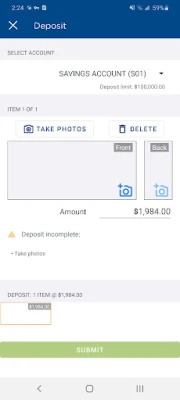
- Instant Check Deposits: Deposit checks instantly from the comfort of your home or on the go.
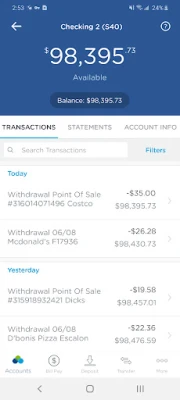
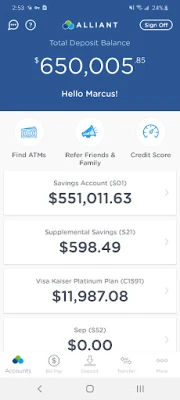
- Account Management: Securely check your account balances and review recent banking activity.
- Transaction History: Access a detailed history of your transactions, including credit card activities.
- Money Transfers: Effortlessly transfer funds between your accounts and set up external accounts.
- Lost or Stolen Card Reporting: Use the tap-to-call feature to report lost or stolen cards quickly.
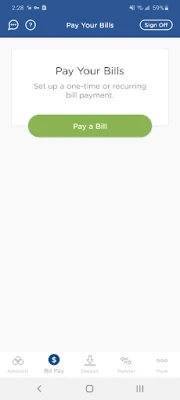
- Bill Payments: Pay your monthly bills and add new payees with ease.
- ATM Locator: Find ATMs within our extensive network of over 80,000 fee-free locations, including those that accept deposits.
- Secure Messaging: Create, receive, and respond to secure messages directly through the app.
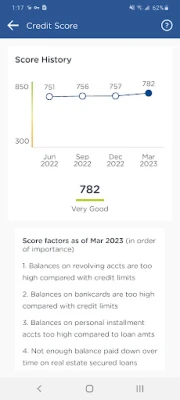
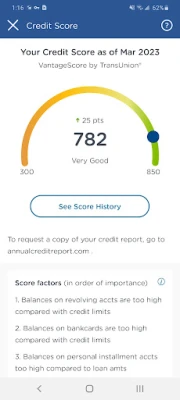
- Personal Financial Management: Utilize powerful tools to keep track of your finances effectively.
Highlighted Features for Enhanced User Experience
The Alliant Mobile Banking App is packed with features that enhance usability and security:
- Fingerprint Authentication: Log in quickly and securely with just a touch of your finger.
- Balance Preview: Check your account balance before logging in for added convenience.
- Customization Options: Easily reorder your accounts to suit your preferences.
- Built-in Help: Access instant answers to your questions without hassle.
Device Compatibility and Security Measures
The Alliant Mobile Banking App is compatible with devices running Android 9.0 and above. Your security is our priority; all transactional data is encrypted, ensuring that no sensitive account information is stored on your mobile device.
Permissions Required for Optimal Functionality
To provide you with the best experience, the app requires certain permissions:
- Location Permissions: Necessary for locating nearby ATMs.
- Camera Permissions: Required for depositing checks using your device's camera.
Important Disclosures and Limitations
While the Alliant Mobile Banking App offers a wealth of features, it's important to be aware of certain limitations:
- Deposit limits and restrictions may apply. The Mobile Check Deposit Service is subject to eligibility.
- Some features are available only to eligible members and accounts.
- While there is no charge from Alliant to use the app, standard message and data rates may apply.
- Transactions at non-Alliant ATMs may incur surcharge fees imposed by the ATM owner.
- All deposits are subject to Alliant Credit Union’s Funds Availability Policy. Please refer to the Account Agreement and Disclosures for more information.
- Retain your check for 90 days before disposal to ensure proper record-keeping.
Contact Us for Assistance
If you have any questions or need assistance, feel free to reach out:
- Website: www.alliantcreditunion.org
- Phone: 800-328-1935
- Social Media: @AlliantCU
Embrace the convenience of modern banking with the Alliant Mobile Banking App. With its robust features and user-friendly interface, managing your finances has never been easier. Download the app today and take control of your banking experience!
Rate the App
User Reviews















Popular Apps










Editor's Choice









