

Latest Version
4.16.0
April 21, 2026
Millennium bim
Finance
Android
0
Free
com.ebankit.android.millenniumbim
Report a Problem
More About Millennium bim Smart IZI
Unlocking the New Features of Smart IZI: A Comprehensive Guide
The latest version of Smart IZI introduces a host of innovative features designed to enhance user experience and streamline financial management. With a fresh look and improved functionality, this app is set to redefine how you interact with your banking services. Let’s delve into the standout features that make Smart IZI a must-have for your financial needs.
Revamped Look and Feel
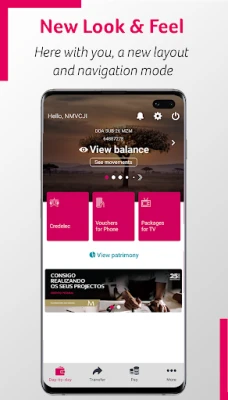
The first notable enhancement in the new Smart IZI version is its modernized Look and Feel. The app now boasts vibrant colors, updated layouts, and intuitive menus and buttons that make navigation a breeze. The redesigned Smart IZI layout offers a fresh navigation mode, allowing users to effortlessly slide left or right on the products carousel. This feature provides a comprehensive overview of all your financial products, including accounts, cards, savings, and loans.
Enhanced Navigation with Fixed Bar
To further simplify navigation, the new version of Smart IZI includes a fixed navigation bar at the bottom of the screen. This bar provides quick access to essential features such as "Day-by-Day," "Transfer," "Pay," and "More," ensuring that you can manage your finances with ease.
Privacy Mode for Enhanced Security
Security is paramount in today’s digital age, and the new Smart IZI version introduces a Privacy Mode. This feature allows users to choose whether to display or hide their account balances after logging in, providing an added layer of confidentiality for your financial information.
Quick Access Features
Smart IZI prioritizes user convenience with quick navigation options located in the top right corner of the "Day-by-Day" feature. Here, you can easily access Alerts, Settings, and the Exit button, making your banking experience more efficient.
Segment Themes and Colors
The app now personalizes your experience by distinguishing your segment and customizing the colors of visual components according to your specific category. This feature enhances user engagement and makes navigation more visually appealing.
Stay Informed with Alerts and Push Notifications
Keeping track of your financial activities has never been easier. The new Smart IZI version allows you to receive important updates about your assets and bank news through alerts. Simply tap the alert icon on the main page and ensure that you enable push notifications in the settings to stay informed.
Comprehensive Settings Menu
The settings area in Smart IZI is designed for user convenience, allowing you to:
- View and delete favorites
- Access authorization codes
- Change your IZI PIN
- Register or update your email
- Reset your Internet Banking password
- Enable or disable biometric configuration
- Manage push notification settings
Products Carousel for Easy Navigation
The products carousel allows users to navigate through all their financial products—accounts, cards, savings, and loans—by simply swiping left or right. You can also perform specific operations for each product and check movements, balances, or details by selecting the “More Details” option.
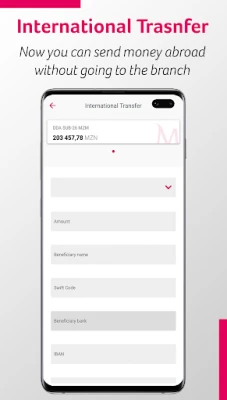
Simplified Transfer Options
Transferring funds is now more straightforward than ever. The transfer option is conveniently located in the navigation bar, offering various types of transfers, including:
- Intrabank Transfers
- Interbank Transfers
- Phone Transfers
- Mobile Transfers
- M-Pesa
- E-Mola (new)
- Scheduled Transfers
Effortless Payment Process
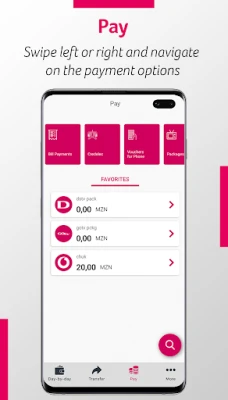
Paying for services is just a click away. By selecting “Pay” from the navigation bar, you can easily make payments for:
- Credelec
- Phone Vouchers
- TV Packages
- Bill Payments
- INSS Payments (new)
- Cash Directo
Additional Operations in the "More" Section
The "More" section of Smart IZI offers a variety of essential operations, including:
- Reading QR Codes
- Generating QR Codes
- Savings Management
- IZI Withdrawals
- Requesting Check Books
- Sending Invitations (available to Prestige Customers)
- Viewing Contacts, Branches, and Current Exchange Rates
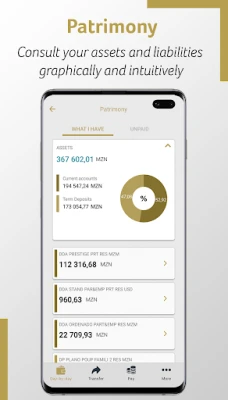
Visualize Your Financial Health with Patrimony
With the Patrimony feature, users can visualize their assets and liabilities in a clear and intuitive manner. Simply click the Patrimony button located below the product carousel to access this insightful overview.
Save Time with Favorites
Make your transactions even quicker by saving your favorite operations. After completing a transaction, select the "Add as Favorite" option to easily reuse it for future transactions.
Access Requirements for Smart IZI
Accessing Smart IZI is simple and convenient. You can use the app on any device with the application installed. Log in using your mobile banking credentials, which include your cell phone number associated with the channel and your 4-digit access PIN, known as the IZI PIN.
With these exciting new features, Smart IZI is poised to enhance your banking experience, making it more intuitive, secure, and user-friendly. Embrace the future of banking with Smart IZI—where managing your finances is truly made easy.
Rate the App
User Reviews















Popular Apps










Editor's Choice









