
Latest Version
9.0.0
April 20, 2026
State Bank of India
Finance
Android
0
Free
com.sbi.sbiquick
Report a Problem
More About SBI Quick
Unlocking the Power of SBI Quick Services: Your Comprehensive Guide
In today's fast-paced world, managing your banking needs efficiently is crucial. The SBI Quick Services offer a seamless way to access essential banking functionalities directly from your mobile device. This service is exclusively available for the mobile number registered with your specific bank account. Below, we delve into the various features and benefits of SBI Quick Services, ensuring you make the most of this convenient banking solution.
What Are SBI Quick Services?
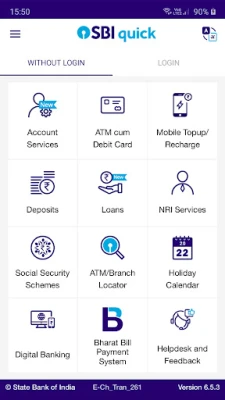
SBI Quick Services provide a range of functionalities designed to simplify your banking experience. Here’s a closer look at what you can do:
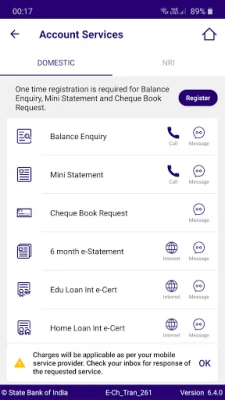
Account Services
- Balance Enquiry: Instantly check your account balance.
- Mini Statement: Get a brief overview of your recent transactions.
- Cheque Book Request: Request a new cheque book with ease.
- 6-Month e-Statement: Access your account statement for the past six months.
- Education Loan Interest e-Certificate: Obtain your interest certificate for education loans.
- Home Loan Interest e-Certificate: Get your home loan interest certificate effortlessly.
ATM Card Management
- Blocking of ATM Card: Secure your account by blocking your ATM card if lost or stolen.
- ATM Card Usage Control: Toggle your card's international or domestic usage ON/OFF.
- Channel Control: Manage your ATM card's usage across different channels (ATM/POS/eCommerce).
- Generate Green PIN: Easily generate a new PIN for your ATM-cum-Debit card.
Mobile Top-Up and Recharge
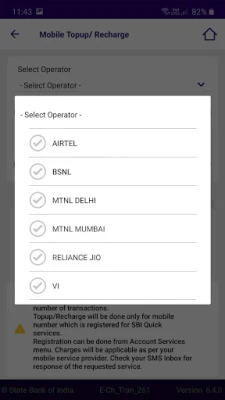
With SBI Quick, you can recharge your mobile number registered with the bank. Simply send the activation code received on your mobile device to complete the process successfully.
Prime Minister Social Security Schemes
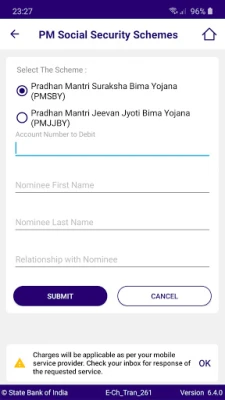
Subscribe to the Prime Minister’s Social Security Schemes, including PMJJBY and PMSBY, directly through SBI Quick.
SBI Holiday Calendar
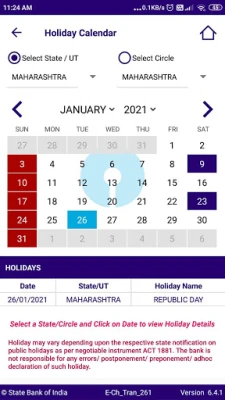
Stay informed about bank holidays with the SBI Holiday Calendar feature.
ATM-Branch Locator
Utilize the SBI Finder to locate nearby SBI branches, ATMs, Cash Deposit Machines, and Customer Service Points (CSP) effortlessly.
Rate Us
Share your experience by rating the SBI Quick Services on the Play Store.
Frequently Asked Questions (FAQs)
Can I register the same mobile number for multiple accounts?
You can only register one mobile number for one account. To switch to another account, you must first deregister SBI Quick from the current account and then register it for the new one.
Is it necessary for the mobile number to be registered with the bank?
Yes, the mobile number used for SBI Quick must be registered with the bank for the specific account. If it’s not registered, visit your home branch to update your mobile number.
Which types of accounts are eligible for SBI Quick?
SBI Quick is available for Savings Bank (SB), Current Account (CA), Overdraft (OD), and Cash Credit (CC) accounts.
How does SBI Quick differ from Yono Lite or Yono?
There are two key differences:
- No need for a Login ID or Password; just a one-time registration using the mobile number linked to your account.
- SBI Quick focuses solely on enquiry and ATM blocking services, unlike State Bank Anywhere or State Bank Freedom, which offer transaction services.
Are there limits on the number of enquiries I can make?
Currently, there are no restrictions on the number of enquiries you can make daily or monthly; you can make unlimited enquiries.
What are the charges associated with SBI Quick Services?
- The service is currently free of charge from the bank.
- Balance inquiries or mini statements may incur a charge for the IVR message played after a few rings, depending on your mobile tariff plan.
- Any SMS sent to 567676, such as for blocking an ATM card, will be charged at premium rates by your service provider.
- SMS charges apply for functionalities like BAL, MSTMT, REG, DREG, CAR, HOME, and HELP, based on your mobile tariff plan.
Using the ATM-Branch Locator (SBI Finder)
The SBI Finder feature allows users to locate SBI branches, ATMs, Cash Deposit Machines, and CSPs easily. Users can navigate based on their current location or set a location manually. The app provides directions to reach your desired location, ensuring you never have to search for banking services again.
Categories Available in SBI Finder
- ATM: Locate the nearest ATM.
- CDM: Find Cash Deposit Machines.
- Recyclers: Access both cash deposit and dispensing points.
- Branch: Discover nearby SBI branches.
- Cash@CSP: Locate Customer Service Points.
Search Results
Search results can be viewed in two formats:
- Map View: Visual representation of locations.
- List View: Detailed list of nearby services.
In conclusion, SBI Quick Services offer a robust solution for managing your banking needs efficiently. By leveraging these features, you can enjoy a hassle-free banking experience right from your mobile device. Make the most of SBI Quick and streamline your banking today!
Rate the App
User Reviews















Popular Apps










Editor's Choice









