

Latest Version
Version
3.43.0
3.43.0
Update
February 18, 2026
February 18, 2026
Developer
VÚB, a.s.
VÚB, a.s.
Categories
Finance
Finance
Platforms
Android
Android
Downloads
1
1
License
Free
Free
Package Name
sk.vub.mobile
sk.vub.mobile
Report
Report a Problem
Report a Problem
More About VÚB Mobile Banking
VÚB Bank brings you the award-winning VÚB Mobile Banking app, which gives you complete management of your finances and secure access to a number of services that make you no longer have to go to a branch. The app retains clarity and simplicity and you can customize it to suit your needs.
Unlocking the Power of Mobile Banking: Features, Activation, and More
In today's fast-paced world, mobile banking has become an essential tool for managing finances efficiently. With a plethora of features designed to enhance user experience, mobile banking apps are revolutionizing how we interact with our finances. This article delves into the most popular features of mobile banking, how to activate the app, and the costs associated with its use.Key Features of Mobile Banking
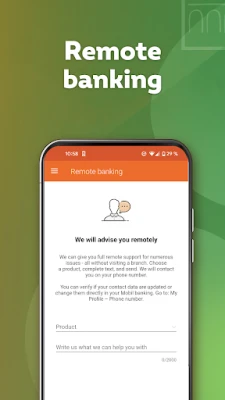
Mobile banking offers a range of functionalities that cater to the needs of modern users. Here are some of the standout features:1. Remote Banking Capabilities
With mobile banking, you can easily contact your financial advisor, upload necessary documents, and sign forms remotely. This convenience allows you to manage your banking needs without visiting a branch.2. Secure Online Payments
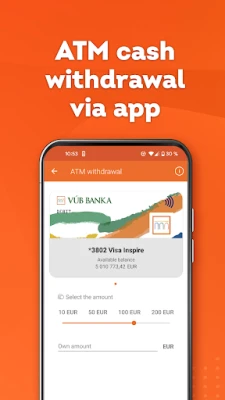
Confirming online card payments has never been easier. Users can authenticate transactions using a Mobile PIN or biometric methods, ensuring a secure payment process.3. ATM Withdrawals via Mobile
Withdraw cash from ATMs using just your mobile phone. This feature eliminates the need for a physical card and PIN, providing a safer way to access your funds.4. Invoice Management
Easily upload invoices in PDF format directly through the mobile app, streamlining your payment processes and keeping your finances organized.5. Authorized Contact Center Calls
Skip the lengthy authorization steps when calling the contact center. By using the app, you can save valuable time and get assistance faster.6. Simplified Payments
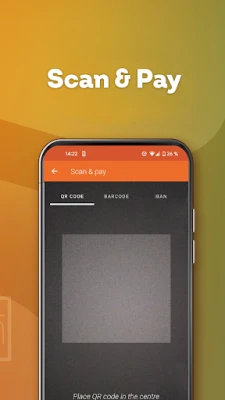
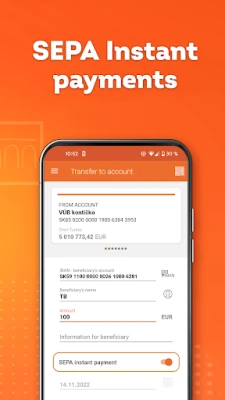
Pay invoices effortlessly with features like postal orders, IBAN, and QR code scanning. This eliminates the hassle of manually entering payment details.7. Biometric Login
Enhance security and convenience with biometric login options, which are utilized by up to 30% of users.8. Mobile Payment Management
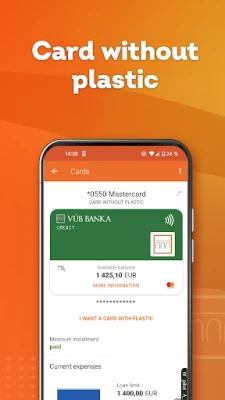
Add and manage your cards directly through the app, making mobile payments a breeze.9. Payment Sharing Made Easy
Quickly share your IBAN or various payments with others using payment links (Payme) or QR codes, simplifying group expenses.10. Instant Balance Checks
Check your account balance without logging in. This feature provides quick access to your financial status.11. Loan Management
Get an overview of your loans and apply for new ones online, making borrowing more accessible.12. Card Management
Easily block or temporarily deactivate your card in case of loss or theft, ensuring your finances remain secure.13. Payment to Phone Numbers
Send money directly to a phone number, making transactions more convenient than ever.Additional Useful Features
Beyond the primary functionalities, mobile banking apps offer several additional features that enhance user experience:1. Quick Access to Features
Customize your app for quick access to your most-used features, streamlining your banking experience.2. Notifications Management
Set up notifications to be sent to your phone, email, or as PUSH messages, keeping you informed about your account activity.3. Standing Orders and Payment Partners
Manage standing orders and payment partners effortlessly, ensuring your bills are paid on time.4. Unlimited Payment Operations
Enjoy the freedom of unlimited payment operations, allowing you to manage your finances without restrictions.5. Interaction with Branch Employees
Easily interact with branch employees for personalized assistance when needed.6. Planned Payments Overview
Organize your payments into pending payments, standing orders, and installments for better financial planning.7. Daily Savings Features
Utilize daily savings options to help you manage your finances more effectively.8. Limit Management
Change your internet limits for both debit and credit cards, as well as ATM withdrawal limits, to suit your spending habits.9. Online Account Opening
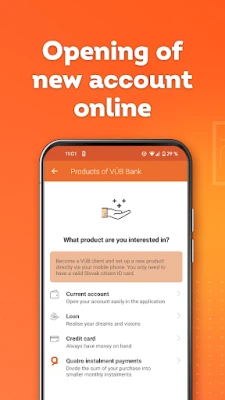
Open savings accounts and purchase travel insurance directly through the app, simplifying your banking needs.10. Comprehensive Product Overview
Access an overview of all banking products with the option to request additional services.11. Currency Converter
Utilize the currency converter and exchange rate features to manage international transactions effectively.12. Branch and ATM Locator
Find nearby branches and ATMs with ease using the integrated map feature.13. Appointment Scheduling
Arrange appointments with your personal bank advisor or banker directly through the app.How to Activate the Mobile Banking App
Activating the mobile banking app is a straightforward process. Follow these steps: 1. Ensure you have the Nonstop banking service enabled. 2. Open the mobile banking app and click on the "Activation" button. 3. Sign in using your ID number and the password for your internet banking account. 4. You will receive an SMS with an activation code. Enter this code into the app. 5. Choose a new 4-digit Mobile PIN. If your device supports it, you can also activate fingerprint scanning or Face ID for added convenience.Cost of Using the Mobile Banking App
The mobile banking app is completely free to use and does not include any paid services. However, fees for operations conducted through mobile banking are subject to the valid price list of VÚB Bank.Need Assistance?
If you do not have the Nonstop banking service or have any questions, feel free to reach out to us: - Call the KONTAKT service at 0850 123 000 within Slovakia or +421 2 4855 59 70 from abroad. - Email us at kontakt@vub.sk. In conclusion, mobile banking is transforming the way we manage our finances, offering a range of features that enhance convenience, security, and efficiency. By understanding how to activate the app and the costs involved, users can fully leverage the benefits of mobile banking.Rate the App
Add Comment & Review
User Reviews
Based on 0 reviews
No reviews added yet.
Comments will not be approved to be posted if they are SPAM, abusive, off-topic, use profanity, contain a personal attack, or promote hate of any kind.















More »

Popular Apps

Nova BrowserJef Studios

Throne WishlistThrone.com

Dark Web Browser : OrNETStronger Apps

LINE: Calls & MessagesLINE (LY Corporation)

XENO; Plan, AutoSave & InvestXENO Investment

Rogue SlimeQuest Seeker Games

Дядя Ваня VPNKONDAKOV

PrivacyWallPrivacyWall

Robinhood WalletRobinhood

Roman empire games - AoD RomeRoboBot Studio
More »
Editor's Choice

Grim Soul: Dark Survival RPGBrickworks Games Ltd

Craft of Survival - Gladiators101XP LIMITED

Last Shelter: SurvivalLong Tech Network Limited

Dawn of Zombies: Survival GameRoyal Ark

Merge Survival : WastelandStickyHands Inc.

AoD Vikings: Valhalla GameRoboBot Studio

Viking Clan: RagnarokKano Games

Vikings: War of ClansPlarium LLC

Asphalt 9: LegendsGameloft SE

Modern Tanks: War Tank GamesXDEVS LTD