

Latest Version
Update
October 08, 2026
October 08, 2026
Developer
Alor Feri Limited
Alor Feri Limited
Categories
Tools
Tools
Platforms
Android
Android
Downloads
0
0
License
Free
Free
Package Name
com.alorferi.ping_ip
com.alorferi.ping_ip
Report
Report a Problem
Report a Problem
More About Ping Tools: Network Utility
Ping Tools - Network Utility is an all-in-one network diagnostics, domain check and WiFi analyzer app for Android. Ping IP addresses and domains, analyze nearby WiFi networks, scan devices on your WiFi or LAN, test internet speed, monitor hosts, check DNS records, trace network routes, scan ports, inspect domain registration details, validate TLS certificates and review saved network history.
PING IP ADDRESS & DOMAIN
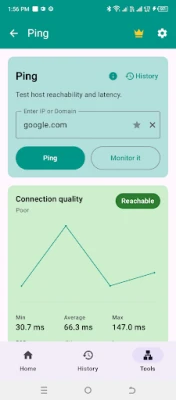
• Ping any IP address or domain
• Measure latency and response time
• View minimum, average and maximum ping
• Check packet loss and connection quality
• Save and review ping history
WIFI ANALYZER
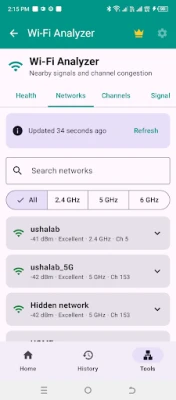
• View nearby WiFi networks
• Check WiFi signal strength in dBm
• Analyze 2.4 GHz, 5 GHz and 6 GHz bands
• View channels and channel overlap
• Detect congestion and compare access points
• Track signal strength
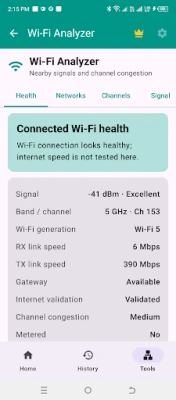
• Check connected WiFi health
• View WiFi generation and link information
ROUTER PLACEMENT & SIGNAL TEST
• Track signal strength while moving around
• Take signal samples
• Compare WiFi signal quality
• Use router placement mode
NETWORK SCANNER & WIFI DEVICE SCANNER
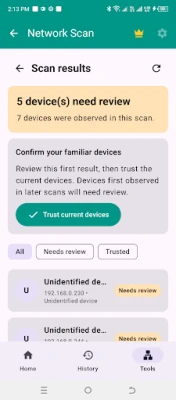
• Find devices connected to your WiFi or LAN
• View detected IP addresses
• Identify known and unknown devices
• Mark familiar devices as trusted
• Save and review scan history
NETWORK CHECKUP
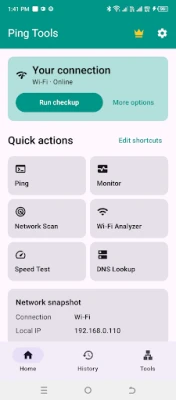
Run a quick checkup for latency, WiFi, DNS and connection problems.
INTERNET SPEED TEST
• Test connection performance and latency
• Troubleshoot slow internet
• Save speed test history
HOST MONITOR
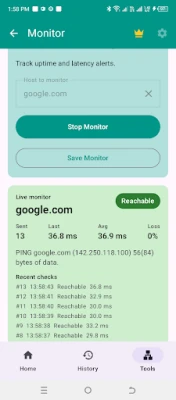
• Monitor websites, servers, IP addresses or domains
• Track availability and latency
• View recent checks and reachable status
• Save monitors and history
DNS LOOKUP
Look up DNS information for a domain and troubleshoot name resolution problems.
DOMAIN CHECK
• Check whether a domain is registered
• View expiry date and time remaining
• View created and last updated dates
• View registrar information
• Save domain results to history
TLS CERTIFICATE CHECK
• Check certificate validity
• Verify trust and hostname match
• Review certificate details
• Check host and port
• Save TLS results to history
TRACEROUTE
Trace the route between your Android device and a website, domain or server.
PORT SCANNER
Check TCP ports on a host or device and find which ports are reachable.
NETWORK SNAPSHOT
Quickly view local IP and important current network details.
WATCHLIST & WISHLIST
• Add domains to a Watchlist for expiry and renewal tracking
• Review days remaining for watched domains
• Refresh saved domain details
• Add domains to a Wishlist for availability tracking
• Recheck wishlist domains later
• Use reminders or alerts where supported
HISTORY
Review saved results, including:
• Ping
• Monitor
• Network scan
• Speed test
• DNS lookup
• Domain check
• TLS certificate check
Ping Tools is useful for checking WiFi signal strength, finding devices connected to WiFi, testing ping and packet loss, diagnosing slow internet, checking server availability, monitoring hosts, testing internet speed, finding congested WiFi channels, troubleshooting DNS problems, checking domain registration details and validating TLS certificates.
Ping Tools combines a WiFi analyzer, network scanner, ping tool, speed test, host monitor, DNS lookup, traceroute, port scanner, domain checker and TLS certificate checker in one lightweight Android network utility app.
• Ping any IP address or domain
• Measure latency and response time
• View minimum, average and maximum ping
• Check packet loss and connection quality
• Save and review ping history
WIFI ANALYZER
• View nearby WiFi networks
• Check WiFi signal strength in dBm
• Analyze 2.4 GHz, 5 GHz and 6 GHz bands
• View channels and channel overlap
• Detect congestion and compare access points
• Track signal strength
• Check connected WiFi health
• View WiFi generation and link information
ROUTER PLACEMENT & SIGNAL TEST
• Track signal strength while moving around
• Take signal samples
• Compare WiFi signal quality
• Use router placement mode
NETWORK SCANNER & WIFI DEVICE SCANNER
• Find devices connected to your WiFi or LAN
• View detected IP addresses
• Identify known and unknown devices
• Mark familiar devices as trusted
• Save and review scan history
NETWORK CHECKUP
Run a quick checkup for latency, WiFi, DNS and connection problems.
INTERNET SPEED TEST
• Test connection performance and latency
• Troubleshoot slow internet
• Save speed test history
HOST MONITOR
• Monitor websites, servers, IP addresses or domains
• Track availability and latency
• View recent checks and reachable status
• Save monitors and history
DNS LOOKUP
Look up DNS information for a domain and troubleshoot name resolution problems.
DOMAIN CHECK
• Check whether a domain is registered
• View expiry date and time remaining
• View created and last updated dates
• View registrar information
• Save domain results to history
TLS CERTIFICATE CHECK
• Check certificate validity
• Verify trust and hostname match
• Review certificate details
• Check host and port
• Save TLS results to history
TRACEROUTE
Trace the route between your Android device and a website, domain or server.
PORT SCANNER
Check TCP ports on a host or device and find which ports are reachable.
NETWORK SNAPSHOT
Quickly view local IP and important current network details.
WATCHLIST & WISHLIST
• Add domains to a Watchlist for expiry and renewal tracking
• Review days remaining for watched domains
• Refresh saved domain details
• Add domains to a Wishlist for availability tracking
• Recheck wishlist domains later
• Use reminders or alerts where supported
HISTORY
Review saved results, including:
• Ping
• Monitor
• Network scan
• Speed test
• DNS lookup
• Domain check
• TLS certificate check
Ping Tools is useful for checking WiFi signal strength, finding devices connected to WiFi, testing ping and packet loss, diagnosing slow internet, checking server availability, monitoring hosts, testing internet speed, finding congested WiFi channels, troubleshooting DNS problems, checking domain registration details and validating TLS certificates.
Ping Tools combines a WiFi analyzer, network scanner, ping tool, speed test, host monitor, DNS lookup, traceroute, port scanner, domain checker and TLS certificate checker in one lightweight Android network utility app.
Rate the App
Add Comment & Review
User Reviews
Based on 0 reviews
No reviews added yet.
Comments will not be approved to be posted if they are SPAM, abusive, off-topic, use profanity, contain a personal attack, or promote hate of any kind.















More »

Popular Apps

Nova BrowserJef Studios

Throne WishlistThrone.com

Dark Web Browser : OrNETStronger Apps

LINE: Calls & MessagesLINE (LY Corporation)

XENO; Plan, AutoSave & InvestXENO Investment

Rogue SlimeQuest Seeker Games

Дядя Ваня VPNKONDAKOV

PrivacyWallPrivacyWall

Robinhood WalletRobinhood

Roman empire games - AoD RomeRoboBot Studio
More »
Editor's Choice

Grim Soul: Dark Survival RPGBrickworks Games Ltd

Craft of Survival - Gladiators101XP LIMITED

Last Shelter: SurvivalLong Tech Network Limited

Dawn of Zombies: Survival GameRoyal Ark

Merge Survival : WastelandStickyHands Inc.

AoD Vikings: Valhalla GameRoboBot Studio

Viking Clan: RagnarokKano Games

Vikings: War of ClansPlarium LLC

Asphalt 9: LegendsGameloft SE

Modern Tanks: War Tank GamesXDEVS LTD