

Latest Version
Update
October 06, 2026
October 06, 2026
Developer
Trostun Apps
Trostun Apps
Categories
Tools
Tools
Platforms
Android
Android
Downloads
0
0
License
Free
Free
Package Name
com.zip.unzip.zipfilemanager
com.zip.unzip.zipfilemanager
Report
Report a Problem
Report a Problem
More About Zip Extractor - RAR & 7Zip App
ZIP UNZIP APP – ZIP FILE OPENER & FILE EXPLORER
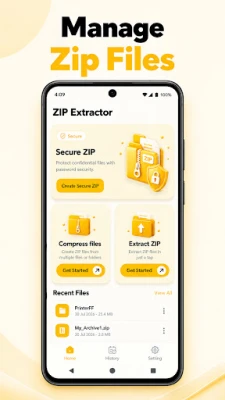
Manage your compressed files with ease using this powerful and simple zip app. Whether you need to zip, unzip, extract, open, or organize files, this app provides convenient tools for managing archives directly from your Android device. It works as a practical file explorer and archive manager for your everyday file management needs.
ZIP & UNZIP FILES EASILY
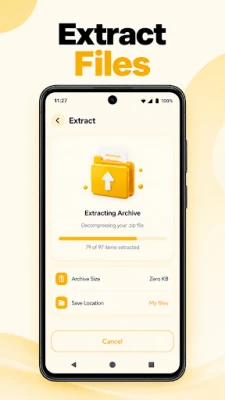
Need to open or extract a zip file? Use the built-in zip extractor to access the contents of compressed archives quickly. You can unzip supported files and view the extracted content directly on your device.
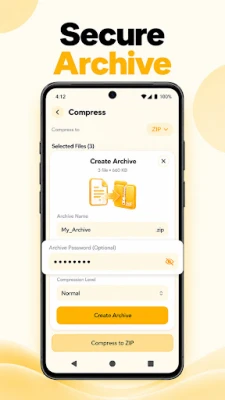
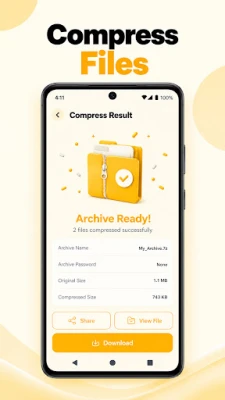
The app also makes it easy to create ZIP archives when you want to combine multiple files into one compressed zip file. This can help keep your files organized and make sharing multiple documents, photos, videos, and other files more convenient.
7 ZIP & RAR FILE MANAGER
This app is designed to help you manage popular archive formats from one place. If you regularly work with 7 zip or RAR files, you can use the available archive tools to access and manage supported compressed content.
The rar extractor lets you extract supported RAR archives, while the rar opener helps you access files stored inside supported RAR packages. You can also use the unrar functionality to extract compatible RAR files and access their contents without complicated steps.
ZIP FILE OPENER
Looking for a simple zip file opener? Find your archive through the built-in file browser and open it to view its contents. Extract the files you need and manage them directly from your device.
Whether you downloaded a ZIP archive, received a compressed file through a messaging app, or already have archives stored on your phone, this zip app makes accessing your files simple and convenient.
BUILT-IN FILE EXPLORER
The integrated file explorer helps you browse folders and locate files quickly. Navigate through your device storage, find compressed archives, and manage extracted files from one convenient interface.
You can browse documents, images, videos, downloads, and other folders while keeping your file management workflow simple. The app brings archive extraction and everyday file browsing together in one place.
SIMPLE UNARCHIVER & FILE UNZIP TOOL
Use the built-in unarchiver to access supported compressed files whenever you need them. The file unzip feature lets you extract archive contents and access individual files without unnecessary steps.
With a straightforward interface and useful archive management tools, you can handle your compressed files whether you are working with documents, photos, videos, or other file types.
KEY FEATURES OF UNZIPPER
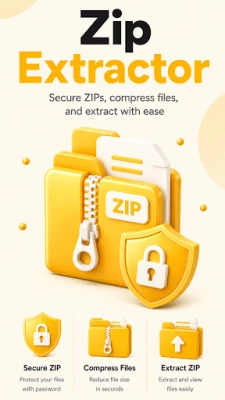
• Zip and unzip supported archive files
• Extract files with a convenient zip extractor
• Open supported ZIP archives with a zip file opener
• Extract supported RAR files with a rar extractor
• Open supported RAR archives with a rar opener
• Browse device storage with a file explorer
• Manage archives with an easy-to-use unarchiver
• Use file unzip tools to access compressed content
• Work with supported 7 zip and RAR archives
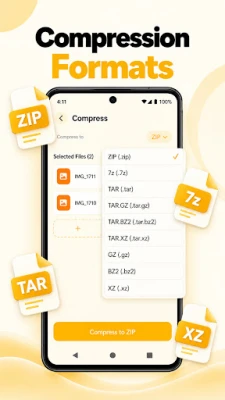
• Create and manage ZIP files in one convenient app
Make file management easier with a reliable zip app for opening, extracting, and organizing supported archive files.
Download the ZIP Unzip App and manage your ZIP and RAR files from one simple place.
ZIP & UNZIP FILES EASILY
Need to open or extract a zip file? Use the built-in zip extractor to access the contents of compressed archives quickly. You can unzip supported files and view the extracted content directly on your device.
The app also makes it easy to create ZIP archives when you want to combine multiple files into one compressed zip file. This can help keep your files organized and make sharing multiple documents, photos, videos, and other files more convenient.
7 ZIP & RAR FILE MANAGER
This app is designed to help you manage popular archive formats from one place. If you regularly work with 7 zip or RAR files, you can use the available archive tools to access and manage supported compressed content.
The rar extractor lets you extract supported RAR archives, while the rar opener helps you access files stored inside supported RAR packages. You can also use the unrar functionality to extract compatible RAR files and access their contents without complicated steps.
ZIP FILE OPENER
Looking for a simple zip file opener? Find your archive through the built-in file browser and open it to view its contents. Extract the files you need and manage them directly from your device.
Whether you downloaded a ZIP archive, received a compressed file through a messaging app, or already have archives stored on your phone, this zip app makes accessing your files simple and convenient.
BUILT-IN FILE EXPLORER
The integrated file explorer helps you browse folders and locate files quickly. Navigate through your device storage, find compressed archives, and manage extracted files from one convenient interface.
You can browse documents, images, videos, downloads, and other folders while keeping your file management workflow simple. The app brings archive extraction and everyday file browsing together in one place.
SIMPLE UNARCHIVER & FILE UNZIP TOOL
Use the built-in unarchiver to access supported compressed files whenever you need them. The file unzip feature lets you extract archive contents and access individual files without unnecessary steps.
With a straightforward interface and useful archive management tools, you can handle your compressed files whether you are working with documents, photos, videos, or other file types.
KEY FEATURES OF UNZIPPER
• Zip and unzip supported archive files
• Extract files with a convenient zip extractor
• Open supported ZIP archives with a zip file opener
• Extract supported RAR files with a rar extractor
• Open supported RAR archives with a rar opener
• Browse device storage with a file explorer
• Manage archives with an easy-to-use unarchiver
• Use file unzip tools to access compressed content
• Work with supported 7 zip and RAR archives
• Create and manage ZIP files in one convenient app
Make file management easier with a reliable zip app for opening, extracting, and organizing supported archive files.
Download the ZIP Unzip App and manage your ZIP and RAR files from one simple place.
Rate the App
Add Comment & Review
User Reviews
Based on 0 reviews
No reviews added yet.
Comments will not be approved to be posted if they are SPAM, abusive, off-topic, use profanity, contain a personal attack, or promote hate of any kind.














More »

Popular Apps

Nova BrowserJef Studios

Throne WishlistThrone.com

Dark Web Browser : OrNETStronger Apps

LINE: Calls & MessagesLINE (LY Corporation)

XENO; Plan, AutoSave & InvestXENO Investment

Rogue SlimeQuest Seeker Games

Дядя Ваня VPNKONDAKOV

PrivacyWallPrivacyWall

Roman empire games - AoD RomeRoboBot Studio

Robinhood WalletRobinhood
More »
Editor's Choice

Grim Soul: Dark Survival RPGBrickworks Games Ltd

Craft of Survival - Gladiators101XP LIMITED

Last Shelter: SurvivalLong Tech Network Limited

Dawn of Zombies: Survival GameRoyal Ark

Merge Survival : WastelandStickyHands Inc.

AoD Vikings: Valhalla GameRoboBot Studio

Viking Clan: RagnarokKano Games

Vikings: War of ClansPlarium LLC

Asphalt 9: LegendsGameloft SE

Modern Tanks: War Tank GamesXDEVS LTD