
Latest Version
Update
September 18, 2026
September 18, 2026
Developer
Vaunou Apps
Vaunou Apps
Categories
Tools
Tools
Platforms
Android
Android
Downloads
0
0
License
Free
Free
Package Name
smart.ai.zip.rar.extractor
smart.ai.zip.rar.extractor
Report
Report a Problem
Report a Problem
More About ZIP RAR Extractor & Archiver
ZIP, RAR and 7Z archiver and extractor for Android. Open archives, preview files without fully extracting them, extract only what you need, and create password-protected archives.
Everything works directly on your device. Your files are never uploaded to the cloud. Internet access is only needed for ads.
━━━ ARCHIVE EXTRACTION ━━━
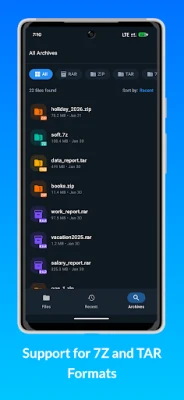
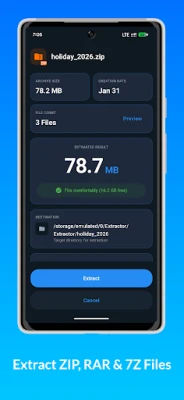
• Open ZIP, RAR, 7Z, TAR, GZ, BZ2, XZ and TAR.GZ archives
• Support for split and multipart archives: part1.rar, .z01, .7z.001 and more
• Open the first part and the app finds the remaining parts automatically
• Extract only the files you need
• Preview photos, PDF and text files directly inside archives
• Support for password-protected archives
• Save archive passwords so you do not have to enter them again
• Choose where to extract your files
━━━ CREATE ARCHIVES ━━━
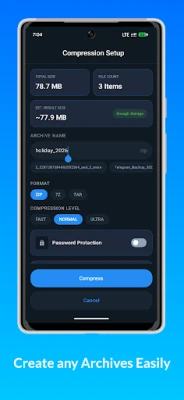
• Create ZIP, 7Z and TAR archives
• Protect archives with a password
• AES-256 encryption for supported archives
• Split ZIP archives into 10, 50, 100 or 500 MB parts
• Choose from fast, normal and maximum compression
• Prepare large files for sharing by email or messenger apps
━━━ PREVIEW WITHOUT EXTRACTION ━━━
You do not need to extract an entire archive to find a file.
• Browse archive contents before extracting
• Open individual files directly from an archive
• Extract only selected files
• Save time and storage space
━━━ STORAGE CLEANER ━━━
• Find duplicate files on your device
• See how much storage you can free up
• Delete only the copies you select
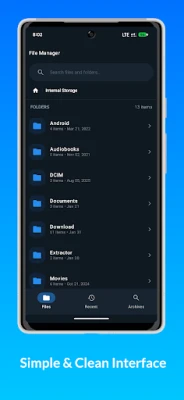
━━━ FILE MANAGER ━━━
• Copy and move files
• Rename and delete files
• Search your device
• Browse all archives in one place
• Share files through messenger apps and email
━━━ BACKGROUND PROCESSING ━━━
Extraction and archive creation can continue after you minimize the app.
• See progress in notifications
• Cancel an operation directly from the notification
• Convenient for large archives
━━━ OPEN ARCHIVES FROM OTHER APPS ━━━
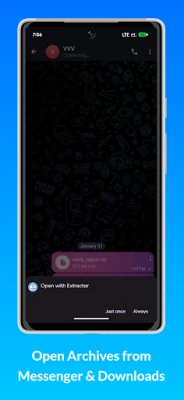
Open ZIP and RAR files directly from your browser, downloads, email, messenger apps and file managers.
━━━ WHY USE THIS ARCHIVER? ━━━
• ZIP, RAR and 7Z in one app
• Preview files without full extraction
• Extract only selected files
• Support for multipart archives
• Password protection and encryption
• Split archives into multiple parts
• Large file support
• Background extraction
• Duplicate file finder
• Dark theme
• Simple interface
• Works offline
Open, extract, create and share archives directly from your Android device.
Your files stay on your device.
━━━ ARCHIVE EXTRACTION ━━━
• Open ZIP, RAR, 7Z, TAR, GZ, BZ2, XZ and TAR.GZ archives
• Support for split and multipart archives: part1.rar, .z01, .7z.001 and more
• Open the first part and the app finds the remaining parts automatically
• Extract only the files you need
• Preview photos, PDF and text files directly inside archives
• Support for password-protected archives
• Save archive passwords so you do not have to enter them again
• Choose where to extract your files
━━━ CREATE ARCHIVES ━━━
• Create ZIP, 7Z and TAR archives
• Protect archives with a password
• AES-256 encryption for supported archives
• Split ZIP archives into 10, 50, 100 or 500 MB parts
• Choose from fast, normal and maximum compression
• Prepare large files for sharing by email or messenger apps
━━━ PREVIEW WITHOUT EXTRACTION ━━━
You do not need to extract an entire archive to find a file.
• Browse archive contents before extracting
• Open individual files directly from an archive
• Extract only selected files
• Save time and storage space
━━━ STORAGE CLEANER ━━━
• Find duplicate files on your device
• See how much storage you can free up
• Delete only the copies you select
━━━ FILE MANAGER ━━━
• Copy and move files
• Rename and delete files
• Search your device
• Browse all archives in one place
• Share files through messenger apps and email
━━━ BACKGROUND PROCESSING ━━━
Extraction and archive creation can continue after you minimize the app.
• See progress in notifications
• Cancel an operation directly from the notification
• Convenient for large archives
━━━ OPEN ARCHIVES FROM OTHER APPS ━━━
Open ZIP and RAR files directly from your browser, downloads, email, messenger apps and file managers.
━━━ WHY USE THIS ARCHIVER? ━━━
• ZIP, RAR and 7Z in one app
• Preview files without full extraction
• Extract only selected files
• Support for multipart archives
• Password protection and encryption
• Split archives into multiple parts
• Large file support
• Background extraction
• Duplicate file finder
• Dark theme
• Simple interface
• Works offline
Open, extract, create and share archives directly from your Android device.
Your files stay on your device.
Rate the App
Add Comment & Review
User Reviews
Based on 0 reviews
No reviews added yet.
Comments will not be approved to be posted if they are SPAM, abusive, off-topic, use profanity, contain a personal attack, or promote hate of any kind.














More »

Popular Apps

Nova BrowserJef Studios

Throne WishlistThrone.com

Dark Web Browser : OrNETStronger Apps

LINE: Calls & MessagesLINE (LY Corporation)

XENO; Plan, AutoSave & InvestXENO Investment

Rogue SlimeQuest Seeker Games

Дядя Ваня VPNKONDAKOV

PrivacyWallPrivacyWall

Roman empire games - AoD RomeRoboBot Studio

Robinhood WalletRobinhood
More »
Editor's Choice

Grim Soul: Dark Survival RPGBrickworks Games Ltd

Craft of Survival - Gladiators101XP LIMITED

Last Shelter: SurvivalLong Tech Network Limited

Dawn of Zombies: Survival GameRoyal Ark

Merge Survival : WastelandStickyHands Inc.

AoD Vikings: Valhalla GameRoboBot Studio

Viking Clan: RagnarokKano Games

Vikings: War of ClansPlarium LLC

Asphalt 9: LegendsGameloft SE

Modern Tanks: War Tank GamesXDEVS LTD