

Latest Version
6.0.5
July 08, 2026
OmniDev Creators
Education
Android
0
Free
com.ecoFree.education.your_vocabulary_notebook
Report a Problem
More About Your Vocabulary Notebook
Unlock the Power of Your Vocabulary Notebook: A Comprehensive Guide
In today's fast-paced world, expanding your vocabulary is more important than ever. Whether you're a student, a professional, or simply a language enthusiast, having a reliable tool to enhance your word knowledge can make a significant difference. Enter the Vocabulary Notebook—your ultimate companion for mastering new words and phrases. This article explores the myriad benefits of using a vocabulary notebook and provides practical tips on how to maximize its potential.
Create and Update Your Personalized Dictionaries
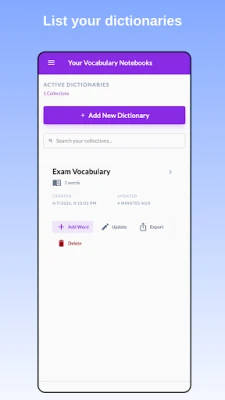
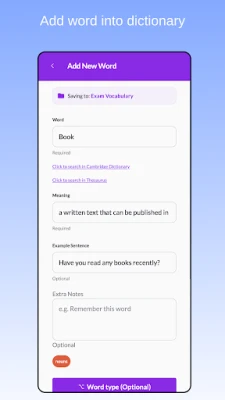
One of the standout features of a vocabulary notebook is the ability to create and maintain your own dictionaries. This app allows you to curate a collection of words that resonate with you. Whenever you come across a new term—be it in a book, article, or conversation—you can easily add it to your personalized dictionary. Regularly updating your vocabulary notebook ensures that you are always learning and retaining new words.
Gradually Build Your Vocabulary
If you're starting your vocabulary journey from scratch, a vocabulary notebook is an invaluable resource. It enables you to build your vocabulary incrementally, focusing on one word at a time. This methodical approach not only makes learning manageable but also reinforces retention, allowing you to incorporate new words into your everyday language.
Access Predefined Word Lists
Feeling overwhelmed by the vast number of words out there? No worries! The vocabulary notebook offers predefined word lists that cater to various themes and levels of difficulty. These curated lists provide a fantastic starting point, allowing you to effortlessly add relevant words to your dictionary without the guesswork.
Engage with Fun Quizzes and Games
Learning doesn't have to be a tedious task. With the vocabulary notebook, you can transform your study sessions into enjoyable experiences. Create quizzes and word games that challenge your knowledge and reinforce what you've learned. This interactive approach not only makes learning fun but also enhances your ability to recall words when you need them.
Organize Your Words Effectively
Searching for a specific word in a cluttered list can be frustrating. Fortunately, the vocabulary notebook allows you to organize your words systematically. Utilize the sorting feature to arrange your entries alphabetically or by the date they were added. This organization makes it easy to locate words quickly, saving you time and effort.
Tag Your Words for Easy Reference
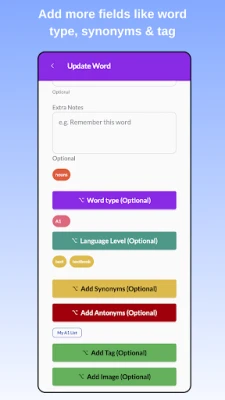
Categorizing your words can significantly enhance your learning experience. The vocabulary notebook enables you to add tags to your entries, acting as labels that group words by themes or meanings. For instance, if you're focusing on vocabulary related to travel, you can tag those words accordingly. This feature simplifies the process of reviewing and studying specific categories, making your learning more efficient.
How to Use Your Vocabulary Notebook Effectively
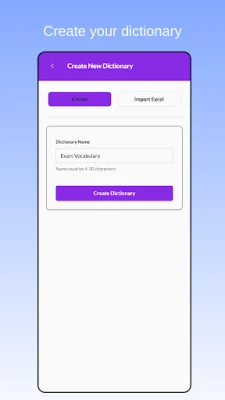
Creating Your Dictionary
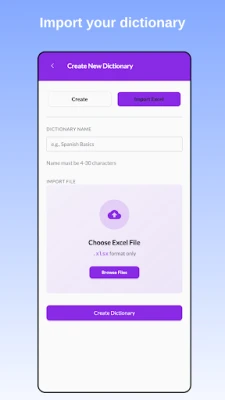
Upon launching the app, the first step is to create your dictionary. Choose a name that resonates with you, and your personalized vocabulary space is ready for action. This initial setup is quick and straightforward, allowing you to dive into your vocabulary-building journey without delay.
Utilizing Predefined Word Lists
If you're unsure about which words to include, take advantage of the predefined word lists available in the app. Simply browse through the options, select a list that piques your interest, and watch as the words are automatically added to your dictionary. This feature is particularly useful for beginners looking to expand their vocabulary efficiently.
Testing Your Knowledge with Quizzes and Games
To reinforce your learning, regularly create quizzes or word games. These activities not only test your knowledge but also make the process enjoyable. Challenge yourself to beat your previous scores or compete with friends to see who can master the most words. This gamified approach to learning can significantly boost your motivation and retention.
Sorting Your Words for Clarity
Maintaining an organized dictionary is crucial for effective learning. Use the sorting feature to keep your entries in order. Whether you prefer an alphabetical arrangement or want to see the most recently added words first, this functionality helps you navigate your vocabulary notebook with ease.
Adding Tags for Thematic Learning
When you want to focus on specific themes or categories, tagging your words is the way to go. For example, if you're learning vocabulary related to technology, you can tag those words as "Technology." This method allows for quick access to related terms, making your study sessions more targeted and efficient.
Conclusion: Elevate Your Language Skills with a Vocabulary Notebook
Incorporating a vocabulary notebook into your language learning routine can significantly enhance your word knowledge and retention. By creating personalized dictionaries, utilizing predefined word lists, engaging in quizzes and games, and organizing your entries effectively, you can transform your vocabulary-building experience. Start your journey today and unlock the full potential of your vocabulary notebook—your gateway to mastering language like never before!
Rate the App
User Reviews














Popular Apps










Editor's Choice









