

Latest Version
April 25, 2026
Douglas Silva :: Dect
Games
Android
0
$0.99
dev.dect.wear.word
Report a Problem
More About Word - Daily word game
Ultimate Guide to the Guessing Word Game for Smartphones and Smartwatches
Discover the exciting world of the guessing word game designed for smartphones and smartwatches equipped with Wear OS. This engaging game supports multiple languages, including English, Portuguese, Spanish, Italian, and French, making it a versatile choice for players around the globe. Dive into the features, instructions, and compatibility details to enhance your gaming experience.
Key Features of the Guessing Word Game
The guessing word game offers a variety of features that cater to both casual and dedicated players. Here’s what you can expect:
- Guess the Word: Challenge yourself to identify the correct word based on the provided clues.
- Language Options: Switch between different languages to keep the game fresh and exciting.
- Statistics Tracking: Monitor your performance and improve your skills over time.
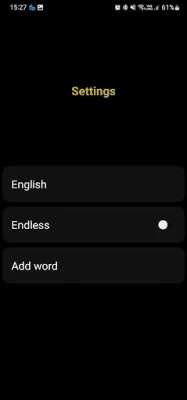
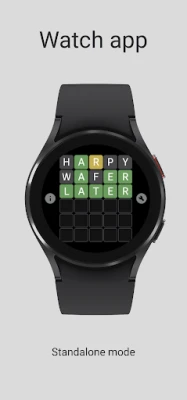
- Endless Mode: Enjoy an infinite gaming experience with the watch app.
- Add Your Own Words: Personalize the game by adding custom words to the database.
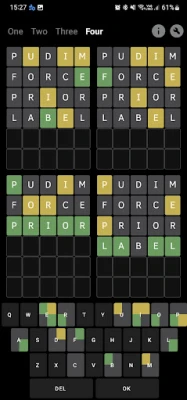
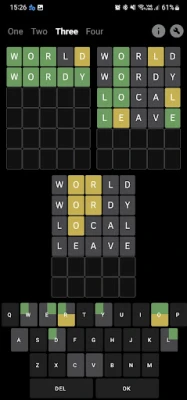
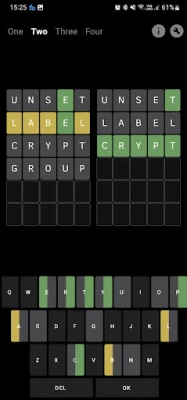
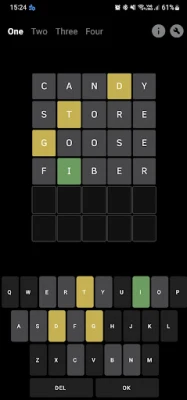
- Multiple Game Modes: Available exclusively on the phone app, choose from modes "One," "Two," "Three," and "Four" for varied gameplay.
Important Warnings and Alerts
Before diving into the game, it’s essential to be aware of certain compatibility and functionality aspects:
- Wear OS Compatibility: Ensure your device is compatible with Wear OS before making a purchase.
- Word Availability: The game features a total of 1,636 words for each supported language.
- Language Settings: Language changes can only be made before starting a game. Once a game begins, the language setting is locked in.
- Device Data Separation: Note that the phone app and watch app do not share data. Each device has its own unique word set and settings.
- Third-Party Word Library: The game utilizes a third-party library for its word database. If you encounter any offensive or missing words, please report them to the developer for future updates.
- Interface Language: While you can change the word dataset language, the game interface will always be in English.
- Endless Mode Availability: This mode is exclusively available on the watch app.
How to Play: Instructions and Gameplay Mechanics
Understanding the gameplay mechanics is crucial for mastering the guessing word game. Here’s how to play:
Color-Coded Feedback
As you guess letters, the game provides feedback through a color-coded system:
- Green: Indicates a correct letter in the correct position.
- Yellow: Signifies a correct letter but in the wrong position.
- Gray: Represents an incorrect letter that is not part of the word.
Watch Instructions
For players using the smartwatch, follow these simple steps:
- Click on the game board to reveal the keyboard.
- Start guessing letters based on the feedback provided.
- Utilize the color-coded hints to refine your guesses.
Tested Devices for Optimal Performance
To ensure a seamless gaming experience, the guessing word game has been tested on various devices. Here are some of the compatible models:
- Samsung Galaxy S10
- Samsung Galaxy Note 20 Ultra
- Galaxy Watch 5
Conclusion: Elevate Your Gaming Experience
The guessing word game for smartphones and smartwatches is an engaging way to challenge your vocabulary and language skills. With its multi-language support, various game modes, and user-friendly interface, it promises hours of entertainment. Remember to check compatibility with your device and enjoy the endless fun this game has to offer!
Rate the App
User Reviews











Popular Apps










Editor's Choice









