
Latest Version
May 19, 2026
Konstantin Kolesnik
Tools
Android
0
Free
com.gothicmaestro.withrottlecab
Report a Problem
More About WiThrottle Cab
Revolutionize Your Model Train Experience with WiThrottle Cab
Imagine effortlessly managing your model trains as you navigate your layout, free from the constraints of wired connections. With WiThrottle Cab, this vision becomes a reality. This innovative tool leverages a wireless network connection, allowing you to control your trains, signals, turnouts, and various accessories seamlessly.
What is WiThrottle Cab?
WiThrottle Cab is a cutting-edge application designed for model train enthusiasts who seek flexibility and convenience. By connecting to WiThrottle command stations via a wireless network, users can operate their trains without the hassle of plugging and unplugging devices. This feature enhances the overall experience, making it more enjoyable and efficient.
Benefits of Using WiThrottle Cab
Utilizing WiThrottle Cab offers numerous advantages for model train operators:
- Wireless Freedom: Move around your layout without being tethered to a wired device.
- Enhanced Control: Manage multiple trains and accessories simultaneously with ease.
- Real-Time Feedback: Receive instant updates on train status and performance.
- User-Friendly Interface: Navigate the app effortlessly, even for beginners.
How to Set Up WiThrottle Cab
Setting up WiThrottle Cab is straightforward. Follow these steps to get started:
- Ensure Compatibility: Verify that your command station supports WiThrottle.
- Connect to Wi-Fi: Make sure your command station is connected to a wireless network.
- Download the App: Install the WiThrottle Cab app on your mobile device.
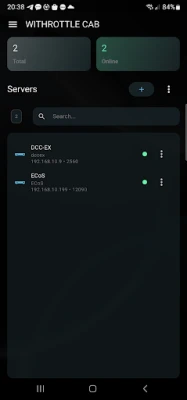
- Configure Settings: Open the app and input the necessary settings to connect to your command station.
- Start Operating: Once connected, you can begin controlling your trains and accessories.
Features of WiThrottle Cab
WiThrottle Cab is packed with features that enhance your model train operations:
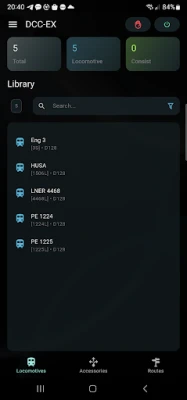
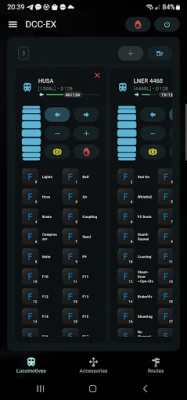
- Train Control: Easily start, stop, and adjust the speed of your trains.
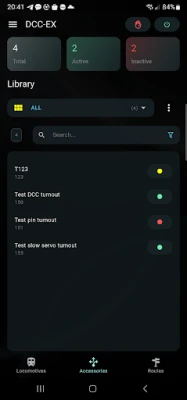
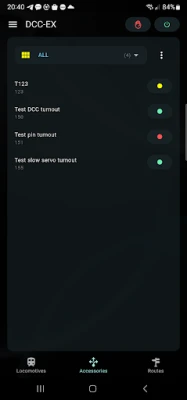
- Accessory Management: Control signals, turnouts, and other accessories directly from your device.
- Customizable Layouts: Personalize your control interface to suit your preferences.
- Multi-Train Operation: Manage multiple trains on different tracks simultaneously.
Tips for Optimizing Your WiThrottle Cab Experience
To maximize the benefits of WiThrottle Cab, consider the following tips:
- Maintain a Strong Wi-Fi Signal: Ensure your wireless network has a strong signal throughout your layout area.
- Regular Updates: Keep the app updated to access the latest features and improvements.
- Explore Custom Settings: Take time to customize your interface for a more personalized experience.
- Practice Makes Perfect: Spend time familiarizing yourself with the app to enhance your operational skills.
Conclusion
WiThrottle Cab transforms the way you interact with your model trains, offering unparalleled freedom and control. By utilizing a wireless network connection, you can manage your entire layout without the limitations of wired devices. Whether you are a seasoned model train enthusiast or just starting, WiThrottle Cab provides the tools you need to elevate your hobby to new heights. Embrace the future of model train operation and experience the convenience of WiThrottle Cab today!
Rate the App
User Reviews















Popular Apps










Editor's Choice









