

Latest Version
2.9.1
October 23, 2024
Ubiquiti Inc.
Tools
Android
0
Free
com.ubnt.usurvey
Report a Problem
More About WiFiman
Unlocking the Power of WiFiman: Your Ultimate Network Management Tool
In today's digital age, managing your network efficiently is crucial for both personal and professional use. WiFiman emerges as a powerful tool that not only detects available WiFi networks but also provides a comprehensive suite of features to enhance your network experience. This article delves into the capabilities of WiFiman, highlighting its essential functions and how it can optimize your network performance.
Instant Detection of WiFi Networks and Bluetooth LE Devices
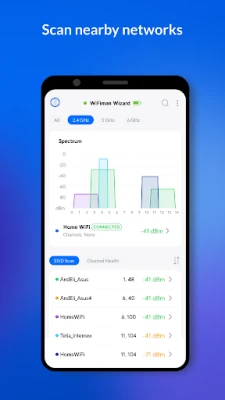
WiFiman allows users to instantly detect available WiFi networks and Bluetooth Low Energy (LE) devices in their vicinity. This feature is particularly useful for identifying the best networks to connect to, ensuring a seamless online experience. With just a few taps, you can view all nearby networks, making it easier to choose the most reliable connection.
Comprehensive Network Scanning for Enhanced Insights
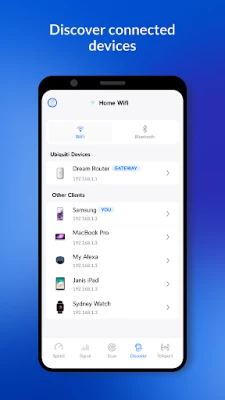
One of the standout features of WiFiman is its ability to scan network subnets for additional details on detected devices. This includes support for various protocols such as Bonjour, SNMP, NetBIOS, and Ubiquiti discovery protocols. By utilizing these protocols, WiFiman provides a deeper understanding of the devices connected to your network, allowing for better management and troubleshooting.
Remote Access to Your UniFi Network via Teleport
With WiFiman, you can connect to your UniFi network remotely using Teleport, a free and zero-configuration VPN. This feature is invaluable for users who need to access their network while away from home or the office. Teleport ensures a secure connection, allowing you to manage your network effortlessly from anywhere.
Speed Tests and Performance Comparisons
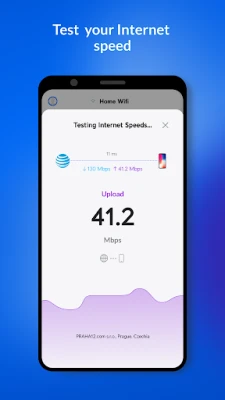
Conducting download and upload speed tests is a breeze with WiFiman. The app not only allows you to test your connection speed but also stores the results for future reference. You can compare network performance over time and share insights with others, making it easier to identify trends and potential issues.
Optimize Signal Strength by Relocating Access Points
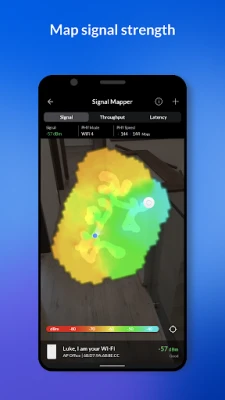
WiFiman provides users with the ability to relocate their access points (APs) to nearby data channels. This simple adjustment can significantly increase signal strength and reduce traffic volume, leading to a more stable and faster internet connection. By optimizing your network layout, you can enhance the overall user experience for everyone connected.
Testing Connection Speeds Between Devices
Another valuable feature of WiFiman is its capability to test the connection speed between your UniFi Dream Machine or UDM Pro and mobile devices. This functionality helps you identify any bottlenecks in your network, ensuring that all devices operate at peak performance.
Detailed Insights into Ubiquiti Devices
WiFiman offers enhanced details about all Ubiquiti devices on your network, including UniFi, AmpliFi, AirMAX, EdgeMAX, EdgeRouter, EdgeSwitch, UISP, AirCube, and AirFiber. This comprehensive overview allows users to monitor their devices effectively, ensuring that everything runs smoothly and efficiently.
What Information Does WiFiman Provide?
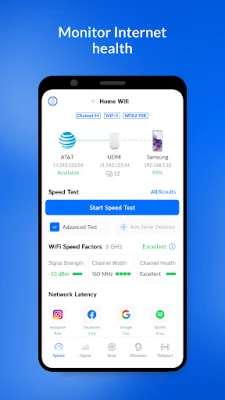
WiFiman displays a wealth of information about your network, including:
- IP address
- Netmask
- Gateway
- DNS server
- SSID
- BSSID
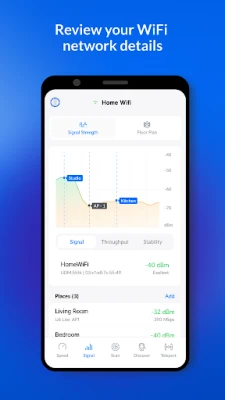
- Signal strength
- Wireless channel
- Ping latency
- Packet loss information
This detailed data empowers users to make informed decisions about their network management and troubleshooting.
WiFiman's Network Tools: A Comprehensive Suite
WiFiman is equipped with a variety of network tools designed to enhance your network management experience:
- Network Analyzer: Supports WiFi 6 and includes a signal strength meter for optimal performance.
- WiFi Speed Testing: Quickly assess your internet speed to ensure you are getting the service you pay for.
- Detailed Network Cell Information: Gain insights into the cellular network performance and connectivity.
- Network Scanner: Discover devices connected to your network effortlessly.
- Port Scanner: Identify open ports on your network for enhanced security and management.
Conclusion: Elevate Your Network Management with WiFiman
WiFiman stands out as an essential tool for anyone looking to optimize their network management. With its robust features, including instant detection of networks, comprehensive scanning capabilities, remote access, and detailed insights into Ubiquiti devices, it empowers users to take control of their network like never before. Whether you're a tech enthusiast or a casual user, WiFiman provides the tools you need to ensure a seamless and efficient online experience.
Rate the App
User Reviews















Popular Apps










Editor's Choice









