

Latest Version
1.0.18
December 01, 2025
BreDev
Tools
Android
0
Free
com.wifi.signal.wifisignaltester
Report a Problem
More About WiFi Signal Strength Meter
Maximize Your Connectivity: The Ultimate Guide to Using the WiFi Signal Meter App
In today's digital age, a strong and reliable WiFi connection is essential for seamless online experiences. Whether you're streaming your favorite shows, working from home, or gaming, the quality of your WiFi signal can significantly impact your activities. The WiFi Signal Meter app is designed to help you identify optimal areas for WiFi connectivity within your network. This article will explore the app's features, benefits, and tips for maximizing your WiFi signal strength.
Understanding WiFi Signal Strength
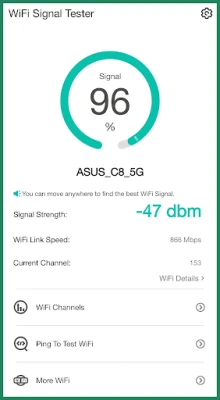
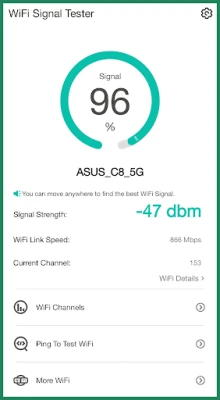
WiFi signal strength is a crucial factor in determining the quality of your internet connection. A signal strength below 50% is considered weak, which can lead to buffering, slow loading times, and dropped connections. Ideally, you should aim for a signal strength above 60% for a stable and fast connection. The WiFi Signal Meter app allows you to monitor and improve your WiFi signal strength effectively.
Key Features of the WiFi Signal Meter App
The WiFi Signal Meter app comes packed with features that make it an invaluable tool for anyone looking to enhance their WiFi experience. Here are some of the standout features:
- WiFi Signal Strength Scanning: The app continuously scans your environment to provide real-time updates on your WiFi signal strength. This feature allows you to identify areas with the best connectivity.
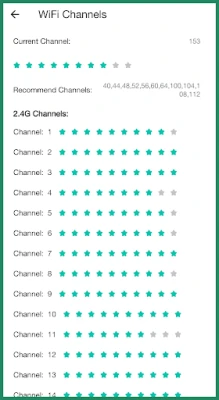
- WiFi Channel Information: Gain insights into the WiFi channels your connected network is using. This information can help you avoid interference from neighboring networks.
- Real-Time Signal Strength Detection: The app detects any changes in your WiFi signal strength in real time, enabling you to make adjustments as needed.
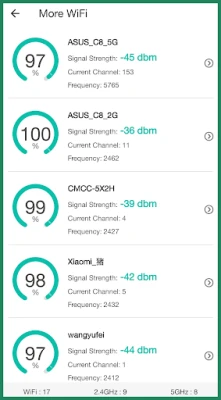
- Discover Nearby WiFi Connections: The app helps you discover additional WiFi networks in your vicinity, giving you more options for connectivity.
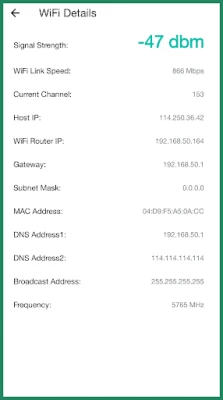
- Comprehensive WiFi Details: Access essential information about your WiFi connection, including your IP address, MAC address, and WiFi link speed.
How to Use the WiFi Signal Meter App Effectively
To make the most of the WiFi Signal Meter app, follow these simple steps:
- Download and Install: Start by downloading the WiFi Signal Meter app from your device's app store. Install it and grant the necessary permissions for optimal functionality.
- Scan Your Environment: Open the app and initiate a scan of your surroundings. Walk around your home or workspace to identify areas with varying signal strengths.
- Identify Sweet Spots: Look for locations where the signal strength exceeds 60%. These areas are your "sweet spots" for optimal connectivity.
- Monitor Changes: Keep the app running as you move around. Pay attention to real-time updates on signal strength and adjust your position accordingly.
- Optimize Your Setup: Once you've identified the best locations, consider rearranging your router or adding WiFi extenders to enhance coverage in weaker areas.
Tips for Improving Your WiFi Signal Strength
In addition to using the WiFi Signal Meter app, consider these tips to further improve your WiFi signal strength:
- Position Your Router Strategically: Place your router in a central location, away from walls and obstructions, to maximize coverage.
- Reduce Interference: Keep your router away from electronic devices that may cause interference, such as microwaves and cordless phones.
- Update Your Router Firmware: Regularly check for firmware updates for your router to ensure optimal performance and security.
- Use a Wired Connection: For devices that require a stable connection, consider using an Ethernet cable instead of relying solely on WiFi.
- Upgrade Your Equipment: If your router is several years old, consider upgrading to a newer model that supports the latest WiFi standards.
Conclusion
The WiFi Signal Meter app is an essential tool for anyone looking to enhance their internet connectivity. By understanding your WiFi signal strength and utilizing the app's features, you can identify optimal areas for connection and make informed decisions to improve your network performance. With a few simple adjustments and the right tools, you can enjoy a faster, more reliable internet experience.
Rate the App
User Reviews















Popular Apps










Editor's Choice









