

Latest Version
July 05, 2026
Mad_Scientist
Tools
Android
0
Free
com.madscientist.huaweiroutermanager
Report a Problem
More About WiFi Manager for Huawei Router
The Ultimate WiFi Management App for Huawei Routers and Beyond
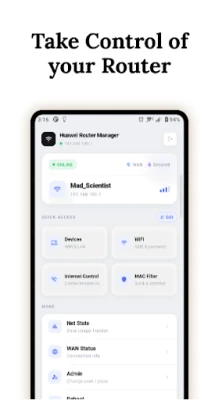
Managing your WiFi network has never been easier. With the most comprehensive WiFi admin app designed for Huawei routers and compatible with various brands, you can effortlessly adjust your WiFi settings, access the router admin page, and perform a complete router setup—all from the convenience of your smartphone. No computer is required!
Key Features of the WiFi Admin App
📶 Real-Time Device Monitoring
Stay informed about every device connected to your network. Whether it’s a smartphone, laptop, smart TV, or any IoT device, you can view essential details such as IP addresses, MAC addresses, signal strength, connection type, and the duration of each device's connection. This feature ensures you have complete visibility over your network.
🌐 Internet Access Control
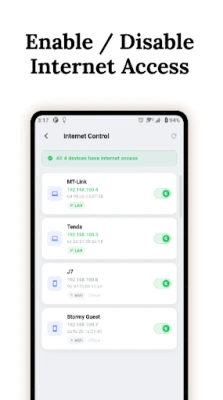
Instantly block internet access for any device on your network. While the device remains connected to WiFi, it will lose internet access. This feature is perfect for managing screen time for children, restricting unknown devices, or simply taking control of your network. You can restore access with just a tap, and the blocks remain effective even after reconnections.
🔒 MAC Address Filtering
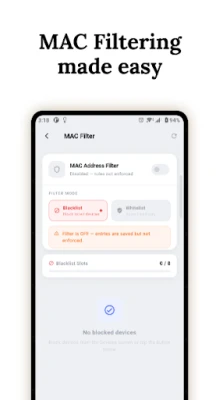
Enhance your network security by blocking specific devices from connecting to your WiFi. You can create a whitelist to allow only approved devices or use a blacklist to deny access to unwanted ones. This dual-mode support gives you flexibility in managing your network's security.
📡 WiFi Settings Management
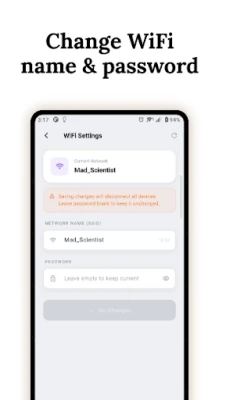
Easily change your WiFi name (SSID) and password directly from the app—no need to navigate through a browser or router admin page. The app supports both 2.4 GHz and 5 GHz bands, allowing you to optimize your network for various devices.
🏠 DHCP Configuration & Static IP Reservation
Access and configure your router's DHCP settings, including IP range, lease time, and subnet. You can reserve static IP addresses for specific devices by their MAC addresses, ensuring that your printer, NAS, smart TV, or any other device consistently receives the same IP address. Say goodbye to the hassle of tracking IP changes!
📊 Comprehensive Network Statistics
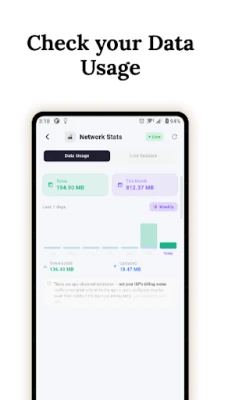
Monitor your network's real-time usage, signal quality, and connected device statistics. This feature allows you to keep an eye on your network's performance and make informed decisions about your connectivity.
🌍 WAN Status Monitoring
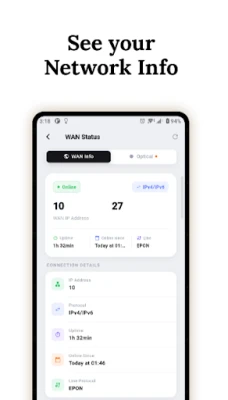
Check your internet connection status, including your IP address, uptime, and connection type (PPPoE/IPoE). With this feature, you can quickly determine if your connection is active or experiencing issues.
⚡ Speed Testing
Evaluate your internet speed without leaving the app. This built-in speed test feature provides you with instant feedback on your network performance.
🔄 Remote Router Reboot
Restart your router remotely with a single tap. No need to physically unplug it—this feature adds convenience to your network management.
🔑 Router Admin Settings
Change your router admin username and password directly from the app, eliminating the need to access the router admin page through a browser. Enjoy full control over your router settings in one convenient location.
Optimized for Huawei Routers
This app has been tested and optimized for various Huawei router models, including:
- Huawei HG8245A / HG8245H
- Huawei HG8141V5
- Huawei HG8145V5
- Most Huawei routers featuring a blue dashboard
It works seamlessly on most Huawei routers running standard firmware. Note that advanced features like Internet Control and Admin Settings require telnet access to the router shell, which is available on most HG8 models. We recommend trying the features for free before committing to a subscription.
Free and Premium Options
All premium features are available for free trial—simply watch a short ad for one hour of access. There are no forced purchases or paywalls without a free option. Opt for the Premium version to remove ads permanently and unlock all features instantly. Subscription plans are available monthly, quarterly, biannually, and annually, with the option to cancel anytime through Google Play.
Privacy and Security First
- Operates entirely on your local network—no data is transmitted off your device.
- No account creation is required.
- Router credentials are securely stored using Android Keystore.
- Supports biometric authentication for added security.
Globally Trusted
This app is trusted by Huawei fiber users across numerous countries, including Pakistan, Saudi Arabia, Indonesia, Germany, the Philippines, South Africa, and over 60 other nations where local ISPs deploy Huawei ONT routers. Whether you need a WiFi manager, admin tool, or a complete router setup wizard, this app has you covered.
Developed by an Independent Developer
Created by a solo developer who uses a Huawei router at home, this app was born out of the frustration of constantly opening a browser to check connected devices. Actively maintained and improved based on user feedback, your support—whether through a Premium subscription or simply using the app—ensures ongoing development and enhancement.
Take control of your WiFi network today with the ultimate WiFi management app, designed for ease of use and comprehensive functionality!
Rate the App
User Reviews















Popular Apps










Editor's Choice









