



Latest Version
5.12.11
July 30, 2026
Wi-Fi Solutions
Communication
Android
1
Free
ua.com.wifisolutions.wifiheatmap
Report a Problem
More About WiFi Heatmap
Maximize Your Wi-Fi Performance: A Comprehensive Guide to Wi-Fi Mapping and Monitoring
In today's digital age, a reliable Wi-Fi connection is essential for both personal and professional use. Whether you're streaming your favorite shows, working from home, or gaming online, understanding your Wi-Fi network's performance can significantly enhance your experience. This article will guide you through the process of optimizing your Wi-Fi setup using advanced mapping and monitoring tools.
Understanding Your Floor Plan for Wi-Fi Optimization
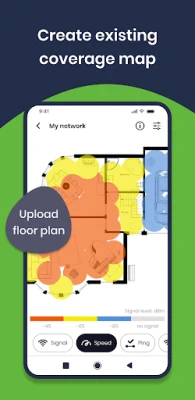
Before diving into the technical aspects, it's crucial to have a clear floor plan of your space. This can be achieved by uploading an image file of your floor plan or using a built-in basic plan constructor. If you don't have a digital copy, simply take a photo of a paper version. This foundational step allows for accurate mapping and analysis of your Wi-Fi coverage.
Key Features of Wi-Fi Mapping Tools
Utilizing a Wi-Fi mapping tool can provide you with invaluable insights into your network's performance. Here are some essential features to look for:
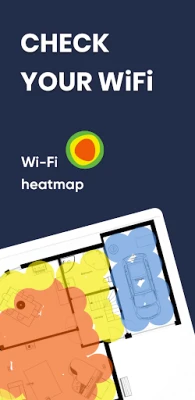
- Signal Coverage Map: Visualize areas with poor signal strength, which can lead to lower quality connections.
- Connection Speed Map: Assess your wireless network's throughput to identify speed issues.
- Frequency Channel Map: Determine which access point (AP) you are connected to, especially when multiple APs are in use.
- Best Access Point Connection Map: Identify and connect to the AP with the strongest signal available.
- Interfering Networks Map: Scan for third-party networks that may disrupt your Wi-Fi quality.
- Network Quality Map: Monitor real-time responses from your Wi-Fi router, including gateway ping times.
Outdoor Capturing Mode: Enhance Your Data Collection
For those who need to assess Wi-Fi performance in outdoor settings, the outdoor capturing mode is a game-changer. This feature allows you to:
- Automatically collect data using GPS.
- Export collected data to Google Earth in *.kml format or as inline *.csv files for further analysis.
Real-Time Wi-Fi Network Quality Monitoring
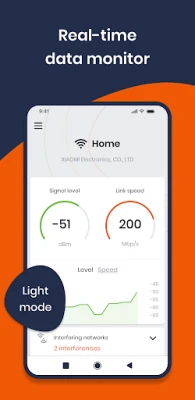
One of the standout features of modern Wi-Fi mapping tools is the real-time network quality monitor. This tool provides a comprehensive overview of your network's performance, including:
- Real-time signal and speed graphs for immediate feedback.
- Wi-Fi equipment vendor detection to identify the hardware in use.
- IP information for network management.
- Separate assessments of local network and Internet quality, complete with real-time graphs.
Step-by-Step Guide to Using Wi-Fi Mapping Tools
To effectively utilize a Wi-Fi mapping tool, follow these simple steps:
- Ensure you are connected to your Wi-Fi network.
- Upload your floor plan image.
- Set the scale by moving markers and selecting the distance between them.
- Position your cursor on your location on the map and click the "Mark" button.
- Move to another location—take at least a few steps—and repeat the previous step.
- Analyze your measurements to identify areas for improvement.
Conclusion: Elevate Your Wi-Fi Experience
By leveraging advanced Wi-Fi mapping and monitoring tools, you can significantly enhance your network's performance. Understanding your coverage, connection speeds, and potential interferences will empower you to make informed decisions about your Wi-Fi setup. Whether you're at home or in an outdoor environment, these tools provide the insights needed to ensure a seamless online experience. Start optimizing your Wi-Fi today and enjoy the benefits of a robust and reliable connection!
Rate the App
User Reviews















Popular Apps










Editor's Choice









