

Latest Version
May 05, 2026
Angry Robot
Tools
Android
0
Free
ru.angryrobot.wifiscanner
Report a Problem
More About Wi-Fi scanner network analyzer
Unlocking the Power of Your WiFi: Essential Features of a WiFi Meter
In today's digital age, a reliable WiFi connection is crucial for both work and leisure. Understanding the intricacies of your wireless network can significantly enhance your online experience. A WiFi meter is an invaluable tool that provides insights into your network's performance. This article explores the key features of a WiFi meter and how it can optimize your internet connectivity.
1. Monitoring Network Signal Strength
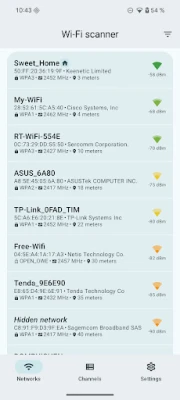
One of the primary functions of a WiFi meter is to monitor network signal strength. This feature allows users to evaluate the quality of their WiFi signal over extended periods. By moving around your home and observing the signal levels in various locations, you can identify dead zones and areas with weak connectivity. This information is vital for ensuring that your devices receive a strong and stable signal, enhancing your overall internet experience.
2. Determining Channel Load
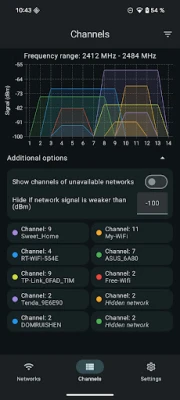
Another significant feature of a WiFi meter is its ability to determine channel load. This function enables users to configure their routers to operate on the optimal channel, which is the least congested by other WiFi networks. By selecting a less crowded channel, you can reduce interference and improve your network's performance. This is particularly beneficial in densely populated areas where multiple routers may compete for the same frequency.
3. Displaying Detailed Information About Networks
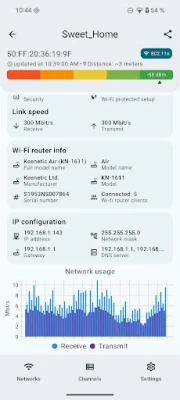
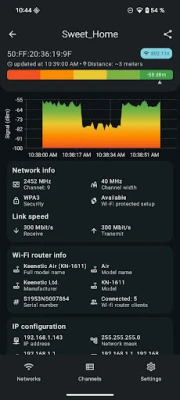
A WiFi scanner provides comprehensive information about available networks. It reveals essential parameters such as network security settings, frequency bands, potential connection speeds, channel numbers, and channel widths. Additionally, the app can uncover hidden details, including the router's manufacturer, brand (if available), and the approximate distance to the router. This wealth of information empowers users to make informed decisions about their network setup and security.
4. Identifying Connection Problems
WiFi meters are indispensable for diagnosing connection issues. With accurate analysis and clear visualizations, these tools help users quickly identify problems affecting their internet connectivity. Whether it's a weak signal, interference from other devices, or an overloaded channel, a WiFi meter can pinpoint the source of the issue, allowing for timely resolutions.
5. Optimizing Coverage and Stability
By utilizing the insights provided by a WiFi meter, users can optimize their network coverage and stability. The app offers smart recommendations based on the data collected, guiding users on how to enhance their WiFi performance. This may include repositioning the router, adjusting settings, or even upgrading equipment to ensure a seamless online experience.
6. Enhancing Security Measures
Security is a paramount concern for any wireless network. A WiFi meter can help users assess the security parameters of their networks, ensuring that they are protected against unauthorized access. By understanding the security settings and potential vulnerabilities, users can take proactive measures to safeguard their data and devices.
Conclusion: Elevate Your WiFi Experience
In conclusion, a WiFi meter is an essential tool for anyone looking to maximize their wireless network's performance. With features like monitoring signal strength, determining channel load, and displaying detailed network information, users can gain valuable insights into their connectivity. By leveraging this information, you can troubleshoot issues, optimize coverage, and enhance the overall stability of your internet connection. Invest in a WiFi meter today and unlock the full potential of your wireless network.
Rate the App
User Reviews















Popular Apps










Editor's Choice









