
Latest Version
1.8.0
September 08, 2025
Andrey Efremov
Tools
Android
0
$3.59
ru.andr7e.wifimonitor.pro
Report a Problem
More About Wi-Fi Monitor+
Unlocking Wi-Fi Insights: A Comprehensive Guide to Wi-Fi Network Management
In today's digital age, managing your Wi-Fi network effectively is crucial for seamless connectivity. This article delves into the essential features and functionalities of Wi-Fi management tools, providing you with the knowledge to optimize your network experience.
Understanding Your Wi-Fi Connection
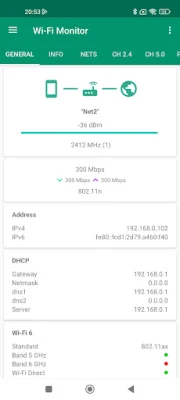
To access your public IP address, simply tap on the internet or earth icon on your device. This straightforward action allows you to view your network's status and connectivity details.
Available Wi-Fi Networks
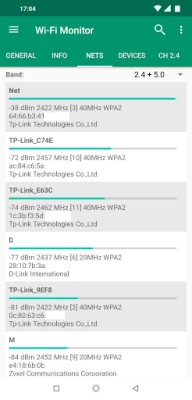
When it comes to available Wi-Fi networks, users can easily filter results to find the most suitable connection. The app provides a comprehensive list of networks, allowing you to open detailed information about each one. For devices running Android 11 and above, additional information such as router model, vendor, channels, country, streams, and extensions in the PRO version are accessible.
Network Channels: 2.4 GHz vs. 5.0 GHz
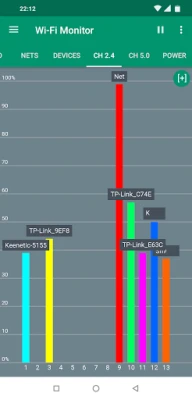
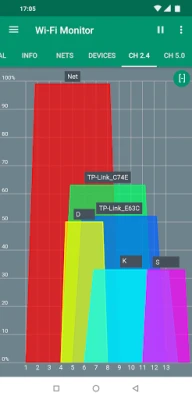
The app features charts that display available networks grouped by channels, specifically for 2.4 GHz and 5.0 GHz frequencies. Users can switch to a mode that shows channel width, utilizing the center frequency for each channel. Additionally, you have the option to pause updates, scale the view with finger gestures, or maximize the display with a double tap.
Monitoring Network Power
Understanding the power levels of your network over time is essential for troubleshooting connectivity issues. The app provides a chart that tracks the power of your network during specified time intervals, helping you identify any fluctuations that may affect performance.
Connected Devices Overview
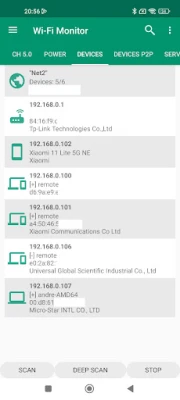
Keep track of all devices connected to your Wi-Fi network with ease. The app allows for a quick scan within the subnet a.b.c.x and a deep scan in the subnet a.b.x.x for devices running Android 13 and lower. It attempts to detect hostnames and router models, offering filtering options for results. Users can access detailed information about each connected device.
Device Detection Limitations
For devices operating on Android 13 and above, the standard method for detecting devices may not be available. However, the app strives to find used IP addresses, and you can increase the timeout by pressing the "..." button for better results.
Peer-to-Peer Device Scanning
Utilizing Wi-Fi Direct technology, the app scans for nearby Wi-Fi devices such as TVs and printers. In the menu options, you can retrieve vendor information by MAC address, enhancing your understanding of connected devices.
Troubleshooting Wi-Fi Issues
With the introduction of new Android releases, certain restrictions may affect Wi-Fi functionality. If you encounter issues, refer to the help section for guidance. For devices running Android 6.0 and above, ensure that location permissions are granted. If the network list does not appear, verify that location services are enabled, as some devices with Android 7.0 and above may require this setting as well.
If your device displays an unknown SSID, it may need permission adjustments, and location services must be activated for the latest Android versions. If devices are not found on your network, initiate a scan or deep scan for public networks. For Android 13 users, increasing the timeout via the "..." button can yield better results.
Pro Version Features
The Pro version of the app offers a customizable theme selection, including light, dark, and black themes, with a two-week trial for the black theme in the free version. Users can generate reports in the info center, selecting general information, networks, and devices to include. Reports can be saved in HTML or PDF format for easy sharing via email. The free version allows for a seven-day test of multiple reports, enabling users to access and share previous reports effortlessly.
Copying Text and Extra Network Information
Users can copy text by long-pressing in menu lists, making it easier to share information. For devices running Android 11 and above, additional network information is available, enhancing the app's functionality.
Requirements and Permissions
The app requires Android version 4.0.3 and above. To function correctly, it needs several permissions:
- INTERNET: Required for obtaining connection information.
- ACCESS_WIFI_STATE: Necessary for Wi-Fi connection details.
- CHANGE_WIFI_STATE: Needed for active network scanning.
- ACCESS_COARSE_LOCATION: Required for listing available networks on Android 6.0 and above.
- ACCESS_FINE_LOCATION: Necessary for network listing on Android 10 and above.
- NEARBY_WIFI_DEVICES: Required for listing P2P devices on Android 13 and above.
- READ/WRITE_EXTERNAL_STORAGE: Needed for report generation and browser access.
Conclusion
Managing your Wi-Fi network effectively is essential for optimal connectivity and performance. By utilizing the features outlined in this guide, you can enhance your network experience, troubleshoot issues, and stay informed about connected devices. Whether you are using the free or Pro version, these tools empower you to take control of your Wi-Fi environment.
Rate the App
User Reviews















Popular Apps










Editor's Choice









