
Latest Version
1.1.0
June 01, 2026
Mr.Bunn
Tools
Android
1
Free
com.mrbunn.waterslide.tycoon
Report a Problem
More About Waterslide Tycoon Home Screen
Unlock the Ultimate Customization with Waterslide Tycoon Home Screen
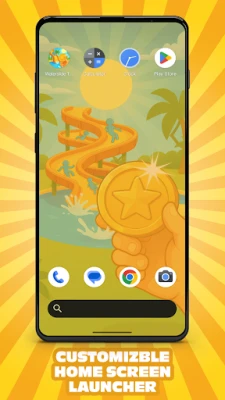
Experience a seamless blend of advanced customization, engaging gameplay, intuitive gestures, and a visually appealing interface with the Waterslide Tycoon Home Screen. This innovative launcher transforms your device into a personalized paradise, allowing you to dive into the world of water park management while enjoying a unique home screen experience.
Set Up Your Default Launcher
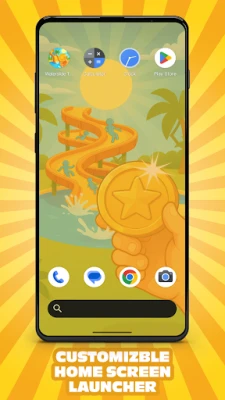
To begin your journey, set the Waterslide Tycoon Home Screen as your default launcher. Simply navigate to the default home app screen and select it. Once activated, you can start enjoying the myriad of features designed to enhance your mobile experience.
🎨 Discover the Waterslide Tycoon Home Screen
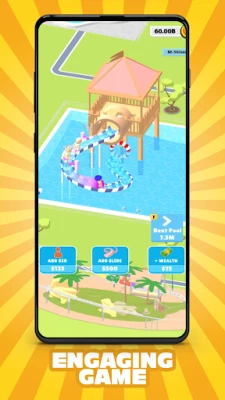
🕹️ Dive into the Integrated Game: Waterslide Tycoon
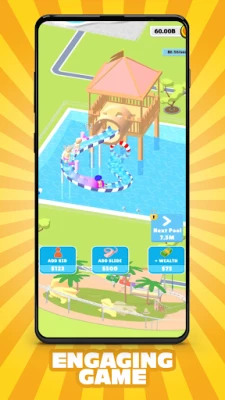
Welcome to Waterslide Tycoon, the most captivating and relaxing idle water park game available! Build your own colossal waterslide tower, watch as visitors race down the slides, and earn cash every second. Upgrade your slides, attract more visitors, and expand your pools to create the ultimate summer destination. The higher your slides ascend, the more revenue you generate!
📎 Quick Access with Home Screen Pop-Up Menu
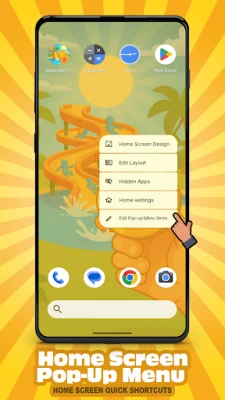
The Home Screen Pop-Up Menu feature offers instant shortcuts directly from your home screen. By pressing and holding an empty area, a pop-up menu appears, providing quick access to essential launcher features, including "Home Screen Design." Customize which shortcuts appear in this menu, allowing you to add, remove, or reorder them to suit your workflow.
To customize: Long-press an empty area on your home screen → Click "Edit Pop-up Menu items."
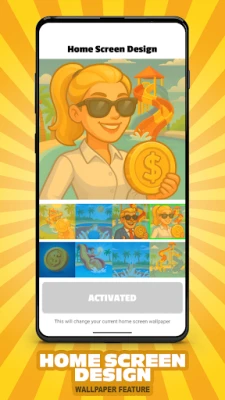
🖼️ Personalize with Home Screen Design - Wallpapers
Choose from an extensive collection of wallpapers inspired by the vibrant universe of Waterslide Tycoon. With vivid scenes, stunning artwork, and colorful backgrounds, you can transform your home screen into a visual delight.
To access the feature: Long press an empty area on your home screen, select "Home Screen Design," and choose from eight unique wallpapers inspired by the game.
🎯 Customize Your Icon Style
Change every app icon to reflect your mood or theme. Adjust shapes, resize icons, and hide labels for a clean, minimalist design that suits your style.
To customize: Long-press an empty area on your home screen → Home Settings → General → Icon Style.
📂 Tailor Your App Drawer
Take complete control of your app drawer with extensive customization options. Adjust the background color and opacity, choose the number of app columns, and fine-tune row height and padding. You can even change icon sizes, hide apps, or personalize the search bar to match your aesthetic.
To customize: Long-press an empty area on your home screen → Home Settings → App Drawer.
🔤 Control Font & Layout
Adjust text size, grid spacing, and font style to create your ideal home layout. Whether you prefer tight, modern grids or open, minimalist designs, every detail is customizable to your liking.
To customize: Long-press an empty area on your home screen → Home Settings → General.
⚡ Enhance Interaction with Gestures
Customize how your home screen responds to your touch with the Interactive Gestures feature. Assign actions to gestures like double-tap and swipes for quicker, more personalized control over your device.
To customize: Long-press an empty area on your home screen → Home Settings → Interactive Gestures.
🔍 Optimize Search Bar Settings
Tailor the search functionality across your home screen. Choose the search bar's location (in the dock or app drawer), decide which results to display—apps, contacts, settings, or history—and control behaviors like auto keyboard display or search algorithm type.
To customize: Long-press an empty area on your home screen → Home Settings → Search Bar.
⚠️ Important Note
The Waterslide Tycoon Home Screen replaces your default home screen layout, offering a range of new customization features. However, you can always revert to your previous home screen layout at any time.
Embrace the ultimate customization experience with the Waterslide Tycoon Home Screen and transform your device into a personalized oasis. Dive into the fun, manage your water park, and enjoy a home screen that reflects your unique style!
Rate the App
User Reviews















Popular Apps










Editor's Choice









