


Latest Version
1.0.0
November 08, 2024
판다인터네셔날
Tools
Android
0
Free
kr.co.coreplanet.pandavpn2
Report a Problem
More About 판다vpn-PandaVPN 한국일본미국홍콩대만태국유럽
Experience Unmatched VPN Services with 24/7 Real-Time Support
In today's digital age, ensuring your online privacy and security is paramount. With the rise of cyber threats, a reliable VPN service is essential. Our VPN service stands out by offering unparalleled features and support that cater to your needs. Here’s what you can expect when you choose our VPN solution.
24/7 Real-Time Consultation
Our dedicated support team is available 365 days a year, providing real-time consultation without any holidays. Whenever you have a question or need assistance, you can expect a swift response within just five minutes. This commitment to customer service ensures that you are never left in the dark.
Seamless Korean Language Support
We understand the importance of effective communication. That’s why our real-time consultation is available in Korean, making it easier for our users to get the help they need without any language barriers.
Advanced Split Tunneling Feature
Our VPN service includes a unique split tunneling feature, allowing you to specify which applications should use the VPN and which should connect directly to the internet. This flexibility ensures that you can optimize your internet usage according to your preferences.
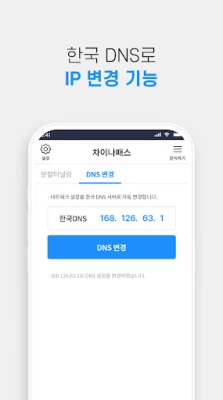
DNS Change Functionality
Within the app, you have the option to change DNS settings easily. This feature enhances your browsing experience by allowing you to access content that may be restricted in your region.
User-Friendly Tutorial for Easy Navigation
Upon your first login, our app provides a comprehensive tutorial that guides you through its features. This ensures that even the least tech-savvy users can navigate the app with ease and confidence.
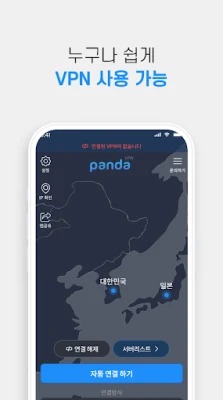
One-Click Automatic Connection
After logging in, simply click the automatic connection button to connect to the fastest server available. This feature makes it incredibly convenient to start using the VPN without any hassle.
High-Speed Streaming Without Worries
Enjoy your favorite streaming services without interruptions. Our VPN guarantees fast speeds, allowing you to stream content seamlessly, whether you're watching movies, series, or live events.
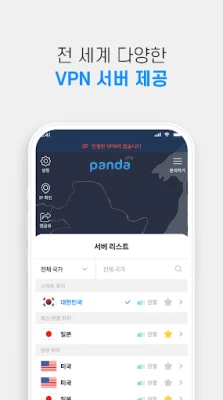
Favorite Your Most Used Servers
To enhance your user experience, you can bookmark your frequently used servers. This feature allows for quick access, saving you time and effort when connecting to your preferred locations.
Compatibility with Various VPN Protocols
Our VPN supports a wide range of protocols, ensuring compatibility across different networks. Whether you’re at home, in a café, or traveling, you can rely on our service to keep you connected securely.
Real-Time Server Ping Testing
With our real-time server ping testing feature, you can easily determine which server is best suited for your needs. This allows you to optimize your connection for speed and reliability.
Stay Updated with In-App Notifications
Our app keeps you informed with real-time notifications. You can check for updates and announcements directly within the app, ensuring you are always aware of the latest features and improvements.
How to Use Our VPN Service
Getting started with our VPN is simple:
- Install the app and log in.
- Click on "Automatic Connection" to connect to the VPN instantly.
- If you wish to use a specific server or an overseas server, select your desired server from the list after logging in.
Thank you for choosing our VPN service. We are committed to providing you with 24/7 real-time support, even during late hours. Feel free to reach out to us anytime you need assistance!
Rate the App
User Reviews















Popular Apps










Editor's Choice









