


Latest Version
v2.7.1.250712
August 07, 2025
Shenzhen Xiaozhen Technology Co., Ltd.
Tools
Android
0
Free
com.vidure.app
Report a Problem
More About Viidure-Dashcam Viewer
Ultimate Guide to Dashcam Features: Control, Preview, Play, Download, and Edit
In the ever-evolving world of automotive technology, dashcams have emerged as essential tools for drivers. They not only provide security but also enhance the driving experience. This article delves into the key features of dashcams, including control settings, real-time previews, online playback, downloading capabilities, and editing options. Let’s explore how these functionalities can elevate your dashcam experience.
Control: Mastering Your Dashcam Settings
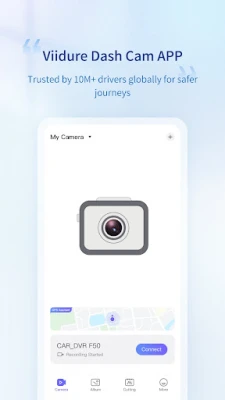
One of the primary functions of a dashcam is its ability to record video and capture photographs. Understanding how to control these features is crucial for maximizing your device's potential. Most modern dashcams come equipped with user-friendly interfaces that allow you to adjust various parameters easily.
- Video Resolution: Choose from different resolutions such as 1080p, 1440p, or even 4K, depending on your needs.
- Loop Recording: Set your dashcam to overwrite old footage automatically, ensuring you never run out of storage.
- G-Sensor Settings: Adjust sensitivity levels to ensure that your dashcam captures critical moments during sudden stops or collisions.
By mastering these settings, you can ensure that your dashcam records high-quality footage tailored to your specific requirements.
Preview: Real-Time Image Monitoring
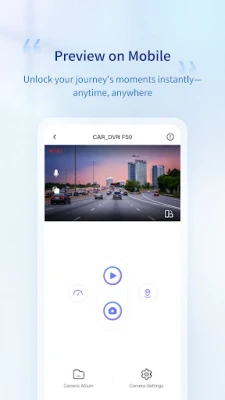
Another significant feature of dashcams is the ability to preview real-time images. This functionality allows drivers to monitor their surroundings while on the road. Many dashcams come with built-in screens or connect to mobile apps, providing a live feed of what the camera sees.
- Safety Checks: Use the preview feature to check for blind spots or obstacles before changing lanes.
- Parking Assistance: Some dashcams offer a rear-view camera option, making parking easier and safer.
Real-time image monitoring not only enhances safety but also provides peace of mind while driving.
Play Online: Effortless Video Access
Gone are the days of cumbersome downloads and complicated file transfers. With modern dashcams, you can play car cam videos directly on your smartphone without the need to download them. This feature is particularly useful for quick access to footage when you need it most.
- Mobile App Integration: Most dashcams come with dedicated apps that allow you to stream video directly to your phone.
- Instant Sharing: Quickly share memorable moments or critical footage with friends or authorities via social media or messaging apps.
This seamless online playback capability ensures that you can access your dashcam footage anytime, anywhere.
Download: Save Your Footage with Ease
While online playback is convenient, there are times when you may want to download videos or photos directly to your phone. Most dashcams offer straightforward downloading options, allowing you to save important footage for later use.
- One-Tap Downloads: With just a tap, you can save videos or images to your device, making it easy to keep important records.
- File Management: Organize your downloaded files into folders for easy access and retrieval.
This feature is invaluable for those who want to keep a permanent record of their driving experiences or incidents.
Edit: Enhance Your Footage for Social Sharing
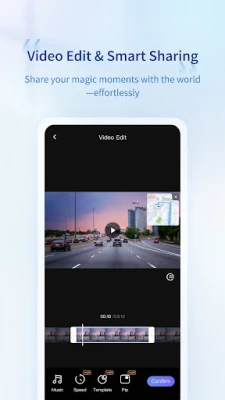
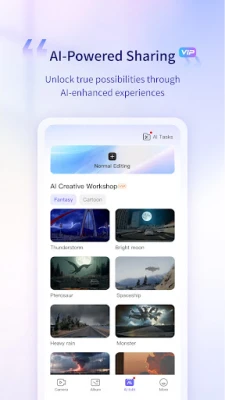
Editing capabilities are essential for anyone looking to share their dashcam footage on social media platforms like Facebook, Twitter, or Instagram. Many dashcams come with built-in editing tools or integrate with mobile apps that allow you to enhance your videos and photos.
- Trimming and Cropping: Easily cut out unnecessary parts of your footage to highlight the most important moments.
- Filters and Effects: Add filters or effects to make your videos more engaging and visually appealing.
- Text and Annotations: Include text overlays or annotations to provide context or commentary on your footage.
With these editing tools, you can create polished videos that are ready to be shared with your audience, showcasing your driving adventures or important incidents.
Conclusion: Elevate Your Dashcam Experience
Dashcams are more than just recording devices; they are powerful tools that enhance safety, provide peace of mind, and allow for creative expression. By understanding and utilizing the features of control, preview, online playback, downloading, and editing, you can significantly elevate your dashcam experience. Whether you are a daily commuter or an avid road tripper, investing time in mastering these functionalities will ensure you get the most out of your dashcam.
Embrace the technology and make your driving experience safer and more enjoyable with a dashcam that meets your needs!
Rate the App
User Reviews















Popular Apps










Editor's Choice









