



Latest Version
8.0
May 26, 2026
Video Meeting and Conference App
Communication
Android
0
Free
com.meeting.onlinemeeting.conferencemeet.acrossworld
Report a Problem
More About Video Meeting
Experience Seamless Video Conferencing with Our Advanced Video Meeting App
Stay connected effortlessly with our high-quality video conferencing solution, designed for smooth and reliable communication. Whether you’re conducting business meetings, hosting online events, or enjoying casual conversations, our Video Meeting app provides an intuitive interface and dependable performance to enhance your experience.
Transforming Virtual Interactions
At Video Meeting, we aim to replicate face-to-face interactions on your screen. Whether you’re leading a team discussion, delivering an impactful presentation, or catching up with friends and family, our app equips you with all the necessary tools for a professional and enjoyable virtual session.
Post-Call Features for Enhanced Management
Our Video Meeting app offers unique after-call features that allow you to manage your meetings even after they conclude. Quickly create new meetings or send messages directly from the after-call screen, ensuring seamless communication at all times.
Key Features of the Video Meeting App
- HD Video & Audio: Enjoy crisp visuals and clear sound for an enhanced communication experience.
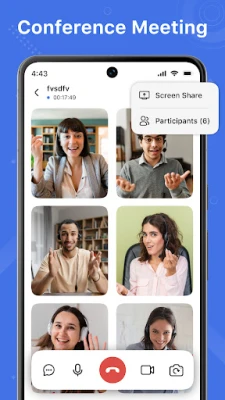
- 1-on-1 & Group Calls: Connect privately or host large meetings with multiple participants effortlessly.
- Screen Sharing: Present documents, slides, or your screen in real-time for effective collaboration.
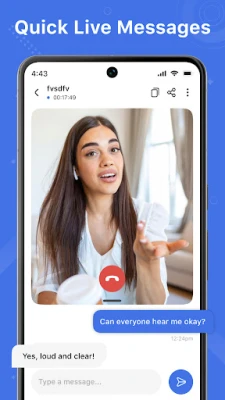
- In-Meeting Chat: Exchange messages without interrupting the flow of your call.
- No Participant Limit: Host sessions of any size without restrictions.
- Camera Switch: Easily toggle between front and rear cameras for versatile viewing.
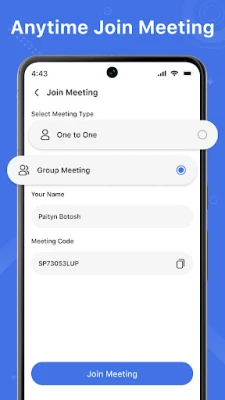
- Quick Join: Enter meetings instantly using a unique code—no account required.
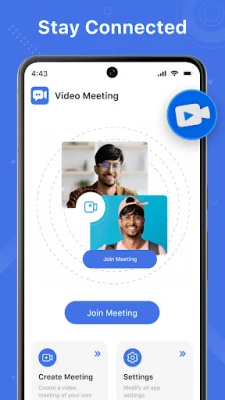
- Fast Meeting Setup: Create and share meeting IDs in seconds.
- Flexible End Options: Choose to leave the session individually or close it for all participants.
How to Use the Video Meeting App
1. Starting a Meeting
- Select the type of meeting: 1-on-1 or group session.
- Personalize your room by adding a meeting name.
- Share the generated code with your participants.
2. Joining a Meeting
- Enter the meeting ID provided by the host.
- No registration or login is required—just join and connect.
3. During the Session
- Effortlessly switch cameras as needed.
- Share your screen to enhance collaboration.
- Utilize the chat feature for side discussions without disrupting the call.
- Easily view and manage attendees throughout the meeting.
4. Ending or Leaving the Meeting
- Exit the meeting individually or choose to close it for all participants.
Why Choose the Video Meeting App?
Our app combines simplicity with powerful features, making online communication both easy and effective. Whether you’re a student, a professional, or someone who enjoys casual chats, Video Meeting ensures uninterrupted video calls with a modern, user-friendly design.
Support & Feedback
Your feedback is invaluable! Reach out to us at rechargeindia007@gmail.com for any suggestions or inquiries.
Privacy First
We prioritize your data security and privacy. For more information, please review our privacy practices here.
Download Now and Elevate Your Video Calling Experience
Stay connected, anywhere and anytime, with the Video Meeting app. Experience the future of virtual communication today!
Rate the App
User Reviews















Popular Apps










Editor's Choice









