
Latest Version
26.4.0
May 13, 2026
Verizon Consumer Group
Tools
Android
0
Free
com.verizon.contenttransfer
Report a Problem
More About Verizon Content Transfer
Seamless Data Transfer: Effortlessly Move Your Contacts, Media, and More
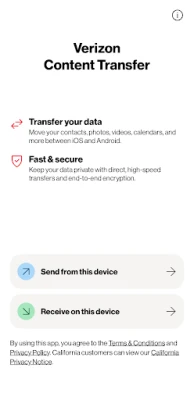
In today's digital age, transferring data between devices should be a hassle-free experience. Whether you're switching from an iPhone to an Android or vice versa, the process can be simplified. This guide will walk you through the steps to transfer your essential data, including contacts, photos, videos, calendars, call logs, and audio files, with ease.
Effortless Data Migration: What You Can Transfer
When transitioning to a new device, it's crucial to ensure that all your important information moves with you. Here’s what you can easily transfer:
- Contacts: Keep your connections intact by transferring all your contacts seamlessly.
- Photos and Videos: Preserve your memories by moving your media files without losing quality.
- Calendars: Stay organized by transferring your calendar events and reminders.
- Call Logs: Maintain your communication history for easy reference.
- Audio Files: Move your favorite music and voice memos effortlessly.
Instant Device Pairing with QR Code Scanning
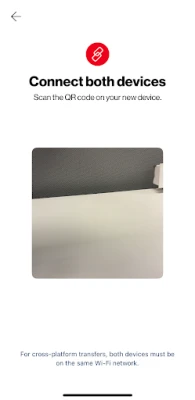
One of the standout features of modern data transfer applications is the ability to pair devices instantly. By simply scanning a QR code, you can establish a connection between your old and new devices in seconds. This method eliminates the need for complicated setups and allows for a smooth transition.
Cross-Platform Compatibility: iPhone and Android
Worried about compatibility issues? Fear not! The latest data transfer solutions work seamlessly across both iPhone and Android platforms. This means you can switch between these operating systems without the fear of losing your valuable data. Enjoy the freedom to choose your device without compromising on your information.
Enhanced Security with End-to-End Encryption
Your data's security is paramount. With end-to-end encryption, you can rest assured that your information remains private during the transfer process. This advanced security feature ensures that only you have access to your data, protecting it from unauthorized access and potential breaches.
Real-Time Progress Tracking: Stay Informed
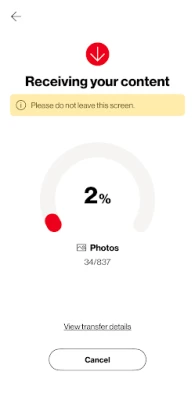
During the transfer process, it's essential to know how things are progressing. With real-time tracking, you can monitor the status of your data transfer. If the process is interrupted for any reason, you can easily resume from where you left off, ensuring that no data is lost in the transition.
Simple Steps to Transfer Your Data
Transferring your data is as easy as opening the app on both devices. Follow these simple steps:
- Open the App: Launch the data transfer application on both your old and new devices.
- Scan the QR Code: Use your new device to scan the QR code displayed on your old device.
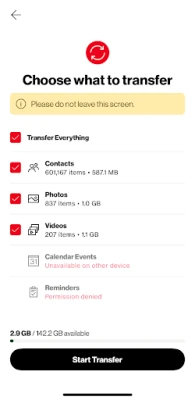
- Select Your Data: Choose the types of data you wish to transfer, such as contacts, photos, and more.
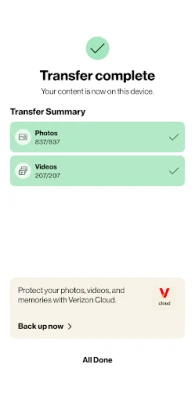
- Initiate the Transfer: Start the transfer process and watch as your data moves seamlessly to your new device.
Conclusion: A Smooth Transition Awaits
Switching devices doesn't have to be a daunting task. With the right tools and features, you can transfer your contacts, media, and more effortlessly. Enjoy the benefits of instant pairing, cross-platform compatibility, enhanced security, and real-time tracking. Embrace the future of data transfer and make your transition as smooth as possible.
Rate the App
User Reviews















Popular Apps










Editor's Choice









