

Latest Version
September 05, 2024
AhnLab Inc.
Tools
Android
0
Free
com.ahnlab.v3mobileplus
Report a Problem
More About V3 Mobile Plus
Secure Your Mobile Transactions with AhnLab V3 Mobile Plus
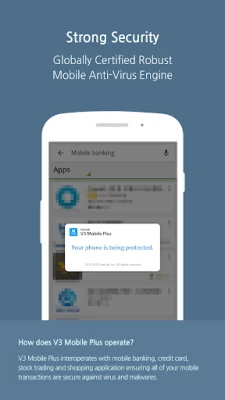
In today's digital age, ensuring the security of your mobile transactions is paramount. AhnLab V3 Mobile Plus offers a robust solution that seamlessly integrates with various services, including mobile banking, credit cards, stock trading, and shopping platforms. This comprehensive security tool guarantees that all your mobile transactions remain secure and protected from potential threats.
Key Features of AhnLab V3 Mobile Plus
AhnLab’s mobile anti-virus engine is designed to safeguard your smartphone against a wide array of threats, including viruses, worms, Trojan horses, and other forms of malware. Here’s how it works:
Real-Time Protection
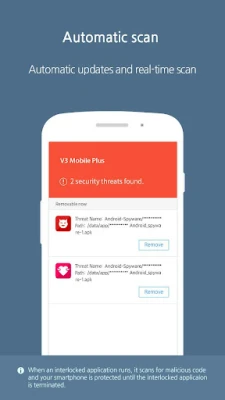
When you launch an application that is linked with V3 Mobile Plus, the anti-virus engine automatically updates to the latest version. This ensures that you benefit from the most current security measures available. The Real-Time Scan feature actively monitors your device, scanning for malware as you use your applications. If any malicious files are detected, you can swiftly remove them, keeping your device and data safe.
Seamless Integration with Applications
V3 Mobile Plus is designed to work harmoniously with various applications, enhancing your mobile experience without compromising security. Whether you are managing your finances or shopping online, this tool ensures that your sensitive information remains protected.
Troubleshooting Common Issues
While AhnLab V3 Mobile Plus is a powerful tool, users may occasionally encounter issues. Here are some troubleshooting tips to help you resolve common problems:
Application Conflicts
If you notice that the service is not functioning properly when multiple applications are opened simultaneously, it may be due to device limitations. To resolve this, consider closing unnecessary applications to free up resources.
Force Stopping the Application
In cases where the application linked with V3 Mobile Plus remains active even after you have closed it, you can manually stop the service. Navigate to Settings > Manage Applications, select V3 Mobile Plus, and choose the option to force stop the application.
Clearing Application Data
If you encounter errors while using an application linked with V3 Mobile Plus, clearing the application data can often resolve the issue. Go to Settings > Manage Applications, select the problematic application, and choose the option to clear data. After doing this, restart the application for optimal performance.
Reinstalling from Official Sources
For users who have installed V3 Mobile Plus from unofficial application markets, it is advisable to uninstall the current version and reinstall it from the Google Play Store. This ensures that you have the most secure and updated version of the application.
Contact Support for Assistance
If you have questions or experience persistent issues, AhnLab encourages users to reach out for support. Please provide your smartphone model, operating system version, application version, and a detailed description of the issue by emailing customer@ahnlab.com. While AhnLab cannot respond to review comments, they are committed to assisting you with any technical difficulties you may encounter.
Conclusion
In conclusion, AhnLab V3 Mobile Plus is an essential tool for anyone looking to secure their mobile transactions. With its advanced anti-virus engine, real-time protection, and seamless integration with various applications, you can confidently manage your financial activities on your smartphone. By following the troubleshooting tips provided, you can ensure that your experience with V3 Mobile Plus remains smooth and secure. Protect your mobile transactions today with AhnLab V3 Mobile Plus and enjoy peace of mind in your digital interactions.
Rate the App
User Reviews















Popular Apps










Editor's Choice









