


Latest Version
4.0.3
June 30, 2026
Cross Ltd.
Tools
Android
0
Free
com.crosserr.trojan
Report a Problem
More About Trojan
Unlocking the Power of the New Trojan: Enhanced Proxy Protocol Support
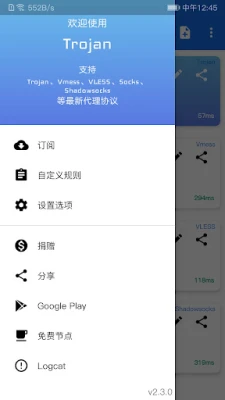
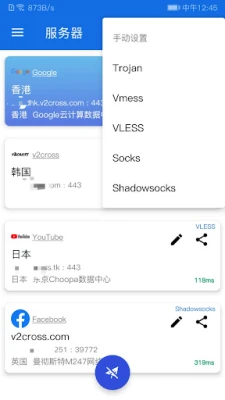
The latest iteration of the Trojan software has arrived, bringing with it a host of exciting features that elevate its functionality. This new version now supports a variety of proxy protocols, including Vmess, VLESS, Trojan, Socks, and Shadowsocks. Additionally, it introduces subscription functions and customizable rules, making it a versatile tool for users seeking enhanced online privacy and security.
What’s New in the Latest Trojan Version?
The updated Trojan software is designed to cater to the evolving needs of users who prioritize online anonymity and security. By incorporating support for multiple proxy protocols, it allows for greater flexibility in how users connect to the internet. Here’s a closer look at the key features:
- Support for Multiple Proxy Protocols: The inclusion of Vmess, VLESS, Trojan, Socks, and Shadowsocks means users can choose the protocol that best suits their needs, ensuring optimal performance and security.
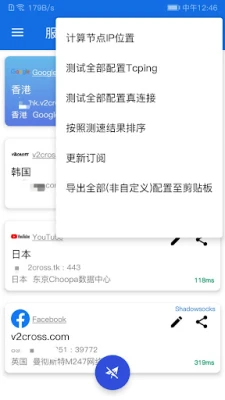
- Subscription Functions: Users can now easily manage their connections through subscription services, simplifying the process of accessing various proxy servers.
- Custom Rules: The ability to create and implement custom rules allows users to tailor their experience, enhancing both security and usability.
Why Choose Trojan for Your Proxy Needs?
With numerous options available in the market, you might wonder why Trojan stands out. Here are several compelling reasons:
- Enhanced Security: Trojan employs advanced encryption methods, ensuring that your data remains secure while you browse the internet.
- High Performance: The software is optimized for speed, allowing for seamless browsing and streaming experiences without significant lag.
- User-Friendly Interface: The intuitive design makes it easy for both beginners and experienced users to navigate and utilize the software effectively.
How to Get Started with the New Trojan Version
Getting started with the new Trojan version is straightforward. Follow these steps to set up your proxy connection:
- Download the Latest Version: Visit the official Trojan website to download the most recent version of the software.
- Install the Software: Follow the installation instructions provided to set up Trojan on your device.
- Configure Your Proxy Settings: Choose your preferred proxy protocol (Vmess, VLESS, etc.) and input the necessary configuration details.
- Utilize Subscription Functions: If you opt for subscription services, enter your subscription link to access a range of proxy servers.
- Create Custom Rules: Tailor your experience by setting up custom rules that fit your browsing habits and security needs.
Engage with the Community
For users seeking assistance or wanting to share experiences, the Trojan community is an invaluable resource. You can connect with fellow users through the Telegram exchange group, where questions and discussions about the software take place. This platform allows you to:
- Ask Questions: If you encounter any issues or have queries about features, the community is there to help.
- Share Tips and Tricks: Exchange insights with other users to enhance your experience and discover new ways to utilize Trojan.
- Stay Updated: Keep abreast of the latest developments, updates, and best practices shared by the community.
Conclusion: Embrace Enhanced Online Privacy with Trojan
The new version of Trojan represents a significant advancement in proxy technology, offering users a robust solution for online privacy and security. With its support for multiple protocols, subscription functions, and customizable rules, it caters to a wide range of user needs. By engaging with the community and leveraging the software’s features, you can enhance your online experience while maintaining the highest level of security.
Don’t miss out on the opportunity to elevate your internet browsing experience. Download the latest version of Trojan today and take control of your online privacy!
Rate the App
User Reviews















Popular Apps










Editor's Choice









