

Latest Version
Version
1.13.1682
1.13.1682
Update
October 10, 2024
October 10, 2024
Developer
Trend Micro
Trend Micro
Categories
Tools
Tools
Platforms
Android
Android
Downloads
0
0
License
Free
Free
Package Name
com.trendmicro.mobile.IDProtection
com.trendmicro.mobile.IDProtection
Report
Report a Problem
Report a Problem
More About Trend Micro ID Protection
Trend Micro ID Protection shields your personal information and online accounts from identity theft, fraud, and unauthorized access. Stay ahead of identity and privacy risks. Enjoy peace of mind knowing your identity is secure and protected.
Enhance Your Digital Security with Trend Micro ID Protection
In today's digital age, safeguarding your personal information is more crucial than ever. With the rise of cyber threats, having a robust security solution is essential. Trend Micro ID Protection offers a comprehensive suite of features designed to protect your identity and secure your online presence. Experience peace of mind with a free 7-day trial, and unlock the power of Trend Micro ID Protection using Touch ID or Face ID.Comprehensive Personal Identity Monitoring
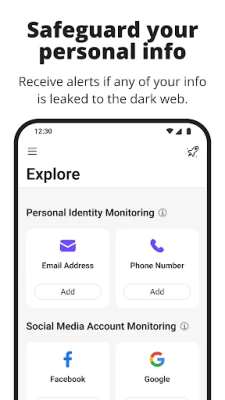
Trend Micro ID Protection provides **Personal Identity Monitoring** that actively scans the internet and dark web for any signs of your personal data being compromised. This proactive approach significantly reduces your risk of identity theft and account takeover attacks. By keeping a vigilant eye on your information, you can take immediate action if any suspicious activity is detected.Stay Safe with Social Media Monitoring
Social media platforms are a common target for cybercriminals. With **Social Media Monitoring**, Trend Micro keeps track of your Facebook, Google, and Instagram accounts for any unusual activity or potential hacks. This feature ensures that you are alerted to any threats, allowing you to secure your accounts before any damage occurs.Advanced Anti-Tracking and Privacy Controls
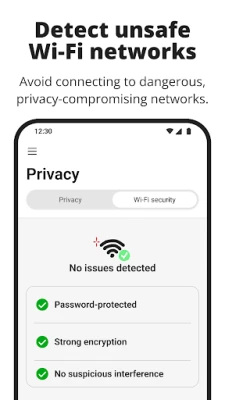
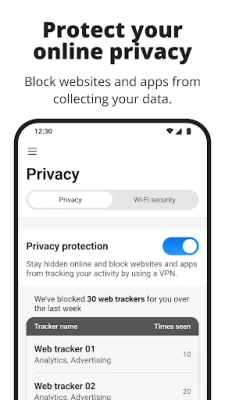
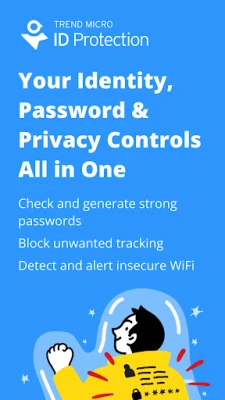
In an era where privacy is paramount, Trend Micro ID Protection offers **Anti-Tracking and Privacy Controls**. This feature prevents unwanted tracking on your mobile devices and alerts you if you connect to an unsafe Wi-Fi network. By maintaining your privacy, you can browse the internet with confidence, knowing that your data is protected.Seamless Cloud Sync Across Devices
With **Cloud Sync**, your information is effortlessly synchronized across all your devices. Whether you are using a smartphone, tablet, or computer, you can access your data anytime, anywhere. This feature ensures that you remain connected and secure, regardless of the device you are using.Robust Password Management Features
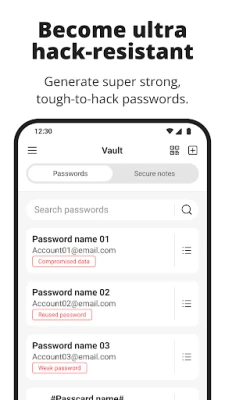
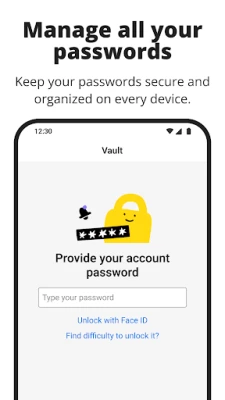
Trend Micro ID Protection excels in **password management**, offering a range of features to keep your credentials secure:- Autofill: Save your usernames and passwords for your favorite websites, allowing you to sign in with just one click.
- Password Check: Receive notifications about weak, reused, or compromised passwords, helping you maintain strong security.
- Password Generator: Create strong, complex passwords that are difficult for hackers to crack.
- Import Passwords: Easily import passwords from your browser or another password manager for a seamless transition.
- Vault and Secure Notes: Store not only your passwords but also other sensitive information in a secure and easily accessible location.
- Smart Security: Automatically locks the ID Protection app when you step away from your device, ensuring your information remains safe.
- Trusted Sharing: Share passwords securely with friends and family, maintaining control over your sensitive information.
Cross-Platform Protection
Trend Micro ID Protection is not limited to mobile devices. You can access your ID Protection account on your computer and download the ID Protection browser extension for added convenience. This cross-platform functionality ensures that your security measures are consistent, no matter where you are.Required Permissions for Optimal Functionality
To provide its full range of features, Trend Micro ID Protection requires specific permissions:- Accessibility: This permission enables the Autofill feature, making it easier to manage your passwords.
- View All Packages: This permission supports Single-Sign-On and allows the app to obtain access tokens by calling getInstalledPackages. It also checks for other installed Trend Micro applications.
- Draw Over Other Apps: This permission allows Trend Micro ID Protection to display the Autofill UI on other applications, enhancing user experience.
Conclusion: Secure Your Digital Life Today
In a world where digital threats are ever-present, investing in a reliable security solution is essential. Trend Micro ID Protection offers a comprehensive suite of features designed to safeguard your identity and personal information. With tools for monitoring, password management, and privacy controls, you can navigate the online landscape with confidence. Start your free 7-day trial today and take the first step towards securing your digital life.Rate the App
Add Comment & Review
User Reviews
Based on 0 reviews
No reviews added yet.
Comments will not be approved to be posted if they are SPAM, abusive, off-topic, use profanity, contain a personal attack, or promote hate of any kind.















More »

Popular Apps

Nova BrowserJef Studios

Throne WishlistThrone.com

Dark Web Browser : OrNETStronger Apps

LINE: Calls & MessagesLINE (LY Corporation)

XENO; Plan, AutoSave & InvestXENO Investment

Rogue SlimeQuest Seeker Games

Дядя Ваня VPNKONDAKOV

PrivacyWallPrivacyWall

Robinhood WalletRobinhood

Roman empire games - AoD RomeRoboBot Studio
More »
Editor's Choice

Grim Soul: Dark Survival RPGBrickworks Games Ltd

Craft of Survival - Gladiators101XP LIMITED

Last Shelter: SurvivalLong Tech Network Limited

Dawn of Zombies: Survival GameRoyal Ark

Merge Survival : WastelandStickyHands Inc.

AoD Vikings: Valhalla GameRoboBot Studio

Viking Clan: RagnarokKano Games

Vikings: War of ClansPlarium LLC

Asphalt 9: LegendsGameloft SE

Modern Tanks: War Tank GamesXDEVS LTD