


Latest Version
3.9.1
July 25, 2026
Rollerbush
Tools
Android
2
Free
com.rollerbush.thermal
Report a Problem
More About Thermal Monitor - Phone Temp
Ultimate Guide to the Lightweight Phone Temperature Monitor: Your Thermal Guardian
Is your smartphone overheating during intense gaming sessions or heavy usage? Are you experiencing performance issues due to thermal throttling? If so, it’s time to take control of your device’s temperature with a reliable phone temperature monitor. This article explores the benefits and features of a lightweight and unobtrusive thermal guardian that keeps your phone cool and performing at its best.
Understanding the Importance of Phone Temperature Monitoring
Smartphones are powerful devices that can heat up quickly, especially during demanding tasks like gaming or multitasking. Overheating can lead to thermal throttling, where the device reduces its performance to prevent damage. This can significantly affect your gaming experience and overall device health. A phone temperature monitor helps you track your device's temperature in real-time, allowing you to take proactive measures before overheating becomes a problem.
Introducing the Thermal Monitor: Your Device's Best Friend
The Thermal Monitor app acts as a thermal guardian for your smartphone, providing real-time updates on battery and CPU temperatures. With its sleek design and minimal impact on performance, this app is perfect for gamers and heavy users alike. Here’s what you can expect:
Key Features of the Thermal Monitor
- Real-Time Temperature Tracking: Monitor your phone's temperature and CPU throttling state continuously.
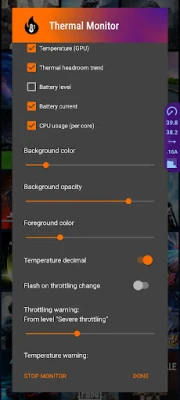
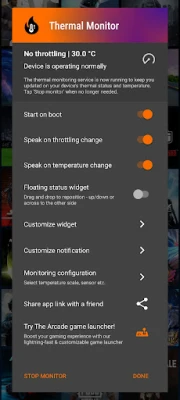
- Customizable Floating Widget: Enjoy a sleek, unobtrusive widget that can be tailored to your preferences.
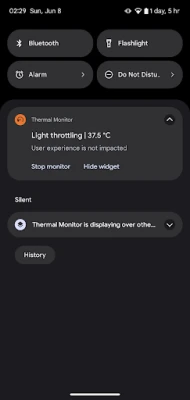
- Status Bar Notifications: Receive alerts for temperature spikes and throttling events directly in your status bar.
- No Ads or Internet Required: Experience a clean interface without distractions or unnecessary permissions.
- Minimal Resource Usage: The app is lightweight, ensuring ultra-low RAM and CPU usage for seamless performance.
How the Thermal Monitor Enhances Your Experience
Your smartphone automatically manages overheating by throttling performance, but the Thermal Monitor empowers you to stay informed and take action. Whether you need to adjust settings, close background applications, or utilize an external cooling solution, this app keeps you in the loop.
Premium Features for Advanced Users
For those seeking more control, the Thermal Monitor offers premium features that enhance customization and precision:
- Extended Widget Customizations: Choose your preferred background and foreground colors, opacity, and the data displayed.
- Custom Notification Icons: Select icons that indicate throttling, temperature, or both for quick reference.
- Multiple Temperature Sensors: Monitor battery, CPU, GPU, or ambient temperatures, depending on device compatibility.
- Enhanced Precision: Adjust the update interval and display extra decimal points for more accurate readings.
- Critical Warnings: Get notified when your phone's temperature or performance throttling reaches critical levels.
Reliability and Accuracy of Temperature Readings
It’s essential to rely on accurate throttling information provided by your smartphone's operating system. While some devices allow direct monitoring of GPU and CPU temperatures, not all do. However, all devices report battery temperature and thermal throttling states, which are crucial indicators of your device's thermal health. The Thermal Monitor focuses on delivering the best user interface and customization options, ensuring you can optimize for accuracy without compromising performance or battery life.
Conclusion: Stay Cool and Game On!
In a world where smartphones are integral to our daily lives, keeping your device cool is paramount. The Thermal Monitor app serves as your thermal guardian, providing essential insights into your phone's temperature and performance. With its lightweight design, customizable features, and real-time tracking, you can enjoy your gaming sessions without the worry of overheating. Download the Thermal Monitor today and take the first step towards a cooler, more efficient smartphone experience!
Rate the App
User Reviews















Popular Apps










Editor's Choice









