
Latest Version
2.2.1
May 30, 2026
SiA - Smileys, Stickers, animated GIF & Emoji apps
Tools
Android
0
Free
com.shareitagain.animatext.stickers_maker
Report a Problem
More About Text sticker maker WASticker
Unleash Your Creativity with a Powerful Photo Editor for Custom Stickers
In today's digital age, expressing yourself through visuals has never been easier. With a robust photo editor at your fingertips, you can create stunning custom stickers that elevate your messaging experience. This article explores the features of a top-tier photo editing tool designed to help you craft unique stickers effortlessly.
Advanced Photo Editing Features
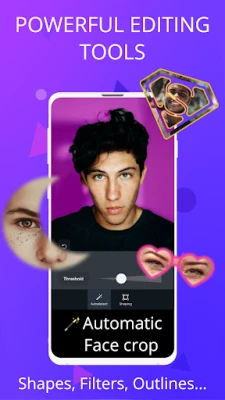
Transform your images into eye-catching stickers with a suite of powerful editing tools. Here’s what you can expect:
- Automatic Background Remover: Effortlessly eliminate backgrounds from your photos, allowing your subjects to shine.
- Automatic Face Detection: This feature recognizes multiple faces in group photos, making it easy to crop and highlight individuals.
- Shape Crop: Choose from a variety of shapes to create fun and engaging photo effects that stand out.
- Manual Crop: Enjoy one of the most advanced and user-friendly cropping tools available, giving you complete control over your images.
- Outlines: Customize the thickness and color of outlines to make your stickers pop.
- Feather Effect: Add a soft, blurry contour around your stickers for a polished look.
- Image Filters: Enhance your photos with a selection of filters that add flair and style.
Create Unique Stickers with Text and Animation
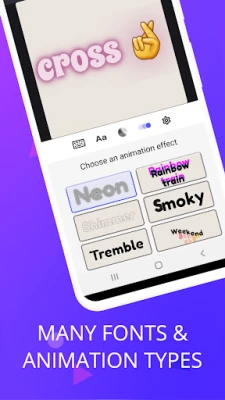
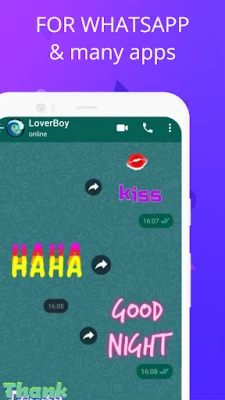
Take your creativity to the next level by designing stickers that incorporate various fonts and animation styles. The possibilities are endless! You can also add emojis directly from your keyboard to inject more fun into your creations.
User-Friendly and Free to Use
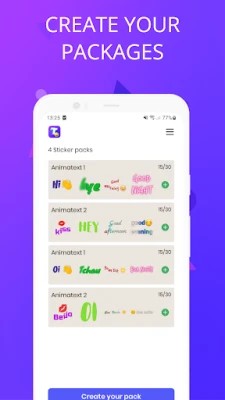
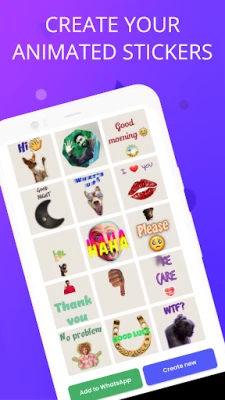
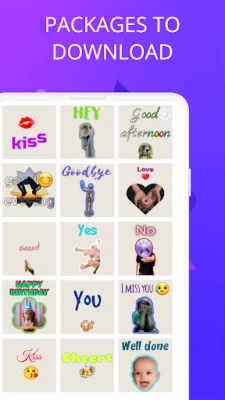
This photo editor is designed with simplicity in mind, making it accessible for everyone. Best of all, it’s completely free! Organize your animated text stickers into packs, create new stickers, and seamlessly add them to WhatsApp. Share your creations as native WhatsApp stickers (WASticker) and enjoy easy import/export options for your sticker packages.
Customize Your Animated Text Stickers
For each animated text sticker, you have the freedom to define:
- Your Own Text: Personalize your stickers with messages that resonate.
- Your Own Picture/Photo: Use your images to create a unique sticker experience.
- Add Emojis: Enhance your stickers with fun emojis.
- Custom Font: Choose from a variety of fonts to match your style.
- Font Color, Outline Color & Width, Background Color: Tailor every aspect of your sticker’s appearance.
⚠️ Tip: For optimal results, keep the background transparent when using your stickers in WhatsApp and other chat applications.
Explore Dozens of Animation Effects
With a wide array of animation effects available, you can create stunning animated text stickers that will captivate your audience in WhatsApp chats. Each effect comes with adjustable parameters, allowing you to fine-tune your designs to perfection.
Share Your Creations Across Platforms
Not only can you share your animated text stickers as native WhatsApp stickers, but you can also export them as GIFs to any messaging app, including MMS, Facebook Messenger, and Instagram. This versatility ensures that your creativity knows no bounds.
Conclusion: Unleash Your Creativity
Whether you want to surprise your friends and family or simply enjoy the process of creating, this powerful photo editor provides all the tools you need. Dive into the world of custom stickers and let your imagination run wild. Start crafting today and transform your messaging experience!
Rate the App
User Reviews














Popular Apps










Editor's Choice









