

Latest Version
May 23, 2026
McAnswer
Tools
Android
0
Free
com.mcanswer.sshterminal
Report a Problem
More About Termux App - SSH & Terminal
Unlock the Power of Termux App: Your Ultimate Terminal Emulator for iOS
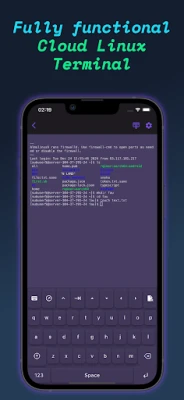
The Termux App stands out as a robust terminal emulator designed specifically for iOS users, offering seamless access to remote servers. Whether you are a developer, a system administrator, or simply someone who enjoys exploring server management, Termux App simplifies the process of executing commands and managing your servers like never before.
Effortless Server Connection
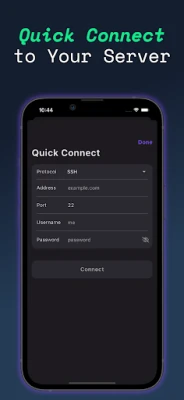
With Termux App, connecting to your remote servers is a breeze. The app allows you to access your servers with just a single tap, enabling you to concentrate on your tasks without the hassle of complicated connection processes. This quick-connect feature ensures that you can jump right into your work, making it an invaluable tool for anyone who relies on remote server management.
Customize Your Terminal Experience
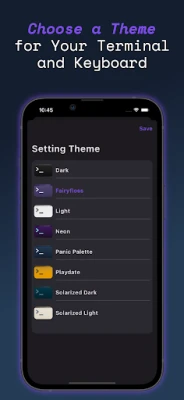
Personalization is key when it comes to productivity. Termux App offers a variety of themes for your terminal window, allowing you to choose a look that suits your style. Additionally, you can customize your keyboard layout to enhance your convenience while navigating through commands. This level of customization ensures that your terminal experience is not only functional but also enjoyable.
Comprehensive Support and Settings Management
Termux App prioritizes user experience by providing easy access to support and settings management. You can effortlessly adjust app settings to fit your preferences and access helpful resources whenever you need assistance. This feature guarantees that you have all the tools necessary for a smooth and efficient experience while using the app.
Streamlined Terminal Navigation
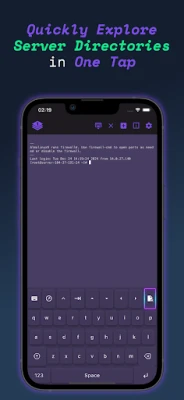
Enjoy a clean and intuitive interface with Termux App, designed for easy navigation. The app’s straightforward layout and user-friendly keyboard controls allow for efficient server management. Whether you are executing commands or managing files, the clear terminal design enhances your productivity and minimizes distractions.
Custom SSH Keyboard for Enhanced Efficiency
Time is of the essence, especially when managing servers. Termux App includes a custom SSH keyboard that provides quick access to essential commands and functions. This feature is particularly beneficial for users who frequently perform repetitive tasks, allowing you to streamline your workflow and save valuable time.
Organized Access with Saved Servers and Folders
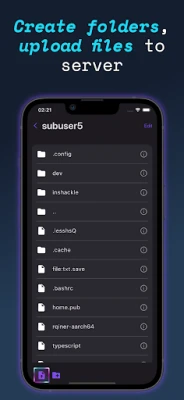
Termux App simplifies your server management by allowing you to save and organize your servers and folders for quick connections. With this feature, you no longer need to re-enter credentials or paths each time you want to connect. Instead, you can enjoy instant access to your saved servers, making your workflow more efficient and hassle-free.
Why Choose Termux App?
Whether you are managing cloud servers, engaging in remote development, or executing various commands, Termux App is the essential tool for anyone working with remote systems. Its combination of user-friendly features, customization options, and efficient navigation makes it a standout choice for both novice and experienced users alike.
Conclusion
In summary, the Termux App is a powerful terminal emulator that enhances your ability to manage remote servers effectively. With its quick connection capabilities, customizable interface, and organized access features, it stands as a must-have tool for anyone involved in server management. Embrace the power of Termux App and elevate your remote server experience today!
For more information, please review our Privacy Policy and Terms of Use.
Rate the App
User Reviews















Popular Apps










Editor's Choice









