

Latest Version
March 17, 2026
Tentacle Sync GmbH
Tools
Android
0
Free
com.tentacle.sync.setup.legacy
Report a Problem
More About Tentacle Setup Legacy
Maximize Your Tentacle Sync Experience: A Comprehensive Guide for Existing Users
For current users of the first-generation Tentacle Sync and Sync E, there’s no need to upgrade to the latest version of the app. This guide will help you set up and optimize your existing devices, ensuring you get the most out of your audio synchronization experience.
Essential Features of Your First Generation Tentacle and Sync E
Understanding the features available on your Tentacle devices is crucial for effective usage. Here’s a breakdown of the key functionalities you can set up:
- Set Timecode / RTC: Configure the real-time clock for accurate timecode synchronization.
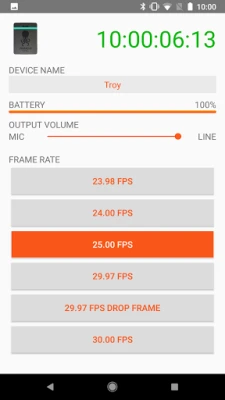
- Frame Rates (fps): Choose from various frame rates including 23.98, 24, 25, 29.97, 29.97DF, and 30 to match your project requirements.
- Set Output Level: Adjust the output level to either Mic or Line, depending on your audio setup.
- Tentacle Device Name: Personalize your device name for easy identification.
- User Bits: Input RTC date or a manual value for additional timecode information.
- Auto Power Off Time: Set a timer for automatic power-off to conserve battery life.
- Auto Mic Level Detection: Toggle this feature on or off to allow the device to automatically adjust mic levels.
Battery Management for Optimal Performance
Maintaining your device’s battery charge is essential for uninterrupted operation. Regularly check the battery status to ensure your Tentacle Sync devices are always ready for use.
Connecting Your First Generation Tentacle to Android Devices
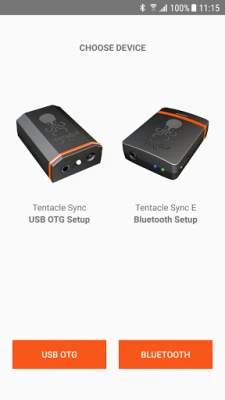
To connect your first-generation Tentacle to an Android device, ensure that your device supports USB Host Mode (USB On-The-Go). You will need a USB OTG cable along with a Micro USB adapter cable for a successful connection.
Utilizing the Tentacle Sync E: Wireless Convenience
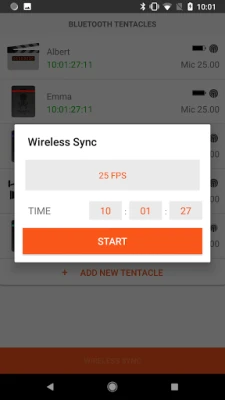
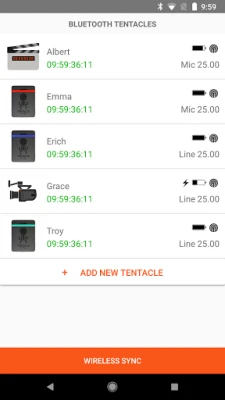
The Tentacle Sync E offers a cable-free experience, making it easier to manage your audio synchronization. Simply activate Bluetooth and follow the app’s instructions to connect. With this setup, you can monitor all Sync E devices within your range, allowing you to keep track of:
- Timecode: Ensure accurate synchronization across devices.
- Sync Status: Check the operational status of each device.
- Device Name: Identify each device easily.
- Frame Rate: Confirm the frame rate settings for consistency.
- Battery Charge: Monitor battery levels to avoid unexpected shutdowns.
- Timecode Output Level: Adjust output levels as needed for optimal performance.
Further Resources and Support
For additional information and support, visit the official Tentacle Sync website at www.tentaclesync.com. Here, you can find detailed guides, FAQs, and customer support to enhance your experience with Tentacle products.
Conclusion
By leveraging the features of your first-generation Tentacle Sync and Sync E, you can achieve seamless audio synchronization without the need for an upgrade. Follow this guide to set up your devices effectively and enjoy a hassle-free audio experience.
Rate the App
User Reviews















Popular Apps










Editor's Choice









