

Latest Version
15.80.199
July 31, 2026
TeamViewer
Tools
Android
0
Free
com.teamviewer.pilot
Report a Problem
More About TeamViewer Assist AR (Pilot)
Unlocking Remote Assistance: The Ultimate Guide to TeamViewer Assist AR
In today's fast-paced world, the need for efficient remote assistance has never been greater. Whether you're dealing with complex machinery, intricate infrastructure, or everyday equipment issues, having the right tools at your disposal can significantly enhance productivity and streamline troubleshooting. Enter TeamViewer Assist AR, the leading application designed to provide visual and remote guidance for field service technicians. This article delves into the key features and benefits of this innovative app, ensuring you have all the information you need to make the most of it.
Revolutionizing Troubleshooting with Visual Support
One of the standout features of TeamViewer Assist AR is its ability to simplify troubleshooting. Instead of merely describing a problem, users can visually demonstrate issues in real-time. This approach not only enhances understanding but also accelerates the resolution process. By showing rather than telling, technicians can quickly identify the root cause of a problem, leading to faster repairs and less downtime.
Real-Time Service and Support from Experts
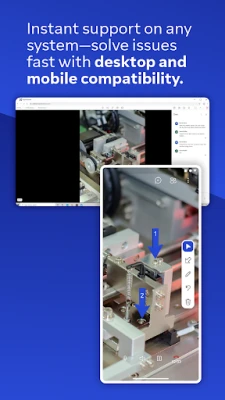
With TeamViewer Assist AR, you can connect with remote experts who provide immediate assistance. This real-time support is invaluable, especially when dealing with urgent equipment failures or complex machinery. Your experts can see exactly what you see, allowing them to offer precise guidance tailored to your specific situation. This level of collaboration ensures that you receive the best possible support, no matter where you are.
Interactive 3D Annotations for Enhanced Clarity
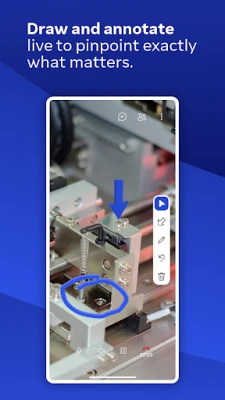
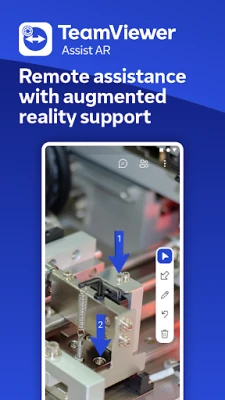
Another remarkable feature of TeamViewer Assist AR is its use of 3D annotations. Experts can annotate directly on the video feed, using markers that stick to real-world objects. This interactive approach allows for clearer communication and understanding, as technicians can follow along with visual cues that highlight critical areas of focus. Whether it's pointing out a specific component or illustrating a repair process, these annotations make complex tasks more manageable.
Empower Your Team with Knowledge Sharing
TeamViewer Assist AR isn't just about troubleshooting; it's also a powerful tool for knowledge sharing. Users can create video tutorials that serve as training resources for colleagues or new team members. By documenting processes and solutions, you can build a library of knowledge that enhances your team's skills and efficiency. This feature not only fosters a culture of learning but also ensures that valuable insights are preserved for future reference.
Key Features of TeamViewer Assist AR
- Remote Camera Sharing and Real-Time Video Streaming: Experience seamless communication with high-quality video feeds.
- HD VoIP: Enjoy crystal-clear audio during your remote sessions, enhancing collaboration.
- 3D Annotations: Utilize interactive markers to guide users through complex tasks.
- Highest Security Standards: Benefit from robust security measures, including 256 Bit AES session encoding and 2048 Bit RSA key exchange, ensuring your data remains protected.
- And Much More: Explore additional features that cater to your specific needs.
Mandatory and Optional Access Information
To fully utilize the capabilities of TeamViewer Assist AR, certain permissions are required:
- Mandatory Access: Camera: This access is essential for generating the video feed within the app.
- Optional Access: Microphone: This feature allows you to enhance the video feed with audio or record messages during sessions. However, you can still use the app without granting this permission by adjusting the in-app settings.
Why Choose TeamViewer Assist AR?
TeamViewer Assist AR stands out as the premier choice for visual and remote guidance among field service technicians. Its combination of real-time support, interactive features, and robust security makes it an indispensable tool for any organization looking to improve efficiency and reduce downtime. By leveraging the power of this app, you can ensure that your team is equipped to handle any challenge that comes their way.
Conclusion
In conclusion, TeamViewer Assist AR is more than just a remote assistance app; it's a comprehensive solution designed to enhance troubleshooting, facilitate expert support, and promote knowledge sharing. With its innovative features and user-friendly interface, it empowers technicians to tackle equipment and infrastructure issues with confidence. Embrace the future of remote assistance and elevate your team's productivity with TeamViewer Assist AR today.
Rate the App
User Reviews















Popular Apps










Editor's Choice









