

Latest Version
6.10.0.41
April 19, 2026
Meep Advanced Enterprise Communications Ltd
Communication
Android
0
Free
com.elbit.italk
Report a Problem
More About Synch Push To Talk (PTT)
Enhancing Communication and Collaboration: The Ultimate Solution for Organizations
In today's fast-paced world, effective communication and collaboration are essential for organizations and frontline workers. Our innovative platform provides secure communication channels that empower teams to execute their operations and missions more efficiently over mobile and data networks.
Exclusive Access for Registered Companies
To ensure a tailored experience, our application is exclusively available to registered companies. If you do not possess an active account, the app will not function for you, emphasizing the importance of secure and controlled access.
Key Features That Transform Team Dynamics
Our platform is equipped with a suite of powerful capabilities designed to enhance communication and collaboration among users. Here are some of the standout features:
1. Instant Push-To-Talk (PTT)
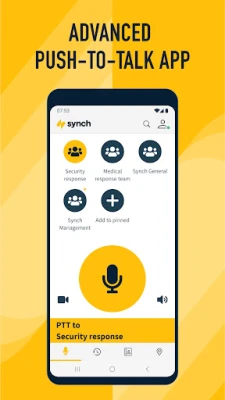
Experience seamless communication with our Push-To-Talk feature, allowing users to connect instantly with large groups or engage in one-on-one conversations. This feature ensures that your team can communicate effectively, regardless of their location.
2. Real-Time Video Sharing (PTV)
Share and receive live, high-quality video with ease. Our platform supports both group and individual video sharing, enabling teams to collaborate visually and make informed decisions quickly.
3. Comprehensive Team Collaboration Tools
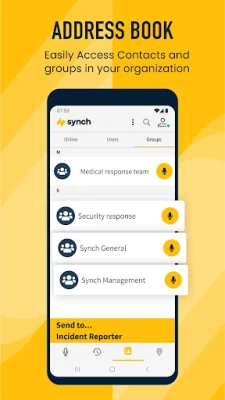
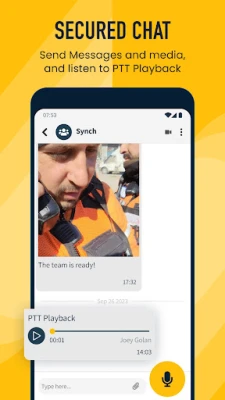
Utilize our organizational phone book and advanced search capabilities to enhance collaboration. The platform supports various communication methods, including text, multimedia, and recorded voice messages, ensuring that your team stays connected.
4. Presence Service
Stay informed about your team's availability with our presence service. This feature visually displays active users and their status, making it easier to coordinate efforts and manage tasks effectively.
5. SOS Alarm for Emergency Situations
In critical situations, our SOS alarm feature allows users to initiate an immediate audio-visual alert, ensuring that help is on the way. This capability is vital for maintaining safety in high-risk environments.
6. Live Location Tracking
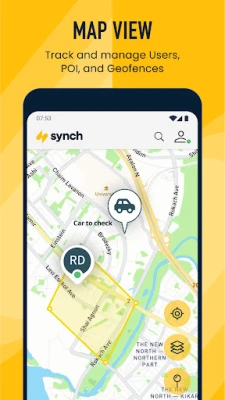
Monitor your workers' locations in real-time with our live location tracking feature. This includes geofencing capabilities and points of interest on the map, providing valuable insights into team movements and safety.
7. Land Mobile Radio (LMR) Network Interoperability
Our platform supports interoperability with Land Mobile Radio networks, facilitating common voice group communication. This feature ensures that your team can communicate effectively, regardless of the technology they are using.
8. Geofencing Groups and Alerts
Mark specific areas on maps and communicate with users within those zones. Our geofencing feature also alerts users when they cross designated boundaries, enhancing situational awareness and safety.
9. Safe Worker Solutions
Prioritize worker safety with our dedicated lone worker and risk mitigation solutions. These tools help manage and protect employees in potentially hazardous situations, ensuring their well-being.
10. Centralized Dispatch Console
Our web-based command and control center allows for centralized communication and coordination of teams and workers. This dispatch console streamlines operations and enhances overall efficiency.
11. Integration with External Applications
Seamlessly integrate with external information systems without the need for standalone mobile applications. This flexibility allows organizations to enhance their existing workflows and improve overall productivity.
Enhancing User Experience with Accessibility Features
Our application leverages the AccessibilityService API to improve user interaction and accessibility. This integration provides convenient control options using device hardware, ensuring efficient functionality even when the app operates in the background.
Importantly, the use of this API is solely focused on enhancing the user experience. We do not collect, store, or share any personal information. Users maintain full control over enabling or disabling this service, adhering strictly to user consent and privacy policies.
Conclusion: Empowering Teams for Success
In conclusion, our platform is designed to revolutionize communication and collaboration within organizations. With a robust set of features tailored to meet the needs of modern teams, we empower users to work more effectively and safely. By prioritizing security, accessibility, and user experience, we ensure that your organization can thrive in today's dynamic environment.
Join us in transforming the way your team communicates and collaborates. Experience the difference today!
Rate the App
User Reviews















Popular Apps










Editor's Choice









