




Latest Version
December 14, 2025
Mesut GÜNGÖR
Tools
Android
0
Free
com.messutgungor.clean.photos.swipetocleanphotos
Report a Problem
More About Swipe to Clean - Photo Cleaner
Discover the Ultimate Photo Management App: Swipe to Clean
In today's digital age, our smartphones are filled with countless photos, many of which clutter our galleries and consume valuable storage space. If you're looking for an efficient way to manage your images, Swipe to Clean is the perfect solution. This innovative app simplifies the process of organizing and decluttering your photo library, making it a breeze to keep your memories intact while freeing up space. Here’s why you’ll love using Swipe to Clean.
🧹 Effortless Swiping Action
One of the standout features of Swipe to Clean is its intuitive swiping mechanism. With just a simple gesture, you can:
- Swipe Left to add a photo to your delete list.
- Swipe Right to keep it safe in your gallery.
This fluid motion allows you to declutter your phone quickly and efficiently, ensuring that you can manage your photos without any hassle.
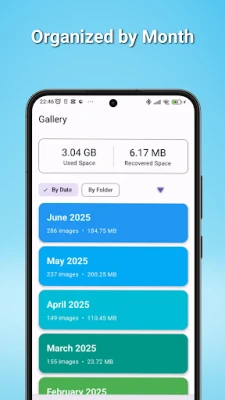
🗓️ Smart Sorting & Organization
Swipe to Clean offers advanced sorting options that make it easy to tackle your photo library. You can:
- Organize your images by month, allowing you to focus on recent pictures first.
- View photos from today, yesterday, this week, and previous months in a clear, organized list.
- Sort through your existing photo albums, cleaning them one by one for a more thorough decluttering process.
This smart organization feature ensures that you can find and manage your photos with ease.
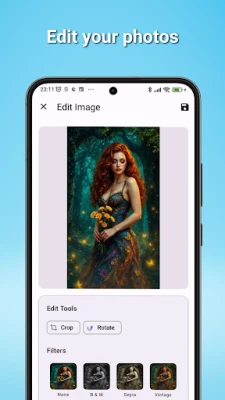
✨ Simple & Powerful Editing Tools
Need to make quick adjustments to your photos? Swipe to Clean includes a suite of editing tools that allow you to:
- Crop and rotate images effortlessly.
- Apply basic filters to enhance your photos directly within the app.
Once you’ve polished your images, you can save them, ensuring that your gallery remains vibrant and visually appealing.
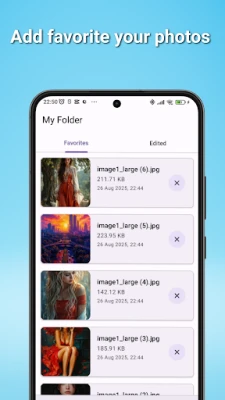
⭐ Favorites & Edited Gallery
Never lose track of your cherished memories again! Swipe to Clean provides a dedicated space for:
- Your favorite photos, making them easily accessible.
- All your edited images, so you can quickly find your best shots.
This feature ensures that your most important images are always at your fingertips.
📊 Track Your Progress with Statistics
Curious about your photo management habits? The app includes a statistics screen that provides valuable insights into your cleaning activities:
- Track how many photos you’ve swiped, deleted, and kept.
- Monitor your storage savings with a total counter that shows how much space you’ve reclaimed.
- Visualize your progress with a pie chart that illustrates the ratio of deleted versus kept photos, motivating you to continue your decluttering journey.
This feature not only helps you stay organized but also encourages you to maintain a clean photo library.
How It Works in 3 Simple Steps
Getting started with Swipe to Clean is incredibly easy. Follow these three simple steps:
- Choose a Batch: Select a month or folder to begin your cleaning process.
- Start Swiping: Keep the memories you love and toss the rest.
- Reclaim Your Space: Review your delete list and permanently remove unwanted photos to free up storage space!
Conclusion
Swipe to Clean is more than just a photo management app; it’s a comprehensive solution for anyone looking to streamline their digital life. With its effortless swiping action, smart sorting capabilities, powerful editing tools, and insightful statistics, you can easily take control of your photo library. Say goodbye to clutter and hello to a well-organized gallery that showcases your best memories. Download Swipe to Clean today and start reclaiming your storage space!
Rate the App
User Reviews















Popular Apps










Editor's Choice









