

Latest Version
2.0
February 09, 2026
Maulik Pareshbhai Hirani
Tools
Android
0
Free
maulik.styleit
Report a Problem
More About STYLE IT - Cool Fancy Text
Transform Your Text with the Ultimate Fancy Text Generator App
In today's digital age, standing out in conversations and social media posts is essential. Enter the world of fancy text generators, where creativity meets technology. Forget the old methods of copying and pasting; with the revolutionary STYLE IT app, you can effortlessly convert your ordinary text into stunning, stylish fonts directly within any application. This article will explore the features, usage, and benefits of this innovative tool.
Why Choose STYLE IT?
STYLE IT is not just another text generator; it’s a game-changer. Available on the Play Store, this app allows users to transform their text into eye-catching styles without the hassle of copy-pasting. Here’s why you should consider using STYLE IT:
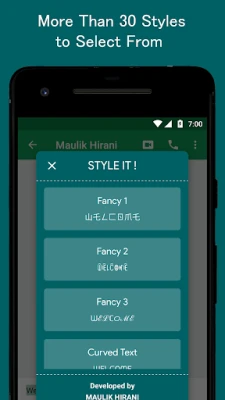
- Over 25 Unique Font Styles: Choose from a diverse range of fonts that cater to every taste and occasion.
- Seamless Integration: Convert your text into fancy styles directly within any app, making it easier than ever to enhance your messages.
- Device Compatibility: The app supports almost all devices through its Accessibility Service, ensuring a wide reach.
- Ad-Free Experience: Enjoy a smooth user experience without interruptions from advertisements.
- Completely Free: Access all features without any hidden costs or subscriptions.
Explore the Sample Styles
With STYLE IT, the possibilities are endless. Here are just a few examples of the unique styles you can create:
- 𝓈𝓉𝓎𝓁𝑒 𝒾𝓉
- ꌗ꓄ꌩ꒒ꍟ ꀤ꓄
- ⓈⓉⓎⓁⒺ ⒾⓉ
- 🅂🅃🅈🄻🄴 🄸🅃
- 🅢🅣🅨🅛🅔 🅘🅣
And that’s just the beginning! Discover even more styles within the app to express your personality and creativity.
How to Use STYLE IT
Getting started with STYLE IT is a breeze. The app offers two modes to cater to different user needs:
Default Mode
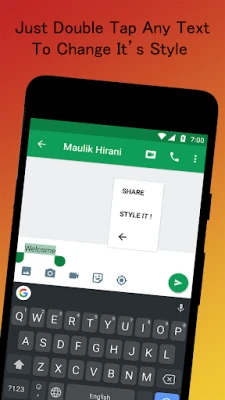
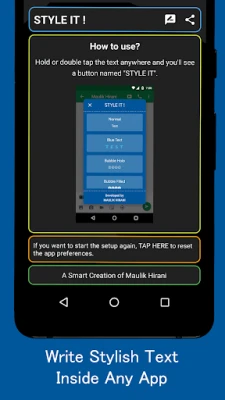
In Default Mode, simply double-tap or hold the text you are writing. A button labeled STYLE IT will appear. Click on this button, select your desired style, and watch the magic happen as your text transforms instantly!
Accessibility Mode
If your device does not support Default Mode, don’t worry! STYLE IT has you covered with Accessibility Mode. Here’s how to use it:
- Add a plus sign (+) before and after the text you wish to style.
- This action will open the Style Chooser, allowing you to select your preferred font style.
- Once selected, your text will be styled instantly!
Note: Some smartphones, such as Xiaomi, Vivo, and Letv, may automatically disable the Accessibility Service. To prevent this, pull down the app from "Recent Apps" and lock it to keep the service active. If you encounter issues, simply restart the setup from the app.
Privacy and Security
STYLE IT prioritizes user privacy. The Accessibility Service is designed solely to enhance your text styling experience. It observes your typing actions to detect commands for styling and retrieves window contents to replace your original text with the styled version. Rest assured, the app does not store or transmit any personal information.
Conclusion
In a world where first impressions matter, using a stylish text creator like STYLE IT can elevate your communication. With its user-friendly interface, diverse font options, and commitment to privacy, it stands out as the premier choice for anyone looking to add flair to their text. Download STYLE IT today and start transforming your ordinary messages into extraordinary expressions!
Whether you’re looking to impress friends on social media or simply want to add a personal touch to your messages, STYLE IT is the ultimate tool for all your fancy text needs. Don’t miss out on the opportunity to express yourself in style!
Rate the App
User Reviews















Popular Apps










Editor's Choice









