

Latest Version
2.4.005
November 07, 2024
Streamomation
Tools
Android
0
Free
com.streamomation.streamerchat
Report a Problem
More About Stream buddy
Unlock Your Streaming Potential with Stream Buddy: The Ultimate Twitch Companion
In the ever-evolving world of live streaming, having the right tools can make all the difference. Stream Buddy is a powerful application designed to enhance your Twitch experience, offering a suite of features that cater to both new and seasoned streamers. This article delves into the key functionalities of Stream Buddy, its integrations with other platforms, and how it can elevate your streaming game.
Stay Updated with the Latest Twitch Features
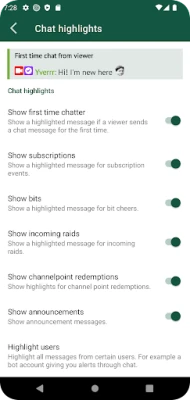
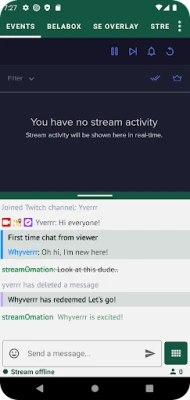
Stream Buddy is consistently updated to incorporate the latest features from Twitch. Whether you're engaging with first-time chatters, running predictions, or conducting polls, this tool ensures you never miss a beat. Additionally, it supports Hype Trains and ad notifications, allowing you to keep your audience engaged and informed.
Enhanced Emote Support
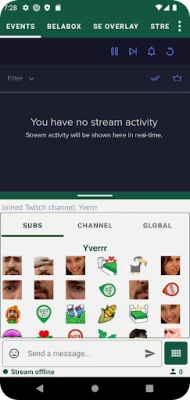
One of the standout features of Stream Buddy is its compatibility with third-party emotes. Streamers can utilize popular emote extensions such as BTTV, FFZ, and 7TV, enriching the chat experience for viewers. This flexibility allows for a more personalized and interactive environment, making your streams more enjoyable.
Seamless Integration with StreamElements
Stream Buddy offers a built-in event list and media player, enabling seamless integration with StreamElements. This connection allows you to manage your overlays and alerts effortlessly, ensuring that your stream remains visually appealing and engaging. With Stream Buddy, you can control all aspects of your stream from one centralized platform.
Multi-Platform Support: YouTube & Kick
In addition to Twitch, Stream Buddy provides basic integration for YouTube and Kick. This feature allows you to combine chats from all three platforms, making it easier to interact with your audience regardless of where they are watching. This multi-platform support is essential for streamers looking to expand their reach and engage with a broader audience.
Control Your Stream with OBS Integration
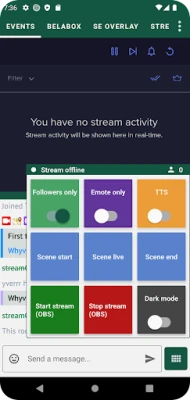
Stream Buddy can be connected to your OBS (Open Broadcaster Software) through the OBS WebSocket. This integration allows you to control scenes, media sources, and more, giving you complete command over your streaming setup. With this level of control, you can create a polished and professional streaming experience that captivates your viewers.
Customizable Stream Board
The fully configurable Stream Board is another highlight of Stream Buddy. You can set up buttons and sliders to control various aspects of your stream, including OBS, Twitch chat, and more. This customization empowers you to tailor your streaming experience to your specific needs, enhancing your overall efficiency and effectiveness.
Additional Features to Enhance Your Streaming Experience
- Disable Followers Only Mode: Temporarily disable this mode during raids to welcome new viewers.
- Load Recent Messages: Access the last 50 messages from when you were offline, ensuring you stay connected with your audience.
- Custom Username Colors: Personalize your chat with unique username colors for better visibility.
- Bluetooth Speaker Support: Keep your Bluetooth speaker on for enhanced audio experiences.
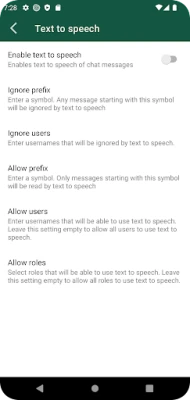
- AI Text-to-Speech Voices: Add your own AI-generated voices for a unique touch to your streams.
Dedicated Support for Streamers
Stream Buddy is crafted by streamers who understand the intricacies of the craft. The team is committed to providing exceptional support to users. If you have questions or need assistance, you can reach out via Discord. Whether you’re trying to navigate the app or seeking advice on best practices, the Stream Buddy team is always ready to help.
Join the Community
Your feedback is invaluable to the development of Stream Buddy. For updates, issues, and to participate in shaping the app's roadmap, join the community on Discord at https://discord.gg/VTbtJFsUdH. Engage with fellow streamers, share your experiences, and contribute to the evolution of this essential streaming tool.
Conclusion
Stream Buddy is more than just a tool; it’s a comprehensive solution for streamers looking to enhance their Twitch experience. With its robust features, seamless integrations, and dedicated support, Stream Buddy empowers you to create engaging and professional streams. Embrace the future of streaming and unlock your full potential with Stream Buddy today!
Rate the App
User Reviews















Popular Apps










Editor's Choice









