




Latest Version
April 29, 2026
深圳市前海乐游原网络技术有限公司
Tools
Android
0
Free
com.biggerlens.sheets
Report a Problem
More About Spreadsheet app for Android
Maximize Your Productivity with Automatic Column Adjustments and Essential Formulas
In today's fast-paced work environment, efficiency is key. One of the most effective ways to enhance your productivity is by utilizing tools that support automatic adjustments of column height and width, along with essential mathematical operations. This article explores how these features can streamline your workflow, meet office demands, and help you achieve your goals more effectively.
Understanding Automatic Adjustments
Automatic adjustments for column height and width are invaluable for anyone working with spreadsheets or data management tools. These features allow you to:
- Ensure that all data is visible without manual resizing.
- Maintain a clean and organized layout, enhancing readability.
- Save time by eliminating the need for repetitive adjustments.
By implementing automatic adjustments, you can focus on analyzing data rather than formatting it, leading to a more efficient workflow.
Essential Mathematical Operations for Enhanced Efficiency
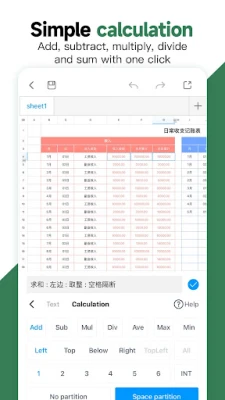
In addition to automatic adjustments, the ability to perform basic mathematical operations—addition, subtraction, multiplication, and division—directly within your spreadsheet is crucial. These operations allow you to:
- Quickly calculate totals and averages.
- Analyze data trends and patterns with ease.
- Make informed decisions based on accurate calculations.
Integrating these functions into your daily tasks can significantly reduce the time spent on manual calculations, allowing you to concentrate on more strategic aspects of your work.
Utilizing Commonly Used Function Formulas
Beyond basic arithmetic, spreadsheets offer a variety of commonly used function formulas that can further enhance your productivity. Some of these include:
- SUM: Quickly add a range of numbers.
- AVERAGE: Calculate the mean of a set of values.
- COUNT: Determine the number of entries in a dataset.
- IF: Perform conditional calculations based on specified criteria.
By mastering these functions, you can automate complex calculations and data analysis, freeing up your time for more critical tasks.
Improving Work Rate and Meeting Office Needs
Implementing automatic adjustments and essential formulas not only boosts your work rate but also aligns with the needs of a modern office environment. Here’s how:
- Streamlined Processes: Automating repetitive tasks reduces the likelihood of errors and increases overall efficiency.
- Enhanced Collaboration: A well-organized spreadsheet is easier for team members to understand and collaborate on.
- Better Time Management: With less time spent on formatting and calculations, you can allocate more time to strategic planning and execution.
These improvements contribute to a more productive workplace, where employees can focus on delivering high-quality results.
Conclusion: Elevate Your Workflow Today
Incorporating automatic adjustments of column height and width, along with essential mathematical operations and commonly used function formulas, can significantly enhance your productivity. By streamlining your workflow, you can meet the demands of your office environment and complete your work more effectively. To experience these benefits firsthand, explore the tools available at Form Master and take your productivity to the next level.
Rate the App
User Reviews















Popular Apps










Editor's Choice









