

Latest Version
6.5.51
December 15, 2025
A-Soft-nl
Communication
Android
0
Free
nl.asoft.speechassistant
Report a Problem
More About Speech Assistant AAC
Unlocking Communication: The Ultimate App for Customizable Messaging
In today's fast-paced world, effective communication is essential. Whether you're looking to enhance your messaging capabilities or need a reliable tool for speech assistance, this innovative app offers a plethora of features designed to meet your unique needs. With customizable categories and phrases, users can create personalized messages that can be displayed or spoken using text-to-speech technology. Let's explore the key features and functionalities that make this app a must-have for anyone seeking to improve their communication experience.
Key Features of the App
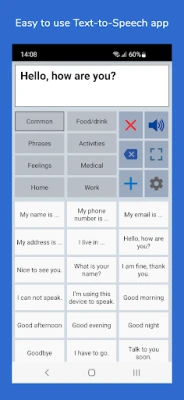
- User-Friendly Interface: The app is designed for ease of use, allowing users to navigate effortlessly through its features.
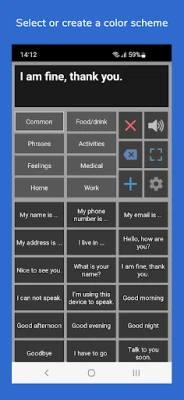
- Customizable Categories: Organize your phrases into categories for quick and easy access.
- History Functionality: Quickly retrieve previously typed phrases with the history feature.
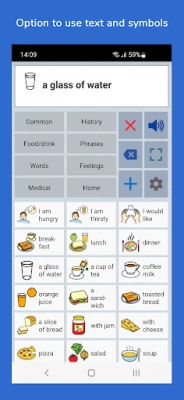
- Visual Customization: Select images from your Photo Library or use symbols to enhance your buttons.
- Text-to-Speech Options: Record your own voice or utilize the app's text-to-speech capabilities.
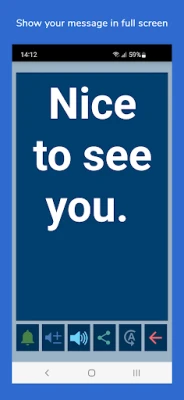
- Full-Screen Display: Showcase your messages in large font for better visibility.
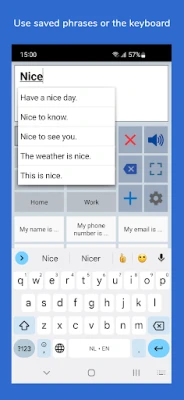
- Auto-Complete Feature: Quickly find phrases with the app's smart auto-complete functionality.
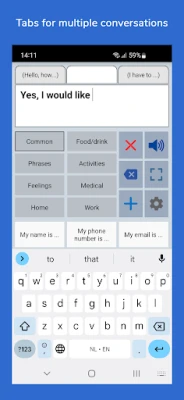
- Multi-Conversation Tabs: Switch between different conversations seamlessly with optional tabs.
- Device Compatibility: The app is optimized for both smartphones and tablets, supporting both portrait and landscape orientations.
- Backup Options: Easily back up your data to Mail or Google Drive for peace of mind.
Organizing Your Categories and Phrases
One of the standout features of this app is its ability to let users add, modify, or delete categories and phrases. This flexibility allows for a tailored experience:
- Custom Categories: Create specific categories to streamline access to your frequently used phrases.
- Easy Editing: Long press on buttons to quickly edit phrases and categories.
- Backup and Restore: Safeguard your personalized settings with the backup and restore options.
Fully Customizable Experience
Customization is at the heart of this app. Users can adjust various elements to suit their preferences:
- Button and Text Size: Modify the size of buttons and text boxes for optimal visibility.
- Color Schemes: Choose from various color schemes or create your own to personalize the app's appearance.
- Button Colors: Assign different colors to individual buttons for easy identification.
Full-Screen Messaging for Enhanced Communication
In noisy environments, clear communication can be challenging. The app addresses this with its full-screen feature:
- Large Font Display: Show messages in a large font for easy reading.
- Text Rotation: Rotate text to face the person you are communicating with, ensuring clarity.
Additional Features for Enhanced Usability
The app is packed with additional features that enhance its functionality:
- Message Sharing: Share your messages via email, text, or social media with a single button press.
- Bluetooth Keyboard Support: Connect a Bluetooth keyboard to create shortcuts for essential functions like Speak, Clear, Show, and Attention Sound.
- Double Tap Prevention: Disable buttons temporarily to prevent accidental double-tapping.
- Undo Functionality: Easily recover from accidental taps with the undo option.
- Attention Sound: Use the attention sound feature to alert others to your messages.
Voice Options for Personalized Communication
The app utilizes the voice capabilities installed on your device, offering a range of options:
- Voice Selection: Choose from various voices, including male and female options in multiple languages, through 'Speech Services by Google.'
- Voice Settings: Easily change the selected voice within the app's settings.
Upgrade to the Full Version for More Features
The app offers a basic version for free, with an option to upgrade to the full version for a one-time payment. The full version includes:
- Unlimited Categories: Create as many categories as you need.
- Backup and Restore: Enhanced backup options for your data.
- Symbol Selection: Access a library of 3,400 Mulberry Symbols for button customization.
- Color Customization: Change the color of individual buttons for better organization.
- History Access: Quickly revisit previously spoken phrases.
- User Profiles: Create profiles for different languages, situations, or individuals.
- Conversation Tabs: Easily switch between multiple conversations.
- Voice Recording: Record speech directly onto buttons and import voice recordings.
About the App
This app is designed to function without an internet connection, ensuring accessibility anytime, anywhere. For feedback or inquiries, users can reach out via email at android@asoft.nl. A comprehensive user manual is available at www.asoft.nl.
In conclusion, this app stands out as a powerful tool for enhancing communication. With its customizable features, user-friendly interface, and robust functionality, it caters to a wide range of users, making it an invaluable resource for anyone looking to improve their messaging experience.
Rate the App
User Reviews















Popular Apps










Editor's Choice









