


Latest Version
January 09, 2026
Google LLC
Communication
Android
0
Free
com.google.android.accessibility.soundamplifier
Report a Problem
More About Sound Amplifier
Enhance Your Hearing Experience with Sound Amplifier: Features and Requirements
In today's fast-paced world, clear communication is essential, especially in noisy environments. The Sound Amplifier app is designed to improve your listening experience by amplifying sounds and filtering out unwanted noise. This article delves into the remarkable features of Sound Amplifier, its requirements, and how it can transform the way you engage with your surroundings.
Key Features of Sound Amplifier
Sound Amplifier offers a range of features that cater to diverse listening needs. Here’s how it can enhance your auditory experience:
1. Noise Reduction for Clearer Speech Recognition
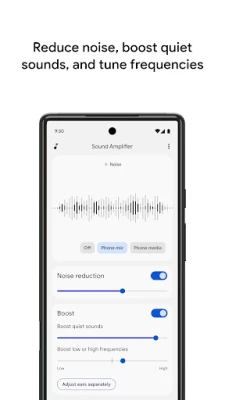
One of the standout features of Sound Amplifier is its ability to reduce unwanted background noise. This functionality allows users to recognize speech more effectively, making conversations clearer and more enjoyable. Whether you're in a bustling café or a crowded room, this feature ensures that you can focus on what truly matters—understanding the speaker.
2. Conversation Mode for Noisy Environments
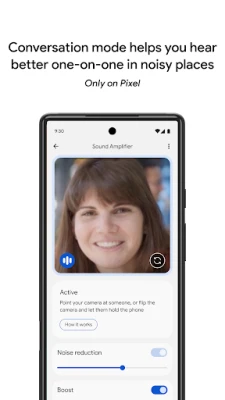
Available for Pixel 3 and newer models, the Conversation Mode is a game-changer for those who often find themselves in noisy settings. This mode prioritizes the speaker's voice, allowing you to engage in conversations without straining to hear. It’s perfect for social gatherings, lectures, or any situation where background noise can be distracting.
3. Enhanced Listening for Various Audio Sources
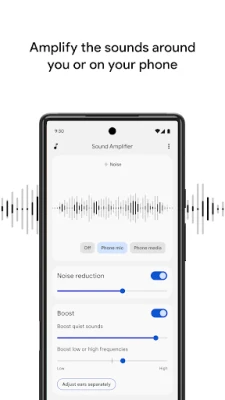
Sound Amplifier is not just limited to conversations; it also enhances your experience while listening to TV shows, lectures, or any audio content. For optimal performance, especially with audio sources that are farther away, pairing your Android device with Bluetooth headphones is recommended. However, be mindful that Bluetooth headphones may introduce a slight delay in sound transmission.
4. Personalize Your Listening Experience
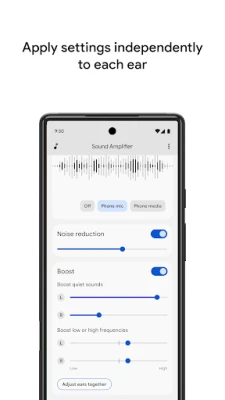
Customization is key when it comes to audio preferences. Sound Amplifier allows users to tailor their listening experience by adjusting settings for surrounding conversations or media playing on their devices. You can reduce noise or boost specific sound frequencies—low, high, or quiet sounds. Additionally, you can set preferences for each ear individually, ensuring a personalized auditory experience.
5. Easy Access with Quick Settings
Turning Sound Amplifier on and off is a breeze. Users can utilize the accessibility button, a simple gesture, or the Quick Settings menu for easy access. For more information on how to use these features, visit the Google Support page.
Requirements for Using Sound Amplifier
To enjoy the benefits of Sound Amplifier, ensure that your device meets the following requirements:
- Compatible with Android 8.1 and later versions.
- Pair your Android device with headphones for the best experience.
- Conversation mode is available exclusively on Pixel 3 and newer models.
Feedback and Support
Your feedback is invaluable in enhancing the Sound Amplifier experience. If you have any suggestions or issues, feel free to reach out via email at sound-amplifier-help@google.com. For assistance with using Sound Amplifier, connect with the support team at Google Disability Support.
Permissions Notice
To function effectively, Sound Amplifier requires certain permissions:
- Microphone: Access to the microphone is essential for processing audio for amplification and filtering. Rest assured, no data is collected or stored during this process.
- Accessibility Service: As an accessibility service, the app can observe your actions, retrieve window content, and monitor the text you type to enhance your experience.
Conclusion
Sound Amplifier is a powerful tool that significantly enhances your listening experience, making it easier to engage in conversations and enjoy audio content in various environments. With its innovative features and user-friendly interface, it stands out as an essential app for anyone looking to improve their auditory experience. Ensure your device meets the requirements, and start enjoying clearer sound today!
Rate the App
User Reviews















Popular Apps










Editor's Choice









