

Latest Version
6.59
November 29, 2025
PhoneLeash: Auto-forward SMS, MMS & more to email!
Communication
Android
1
Free
com.gearandroid.phoneleashfree
Report a Problem
More About SMS Forwarder and SMS Reply
Unlock Seamless Communication with PhoneLeash: The Ultimate SMS Forwarding Solution
In today's fast-paced world, staying connected is more important than ever. Whether you're a busy professional, a small business owner, or someone who simply wants to streamline their communication, PhoneLeash offers a powerful solution. This innovative app allows you to forward SMS, MMS, group texts, and even WhatsApp notifications directly to your email or another phone, ensuring you never miss an important message. Let’s explore the standout features and how to get started with PhoneLeash.
Key Features of PhoneLeash
- Quick and Simple Setup: Get started in minutes with an intuitive installation process.
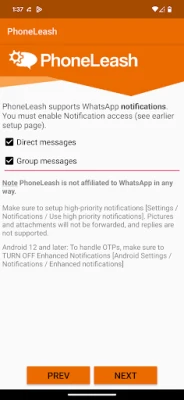
- Forward Messages Effortlessly: Send SMS, MMS, group texts, and WhatsApp notifications to your email or another phone.
- Easy Replies: Respond to messages directly from your email or a second phone.
- Picture Forwarding: Share images seamlessly along with your text messages.
- Selective Forwarding: Utilize keyword-based forwarding to filter important messages.
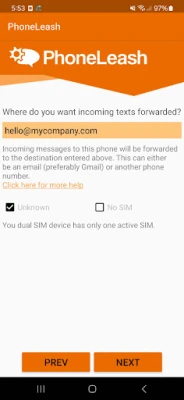
- Dual-SIM Support: Perfect for users with dual-SIM phones, enhancing flexibility.
- Send New Texts: Compose and send new messages from your email or secondary phone.
- No Ads: Enjoy an uninterrupted experience without advertisements.
Note: PhoneLeash is not affiliated with WhatsApp Inc.
How to Get Started with PhoneLeash
- Download the App: Find PhoneLeash on the Play Store and install it on your device.
- Grant Permissions: Accept all permission requests; these are essential for the app's functionality.
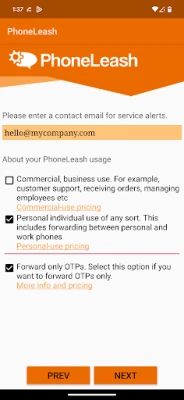
- Set Up Forwarding: Enter the email address where you want to receive incoming texts. PhoneLeash works exceptionally well with Gmail.
- Select Usage Type: Choose between Personal or Commercial usage based on your needs.
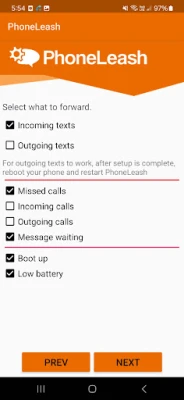
- Default Settings: For your first installation, keep the settings at default. You can adjust them later as needed.
- Testing: To test the setup, use another phone to send a text. You should see the message forwarded to your email or second phone within seconds.
Why Choose PhoneLeash?
With over a decade of experience on Google Play, PhoneLeash has proven to be a reliable tool for both individuals and businesses. Here are some compelling reasons to choose PhoneLeash:
- Business Communication: Ideal for businesses that rely on text and WhatsApp for customer interactions, allowing for centralized message management.
- Team Collaboration: Enables any team member to respond to customer inquiries, regardless of who the customer initially contacted.
- Personal Convenience: Perfect for individuals who want to manage personal and work communications from a single device.
- Travel-Friendly: Use a different phone while traveling internationally without losing access to your home number.
- Desktop Convenience: Enjoy the ease of texting from a desktop or tablet, enhancing productivity.
- Record Keeping: Keep a comprehensive record of all text communications for future reference.
How Businesses Leverage PhoneLeash
Businesses of all sizes utilize PhoneLeash to enhance their communication strategies:
- Sync messages from various platforms to a single location for better management.
- Allow team members to respond to customer messages, ensuring no inquiry goes unanswered.
- Enable assistants or family members to handle business texts when the owner is unavailable.
How Individuals Benefit from PhoneLeash
Individuals find PhoneLeash invaluable for various reasons:
- Carry only one phone while managing both personal and work communications.
- Stay connected in workplaces that restrict cellphone use.
- Access home messages while using a different phone abroad.
- Overcome poor signal issues by keeping your phone in a better location.
- Enjoy the convenience of sending texts from a larger screen.
- Maintain a record of all text communications for personal or professional use.
Trial and Support Information
PhoneLeash offers a 30-day trial period, allowing users to experience its features before committing. After the trial, the app will pause until a subscription is activated. It’s important to note that PhoneLeash is not intended for spying; robust safeguards are in place to prevent misuse.
For more information, visit the following resources:
For support inquiries, reach out via email at support@phone-leash.com.
Conclusion
PhoneLeash stands out as a versatile tool for anyone looking to enhance their communication efficiency. With its user-friendly setup, powerful features, and robust support, it’s the perfect solution for both personal and business needs. Don’t miss out on the opportunity to streamline your messaging—try PhoneLeash today!
Rate the App
User Reviews















Popular Apps










Editor's Choice









