

Latest Version
1.0.7
December 12, 2025
smartpositive
Tools
Android
0
Free
com.smartpositive.sms_exporter
Report a Problem
More About SMS Exporter
Effortlessly Export Your Messages: A Comprehensive Guide
In today's digital age, managing your messages efficiently is crucial. Whether you need to back up important conversations or share them with others, exporting your messages can simplify the process. This guide will walk you through the steps to export your messages seamlessly while ensuring your privacy remains intact.
Step-by-Step Guide to Exporting Your Messages
Exporting your messages is a straightforward process. Follow these simple steps to get started:
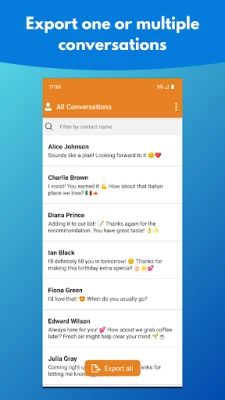
1. Choose Your Conversations
Begin by selecting the specific conversation you wish to export. If you prefer, you can opt to export all your messages at once. This flexibility allows you to manage your data according to your needs.
2. Click the Export Button
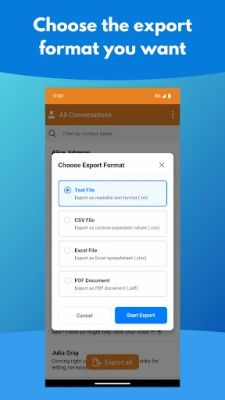
Once you have made your selection, locate the Export button. This feature enables you to choose your desired file format for the exported messages. Options typically include:
- TXT - A simple text format for easy readability.
- CSV - Ideal for data analysis and spreadsheet applications.
- PDF - Perfect for sharing and preserving the format.
- XLSX - A Microsoft Excel format for advanced data manipulation.
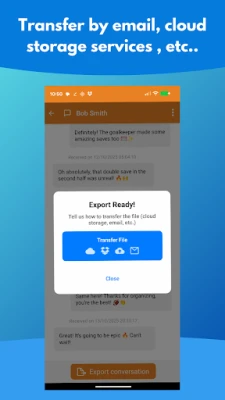
3. Transfer Your File
After selecting your preferred format, you can transfer the exported file effortlessly. Options for transferring include:
- Email - Send the file directly to your inbox or someone else's.
- Cloud Storage Services - Utilize platforms like Google Drive or Dropbox for easy access and sharing.
- Messaging Apps - Share the file through popular messaging applications for quick distribution.
Prioritizing Your Privacy
When it comes to handling personal data, privacy is paramount. Rest assured that your information remains secure throughout the export process. The SMS Exporter tool is designed with your privacy in mind:
- Your Data Stays Yours - SMS Exporter does not collect or store any of your messages. This ensures that your conversations remain confidential.
- Secure on Your Device - All exported files are stored locally on your device, minimizing the risk of unauthorized access.
Conclusion
Exporting your messages has never been easier. By following the steps outlined above, you can manage your conversations efficiently while keeping your data secure. Whether for personal use or professional needs, the ability to export messages in various formats empowers you to take control of your digital communications. Enjoy the peace of mind that comes with knowing your privacy is protected as you navigate the world of message exporting.
Rate the App
User Reviews















Popular Apps










Editor's Choice









