

Latest Version
1.20.1
August 31, 2024
XtrasZone
Tools
Android
1
Free
com.xtraszone.smartclean
Report a Problem
More About Smart Clean:Phone Junk Cleaner
The Ultimate Android Cleaner: Features That Transform Your Device
In today's digital age, maintaining the performance of your Android device is crucial. With countless apps and files cluttering your storage, a reliable cleaning tool can make all the difference. This article explores the standout features of an exceptional Android cleaner that not only optimizes your device but also ensures your important files remain intact.
1. Comprehensive Log File Management
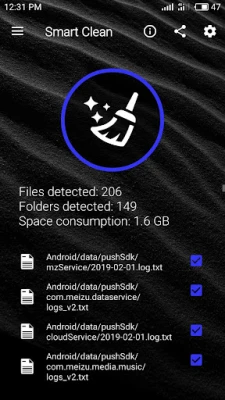
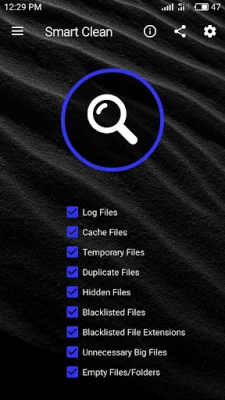
One of the primary features of this Android cleaner is its ability to efficiently remove log files and folders from every corner of your device. Log files can accumulate over time, consuming valuable storage space. By eliminating these unnecessary files, you can enhance your device's performance and free up space for essential applications.
2. Intelligent Cache File Removal
This cleaner excels at removing cache files without affecting your important data. Cache files can slow down your device, but with this tool, you can clear them out safely, ensuring that your essential files remain untouched. Enjoy a smoother experience without the worry of losing vital information.
3. Temporary File Cleanup
Temporary files often linger on your device, taking up space and potentially causing performance issues. This cleaner effectively removes temporary files and folders that apps sometimes fail to delete. By doing so, it helps you reclaim storage and maintain optimal device performance.
4. Rapid Duplicate File Scanning
Duplicate files can clutter your storage and make it difficult to find what you need. This Android cleaner features a fast scanning capability that identifies clone files without deleting the originals. You can quickly manage duplicates, ensuring your storage remains organized and efficient.
5. Efficient Blacklist Management
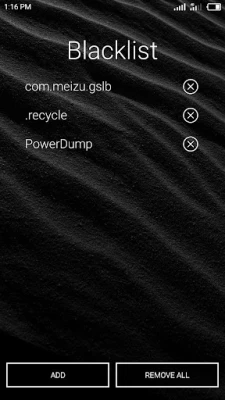
With the blacklist feature, you can easily remove files that you deem unnecessary. This tool allows you to keep certain files or folders in a blacklist, ensuring they are automatically deleted during each scan. This proactive approach helps maintain a clean and efficient device.
6. Customizable Blacklisted File Extensions
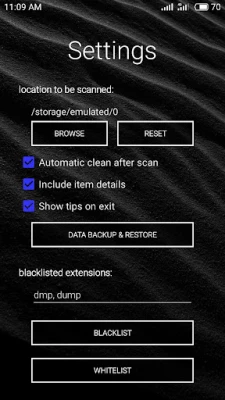
For users who want more control, the cleaner allows you to specify file extensions to blacklist. Simply input the extensions you wish to exclude, separated by commas, and the tool will remove all files with those extensions. This feature ensures that unwanted files are consistently eliminated from your device.
7. Hidden File Management
Hidden files can take up space without your knowledge. This cleaner effectively removes all hidden files and folders, which typically start with a period. However, it’s essential to whitelist any important hidden files to prevent accidental deletion during scans.
8. Removal of Unnecessary Large Files
Large files can consume significant storage space, but this cleaner allows you to remove unnecessary large files without the fear of losing your favorite movies, music, or apps. You can confidently reclaim space while keeping your essential media intact.
9. Elimination of Empty Files
Empty files serve no purpose and can clutter your storage. This cleaner efficiently removes all empty files, ensuring that your device remains organized and free from unnecessary clutter.
10. Cleanup of Empty Folders
Just like empty files, empty folders can accumulate over time. This tool helps you remove all empty folders, streamlining your file management and enhancing your device's overall performance.
11. Whitelist for Important Files and Folders
The whitelist feature is designed to protect your important files and folders from being deleted during scans. By adding essential items to the whitelist, you can ensure that they remain safe while still benefiting from the cleaner's powerful features.
12. Data Backup and Restore Functionality
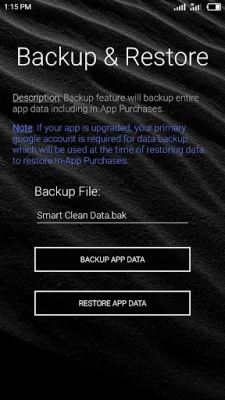
Backing up your data is crucial, and this cleaner offers a robust backup and restore feature. It allows you to save all your settings, including blacklist and whitelist preferences, ensuring that your configurations are preserved even after a device reset or app reinstall.
Conclusion: The Best Android Cleaner for Optimal Performance
In summary, this Android cleaner stands out as one of the best tools available for optimizing your device. With its comprehensive features, including log file management, intelligent cache removal, and customizable blacklisting, it provides a thorough cleaning solution. By utilizing this cleaner, you can enhance your device's performance, reclaim storage space, and ensure that your important files remain safe. Experience the difference today and enjoy a cleaner, faster Android device!
Rate the App
User Reviews















Popular Apps










Editor's Choice









