


Latest Version
June 17, 2026
Top Mobile Apps Studio
Tools
Android
0
Free
file.explorer.app
Report a Problem
More About Simple File Explorer
Ultimate File Manager for Android: Effortlessly Explore, Organize, and Manage Your Files
In today's digital age, managing files on your Android device can be a daunting task. However, with the right file manager app, you can take complete control of your phone's internal storage and SD card. This powerful file manager and file explorer app is designed to help you browse, search, and organize all your files with ease, making it an essential tool for everyday use.
Streamlined File Organization Made Easy
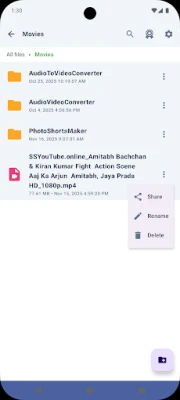
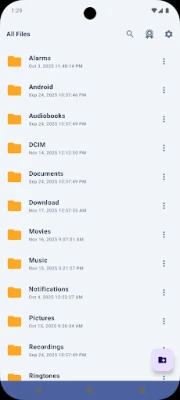
This Android file manager combines robust features with a user-friendly interface, making it the perfect solution for anyone looking to manage their files efficiently. Whether you need a document manager, media organizer, or a comprehensive file explorer, this app has you covered. Access your files instantly and navigate through folders at lightning speed, ensuring that you can find what you need without any hassle.
Comprehensive Storage Management
As your personal storage cleaner and space analyzer, this file explorer app helps you identify large files, duplicate content, and unnecessary data, allowing you to free up valuable storage space. Its lightweight design ensures smooth performance without draining your device's resources, making it an ideal choice for all Android users.
Key Features of the File Manager
Explore & Browse Files
- Instant access to all directories with a quick file explorer
- Smart folder management for efficient navigation
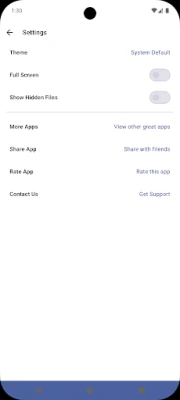
- Hidden files viewer to access protected content
- Robust search functionality across internal and external storage
- Offline file explorer that works without an internet connection
- Efficient file organization tools for categorization
- Minimalist file browser with a clean interface
Organize & Manage Your Content
- Supports all file formats for seamless management
- Document manager for PDFs, Word, and Excel files
- Media manager for photos, videos, and music
- File viewer with preview capabilities for quick access
- Secure file manager with built-in privacy protection
- SD card manager for external storage management
- Internal storage manager for efficient phone memory usage
Advanced File Management Tools
- Zip and RAR opener for compressed archives
- APK file manager for easy app installations
- File tools for cut, copy, paste, and rename operations
- Batch file operations for managing multiple files at once
- Storage manager with detailed analytics for informed decisions
Why Choose This File Manager App?
This fast and secure file manager is designed to protect your privacy while offering professional-grade features. Its intuitive interface simplifies complex tasks, making it easy to organize personal files or manage work documents. Here’s why this app stands out:
- Efficiently manage photos, videos, music, and documents
- Clean up storage space with the built-in phone storage cleaner
- Organize downloads, app files, and system folders effortlessly
- Access hidden files and protected directories with ease
- Work with ZIP, RAR, 7Z, and APK files offline
Fast, Clean, and Reliable File Browser
This clean file explorer prioritizes speed and simplicity, featuring a lightweight architecture that ensures quick loading times and smooth handling of thousands of files. The app is designed for optimal performance, making file management a breeze.
Advanced Features for Enhanced File Management
The storage space analyzer provides detailed breakdowns of file types, sizes, and locations, helping you make informed decisions about your storage. The advanced file organizer allows you to create custom folder structures, while the minimal file browser mode offers distraction-free navigation. Access the hidden files viewer for system-level visibility when needed.
Smart File Manager Capabilities
With a built-in file search feature, you can find documents instantly across your entire device. The quick file explorer responds immediately to your commands, and multiple view modes let you browse files as lists, grids, or detailed views. The folder manager automatically creates organized hierarchies, simplifying your file management experience.
Security & Privacy Features
This secure file manager keeps your sensitive files protected. You can lock folders, hide content, and manage permissions easily through the user-friendly interface. The app respects your privacy, ensuring no data collection occurs, giving you peace of mind while managing your files.
Download the Ultimate File Manager for Android Today!
Experience complete control over your storage management, file organization, and media management needs with this powerful file manager for Android. Download now and transform the way you manage your files!
Rate the App
User Reviews















Popular Apps










Editor's Choice









